Image is not fully rendered #64

Description

Hi, I'm having a similar issue. I can't get the full image to be displayed on the TFT screen. I'm using the M5Stack Core2 (ESP32) platform, and here is the code:
#include <M5Core2.h>
#include <WiFi.h>
#include <HTTPClient.h>
#include <ArduinoJson.h>
#include <TJpg_Decoder.h>

#define WIFI_SSID "wifissd"
#define WIFI_PASSWORD "wifipassword"
#define NASA_API_KEY "apikey"

void connectWiFi() {
  WiFi.begin(WIFI_SSID, WIFI_PASSWORD);

  M5.Lcd.setCursor(10, 10);
  M5.Lcd.setTextColor(BLACK);
  M5.Lcd.setTextSize(1);
  M5.Lcd.printf("Connecting to %s", WIFI_SSID);

  while (WiFi.status() != WL_CONNECTED) {
    delay(500);
    Serial.print(".");
    M5.Lcd.printf(".");
  }

  Serial.println("Connected to WiFi");
  M5.Lcd.setCursor(10, 10);
  M5.Lcd.clear(WHITE);
  M5.Lcd.printf("Connected to %s", WIFI_SSID);
}

String fetchPhotoData() {
  String url = "https://api.nasa.gov/planetary/apod?api_key=" + String(NASA_API_KEY) + "&count=1";
  HTTPClient http;
  http.begin(url);
  int httpResponseCode = http.GET();
  String payload = http.getString();
  http.end();
  return payload;
}

bool jpegRender(int16_t x, int16_t y, uint16_t w, uint16_t h, uint16_t* bitmap) {
  // Stop further decoding as image is running off bottom of screen
  if ( y >= M5.Lcd.height() ) return 0;

  // This function will clip the image block rendering automatically at the TFT boundaries
  M5.Lcd.pushImage(x, y, w, h, bitmap);

  // Return 1 to decode next block
  return 1;
}

void drawJpgUrl(const char *url, int xpos, int ypos) {
  HTTPClient http;
  http.begin(url);
  int httpResponseCode = http.GET();

  if (httpResponseCode == 200) {
    WiFiClient *client = http.getStreamPtr();
    uint8_t *buf = nullptr;
    size_t buf_len = 0;
    size_t len = http.getSize();
    Serial.println("Image size: " + String(len) + " bytes");

    buf = (uint8_t *)malloc(len);
    if (!buf) {
      Serial.println("Failed to allocate memory for image buffer");
      http.end();
      return;
    }
    buf_len = client->read(buf, len);

    // Time recorded for test purposes
    uint32_t t = millis();

    // Get the width and height in pixels of the jpeg if you wish
    uint16_t w = 0, h = 0;
    TJpgDec.getJpgSize(&w, &h, buf, buf_len);
    Serial.print("Width = "); Serial.print(w); Serial.print(", height = "); Serial.println(h);

    // Draw the image, top left at 0,0
    TJpgDec.drawJpg(xpos, ypos, buf, buf_len);

    free(buf);

    t = millis() - t;
    Serial.print(t); Serial.println(" ms");

  }
  http.end();
}

void displayPhoto(const char* url, const char* title, const char* date) {
  M5.Lcd.clear(WHITE);
  drawJpgUrl(url, 0, 0);

  M5.Lcd.setTextColor(BLACK);
  M5.Lcd.setTextSize(1);
  M5.Lcd.setCursor(5, M5.Lcd.height() - 20);
  M5.Lcd.printf(title);

  M5.Lcd.setCursor(5, M5.Lcd.height() - 10);
  M5.Lcd.printf(date);
}

void fetchAndDisplayPhoto() {
  M5.Lcd.clear(WHITE);
  M5.Lcd.setCursor(M5.Lcd.width()/2 - 30, M5.Lcd.height()/2);
  M5.Lcd.printf("Loading...");

  String payload = fetchPhotoData();
  DynamicJsonDocument doc(1024 * 6);
  deserializeJson(doc, payload);

  const char* url = doc[0]["url"];
  Serial.println(url);
  const char* title = doc[0]["title"];
  const char* date = doc[0]["date"];

  displayPhoto(url, title, date);
}

void buttonAHandler() {
  fetchAndDisplayPhoto();
}

void setup() {
  M5.begin();
  M5.Lcd.clear(WHITE);
  Serial.begin(115200);
  connectWiFi();
  M5.Lcd.setBrightness(128);

  // The jpeg image can be scaled by a factor of 1, 2, 4, or 8
  TJpgDec.setJpgScale(1);
  TJpgDec.setSwapBytes(true);
  TJpgDec.setCallback(jpegRender);
  fetchAndDisplayPhoto();
}

void loop() {
  static unsigned long prevMillis = 0;
  M5.update();

  if (M5.BtnA.wasPressed()) {
    fetchAndDisplayPhoto();
  }

  if (millis() - prevMillis >= 5 * 60 * 1000) {
    prevMillis = millis();
    fetchAndDisplayPhoto();
  }

  delay(10);
}
Here's an example of how an image is rendered:
https://drive.google.com/file/d/1jbd1YidgceKbn9TgsfUfybOOGcFRDVP4/view?usp=sharing
And this is the image URL:
https://apod.nasa.gov/apod/image/0410/PassageOmbre_sm4.jpg
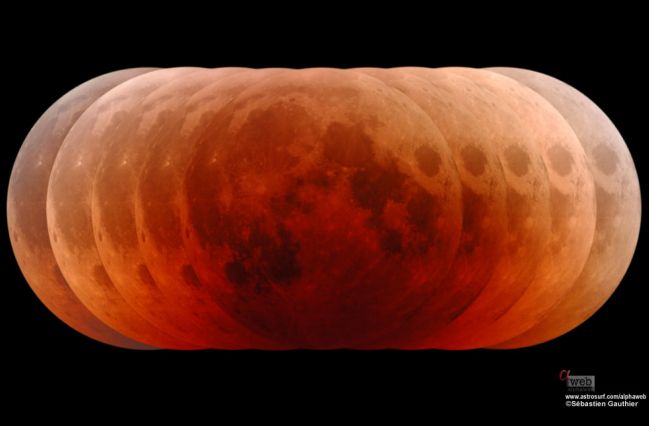
Also, how can I make the image fit the screen size?
Thank you!