- Your browser is the interface/window through which you interact with the World Wide Web.
- Under you browser's hood lies a collection of files that make viewing the page possible:
- CSS
- HTML
- Javascript
- Videos
- Images
- All these files were sent from a server to your browser (the client) by an application protocol called HTTP. This is why URLs in your browser search bar start with 'http://'.
- HyperText Transfer Protocol acts as a link between applications and transfers hypertext documents.
- HTTP follows a simple model:
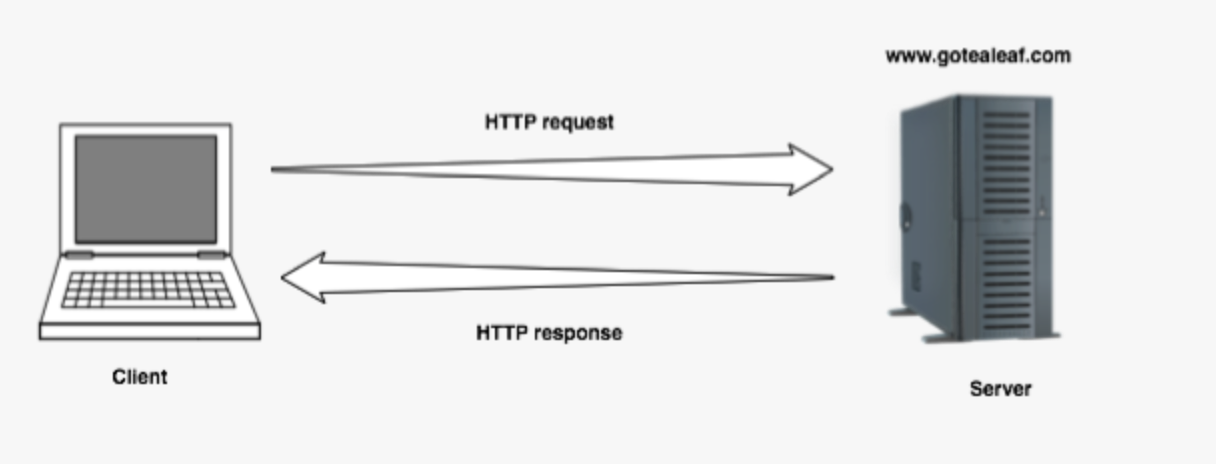
- A client makes a request to a server and waits for a response (request response protocol). These request and response messages are like text messages or strings, which are formatted in a language the other machine understands.
HTTP has been through several changes since its inception:
| Date | version | Description |
|---|---|---|
| At the start | HTTP protocol | Only transmits HTML pages |
| 1991 | HTTP/0.9 | Can transmit Documents |
| 1992 | HTTP/1.0 | Can transmit CSS documents, videos, scripts, images |
| 1995 | HTTP/1.1 | Can re-use established connections for subsequent requests |
| 1999 | still HTTP/1.1 | Mostly as we use it today |
| ? | HTTP/2 | is fast gaining traction |
| ? | HTTP/3 | currently in development |
- The internet is made of millions of networks composed of many kinds of computers which all communicate with each other.
- By convention all computers that make up a network are assigned an IP address.
- An Internet Protocol Number is like a phone number for that computer.
- Port numbers add more detail about how to talk to that computer (like a phone extention).
- An IP address might look like this:
192.168.0.1 - With a port number added it would look like this:
192.168.0.1:1234 - An IP address acts as the identifier for a device or server. Within that there could be hundreds or thousands of ports.
- With the wider internet communication occurs when each device has a public IP address provided by an internet service provider.
- If we need an IP address to get anywhere, why do website addresses look like 'www.google.com' ?
- Domain Name System: This maps the address to the IP address.
- DNS is a distributed database that translates the names we humans use to IP addresses so that they can be sent to a server.
- It still works to type an IP address directly into the address bar.
- DNS databases are stored on computers called DNS servers.
- There is a huge global hierarchical network of DNS servers. No single one contains the whole database.
- If a DNS server does not contain the address it passes the request up the chain to the next DNS server. Eventually the address will be found in a DNS database and the corresponding IP address will be used to receive the request.
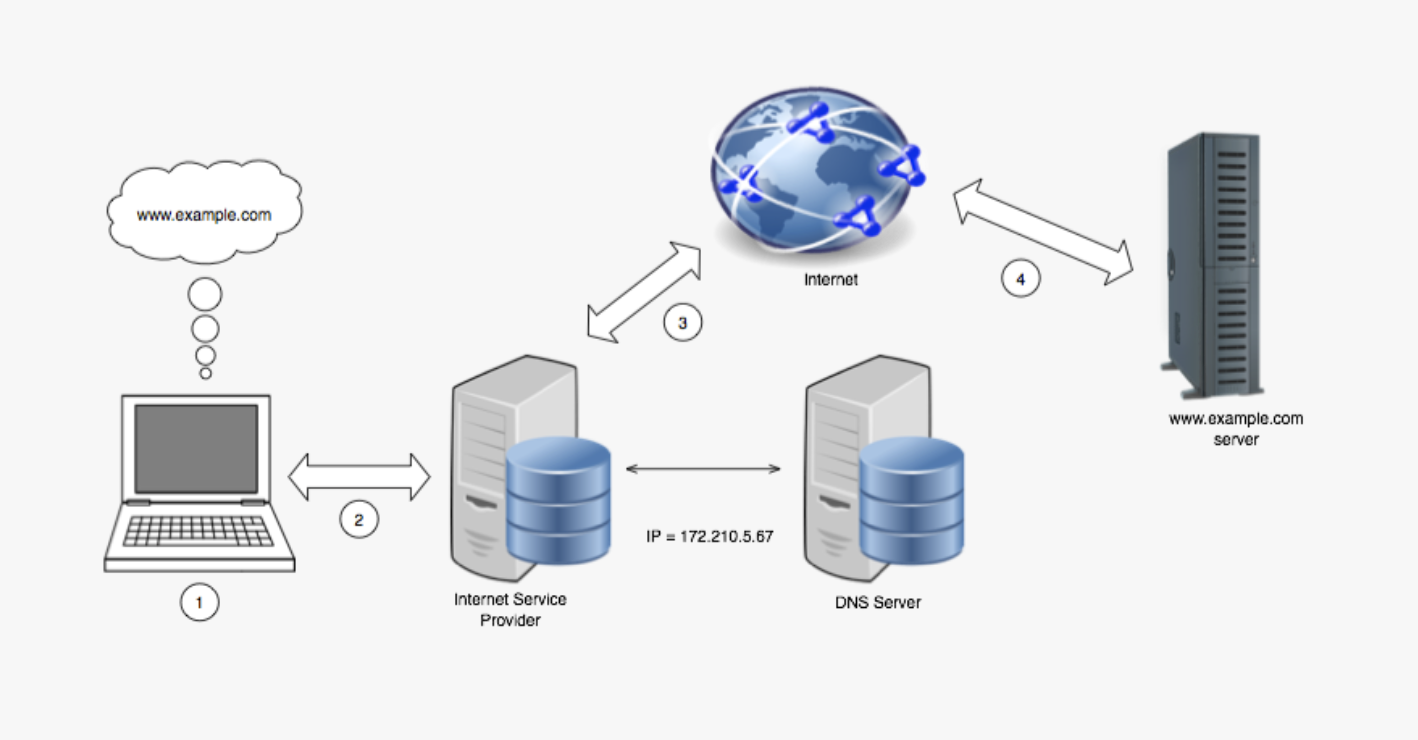
- A typical interaction with the internet could look like this:
- type a URL into the address bar
- The browser creates a HTTP request, which is packaged up and sent to your device's network interface.
- If your device already has a record of the IP address for the domain name in its DNS cache it will use that. If not, a request will be made to the Domain Name System to obtain it.
- The packaged up HTTP request then goes over the internet where it is directed to the server with the matching IP address.
- The remote server accepts the request and sends a response over the internet back to your network interface which hands it to your browser.
- The browser displays this response as a web-page.
- Your browser issuing a request is simply sending some text to an IP address.
- The client (web-browser) and server (recipient of the request) have an agreed protocol (HTTP) which allows the server to:
- take apart the request
- Understand each component
- Send a response back to the web-browser.
- The web browser then translates this response into a form you can understand.
- All websites use HTTP. Even though you are unaware of it. Your browser is sending requests and processing the responses automatically.
- The most common client is an application called a web browser (ie Internet Explorer, Firefox, Chome, Safari, including mobile versions)
- Their job is to send the HTTP request and process the HTTP response in a user friendly manner.
- Web-browsers aren't the only clients around. There are other ways and applications that can issue HTTP requests.
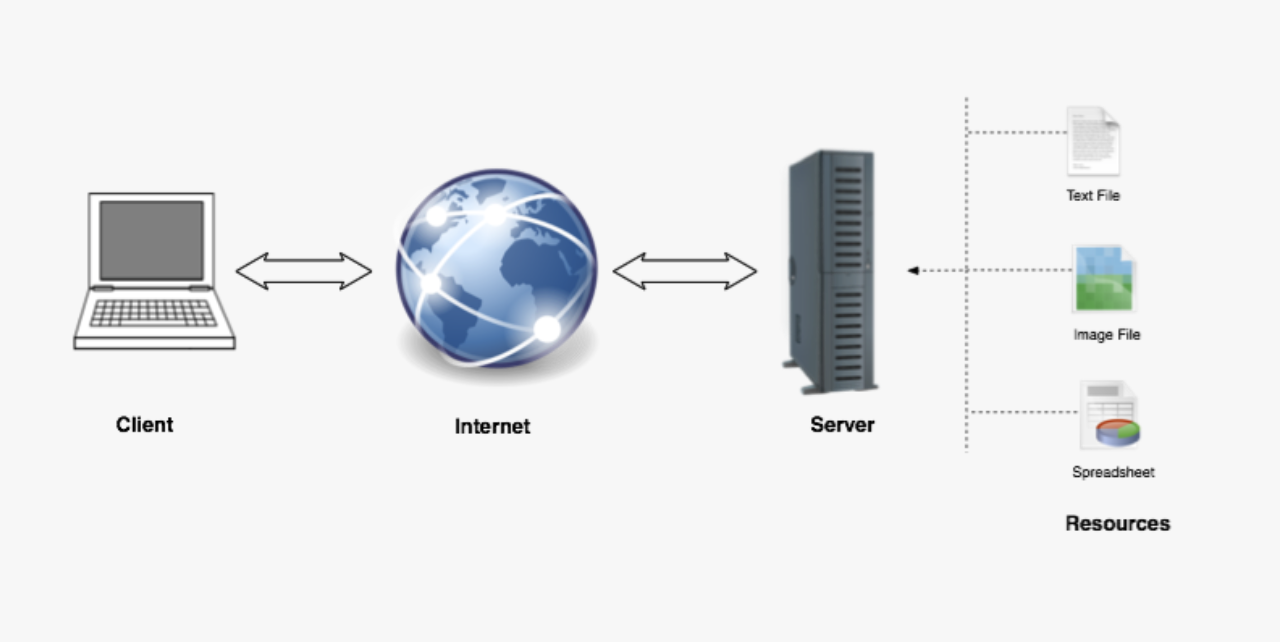
- The content you request is on a server, which is a remote-computer.
- Servers are machines that can handle inbound requests and issue a response back. Often the response contains data specified in the request.
- 'Resource' is a generic term for things on the internet which you can interact with via a URL. Images, videos, web-pages, other files or even stock-trading software and video-game software. There's a lot of them about.
- A protocol is said to be stateless when each request/response pair is completely independent of the previous one.
- HTTP is a stateless protocol and this has implications for server resources and ease of use.
- It means that the server does not need to hang on to information or state between requests.
- This means that when a request breaks on route to the server no part of the system has to do any clean-up.
- This makes HTTP a resilient protocol. It also makes it a difficult protocol for building stateful applications.
- Since HTTP is inherently stateless, that means web developers need to work hard to create stateful experiences in web-applications.
- An example of this is remaining logged into something, while completing more request/response cycles. And how does the website even know these requests are coming from you?
- There are tricks that make it seem like an experience is stateful, but those tricks are not covered in this book.
- Just remember, even though you think an experience is stateful, the web is built of HTTP, which is stateless.
| pros of statelessness | cons of statelessness |
|---|---|
| resilient | difficult to secure |
| distributed | difficult to build on top op |
| hard-to-control |
- It's the technical name for the website address.
- It's a type of URI (Uniform Resource Identifier), but not the only kind. URIs specify how resources are located.
http://www.example.com:88/home?item=book
| section | name | function |
|---|---|---|
| http | The scheme | Always comes before the colon and two slashes. This tells the web-client how to access the resource. In this case it says to use HyperText Transfer Protocol. (other popular URL schemes are ftp, mailto, or git. It's sometimes called the protocol, but it is more correct to say scheme. The scheme can indicate which protocol to use, but they're not the same thing. |
| www.example.com | The host | Tells the client where the resource is hosted |
| :88 | The port number | Only required if you want to use a port which is not the default. |
| /home | The path | Shows what local resource is being requested. This part of the URL is optional |
| ?item=book | The query string made of query parameters | To send data to the server (also optional) |
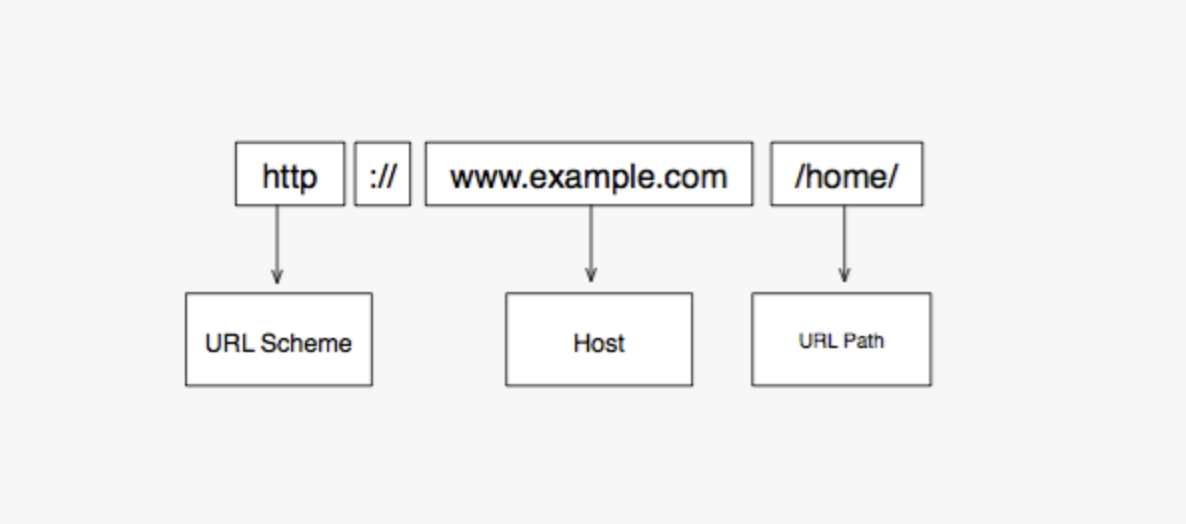
- Sometimes the path can point to a specific resource on the host. ie. http://www.example.com/home/index.html
- The default port for HTML is 80. A non-default port could look like this:http://localhost:3000/profile
- A simple url with a query string could look like this:
http://www.example.com?search=ruby&results=10
| Query string component | Description |
|---|---|
| ? | This is a reserved character that marks the start of a query string |
| search=ruby | This is a parameter name/value pair |
| & | This is a reserved character used when adding more parameters to the query string |
| results=10 | This is also a parameter name value pair |
For example:
http://www.phoneshop.com?product=iphone&size=32gb&color=white
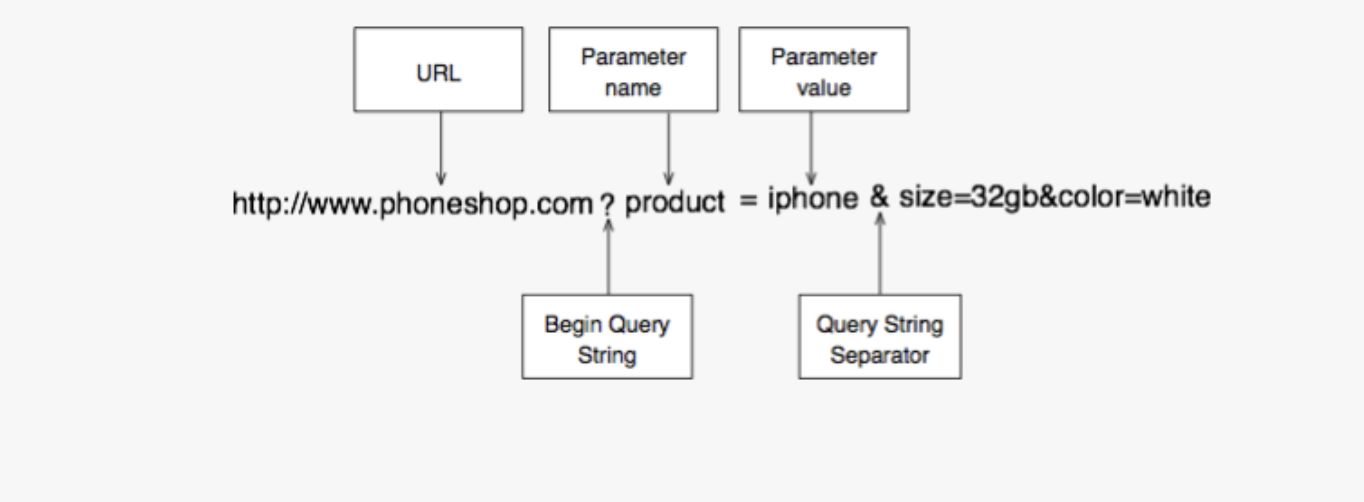
- Here 3 name value pairs are passed to the server from the URL:
product=iphone- 'size=32gb'
- 'color-white'
- This is asking the
phoneshopserver to narrow down on a product,iphone, size '32gb' and colour 'white'. What the server does with these parameters is up to the server-side application. - Because query strings are passed in from the URL they are only used in HTTP GET requests.
- There are different types of HTTP requests. Typing a URL into the browser is a HTTP GET request. Most links are too.
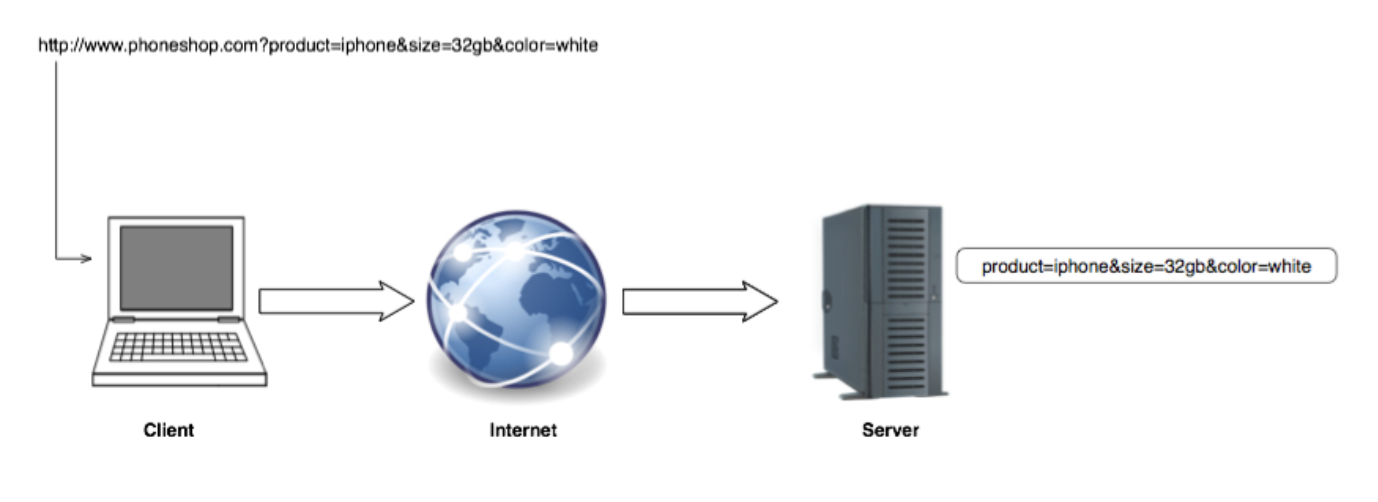
- Query strings are great for passing additional information to the server, but here are some disadvantages:
- Max length: If you have a lot of data to pass you won't be able to do it with query strings.
- Name/Value pairs are visible in the URL. So passing things like passwords is ill-advised.
- Space and special characters like
&can't be used with query strings they must be URL
- URLs can only accept certain ASCII characters.
- Chars which have to be encoded:
- reserved chars
- unsafe chars
- chars not from 128 character ASCII set.
- URL encoding replaces these chars with
%and a hexadecimal number representing the equivalent UTF-8 number. - You don't need to get UTF-8, just know that it uses 1-4 bytes to represent every possible character in the Unicode character set.
- Here are some popular encoded characters and examples:
| Char | UTF-8 code | URL example |
|---|---|---|
| space | %20 | http://www.thedesignshop.com/shops/tommy%20hilfiger.html |
| $ | %24 | http://www.spam.com/i-have-%2410-million-for-you |
| £ | %C2%A3 | http://www.spam.com/big-inheritance-%C2%A3-millions |
| € | %E2%82%AC | http://www.spam.com/big-inheritance-%E2%82%AC-millions |
| 𐍈 | %F0%90%8D%88 | http://www.symbols-of-the-world.com/hwair-%F0%90%8D%88 |
-
All characters in the ASCII set have equivalent UTF-8 numbers.
-
Characters must be encoded if:
- They have no coresponding character within the standard ASCII character set.
- Using characters would be unsafe because it could be modified or misinterpreted by some systems. For example
%is unsafe because it is used to encode other characters. Other unsafe characters include (but are not limited to):- spaces
- "
- This symbol, which isn't formatting properly #
- Greater than > and less than <
- {
- }
- [
- ]
- ~
- The character is reserved for special use in the URL. For example:
- ?
- : (delimits host/port components and user/password.
- @
- & (is a query string delimiter)
-
What characters can be used safely within a URL?
- Alphanumeric characters
- _
- .
- Plus + (which is rendering as a square bullet point)
- !
- '
- (
- )
- ' (this is clarified here which explains that single quote are safe but double quotes are unsafe)
- ,
- Reserved characters when used for their reserved purpose.
- I chose paw (or RapidAPI)
- Curl is available with the command
curlas incurl www.google.com
- Example of typing in https://www.reddit.com
- The server that hosts the main Reddit website handles your request and sends back a response to your browser. Your browser renders that as the website you see.
- How do we see the raw HTTP data? We use an HTTP tool
- It issues the request and displays the raw text data.
- For a trainee web-developer you need to be able to scan and understand this raw data. Just to get a general idea.
- Every modern browser has a way to view HTTP requests, usually called an inspector.
option + command + ito pop it up.- Just by entering a URL your browser is making multiple requests. One for every resource.
- The initial request for
www.website.comreturns an HTML file containing references to many other resources. Your browser understands that these resources need to be found and issues requests for them. - You can see all of these sub-requests (my term) in the inspector tool.
curlis less decipherable.- Bear in mind that Reddit now requires a User-Agent to be added to any HTTP request to prevent bots from accessing the site. That looks like this:
-A 'User-Agent: Mozilla/5.0 (Macintosh; Intel Mac OS X 10_9_5) AppleWebKit/537.36 (KHTML, like Gecko) Chrome/38.0.2125.101 Safari/537.36'
- Looking at the 'Method' and 'status' columns.
- In the Method column you have HTTP Request Methods. This is like a verb that tells the server what actioins to perform in a resource.
- The two most common commands are
GETandPOST. - The status column shows response status for each request.
- Every request gets a response, even if it is
ERROR.(... unless they timeout, but that's rare).
- Initiated by clicking a link or putting an address in the browser bar.
- The default behaviour of a link is to issue a
GETrequest to a URL. - To remember for now:
- GET requests are used to retrieve a resource. Most links are GET requests
- The response to a GET request can be anything, but if it is HTML and that HTML references other resources then your browser will automatically issue GET requests for those. (A pure HTML tool will not).
- To send/submit data or initiate an action to/on the server.
- POST requests allow us to send sensitive and much larger data to the server, like images and videos.
- This is because the alternative is sending a GET request with the information written in the query string, which would be:
- Exposing our credentials.
- Limited in size
- I'm receiving a 303 response, i'm not sure if that's a bad thing. But what I'm supposed to be demonstrating is that the data is being submitted to the server, not via the URL but in the HTTP body. The body contains the data that is being transmitted in a HTML message. So HTTP messages can be sent with an empty body.
- Or the body can contain HTML messages, images, videos. The body is like the letter inside an envelope.
- Filling out the POST request is (meant to be) the same as you filling out the form on the web-page itself.
- The HTTP response to our POST is
Location: http://al-blackjack.herokuapp.com/betwhich shows the webpage we are directed to once we've filled out the name form. - The
locationheader is a response header (because responses have headers too). More on headers later. - Your browser sees 'Location' in the header and automatically issues the next request for the URL specified. So the "make a bet" page is the response to that second request.
- Remember : when using a browser most of the request/response cycles are hidden from you.
- HTTP headers allow the client and server to send additional information during the HTTP request/response cycle.
- Headers are colon-seperated name-value pairs that are sent in plain text.
- we can look at them in raw form in the Inspector. (mine doesn't look like this?)
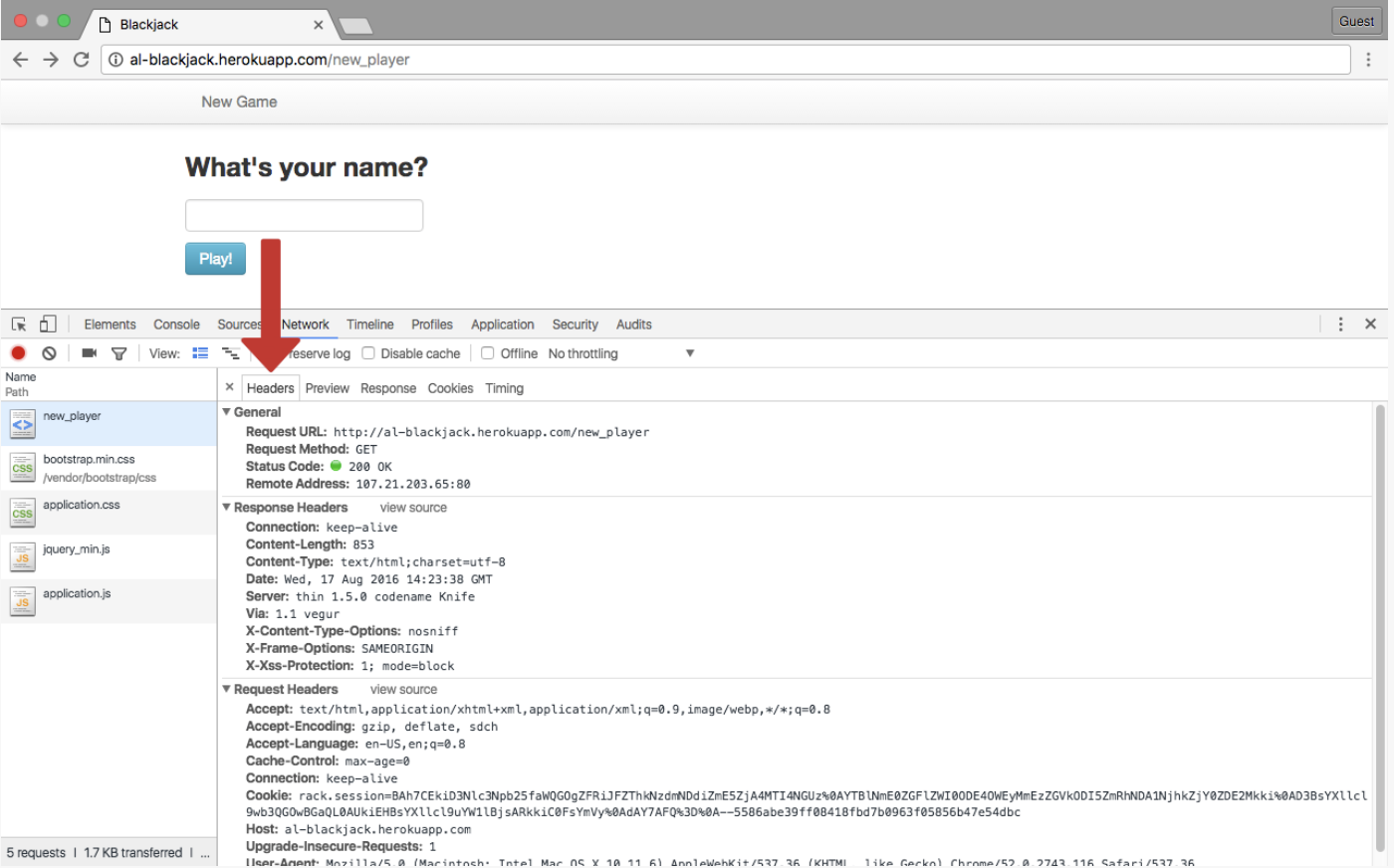
- Here [above] are the various headers being sent during a request/response cycle.
- And request headers are different:
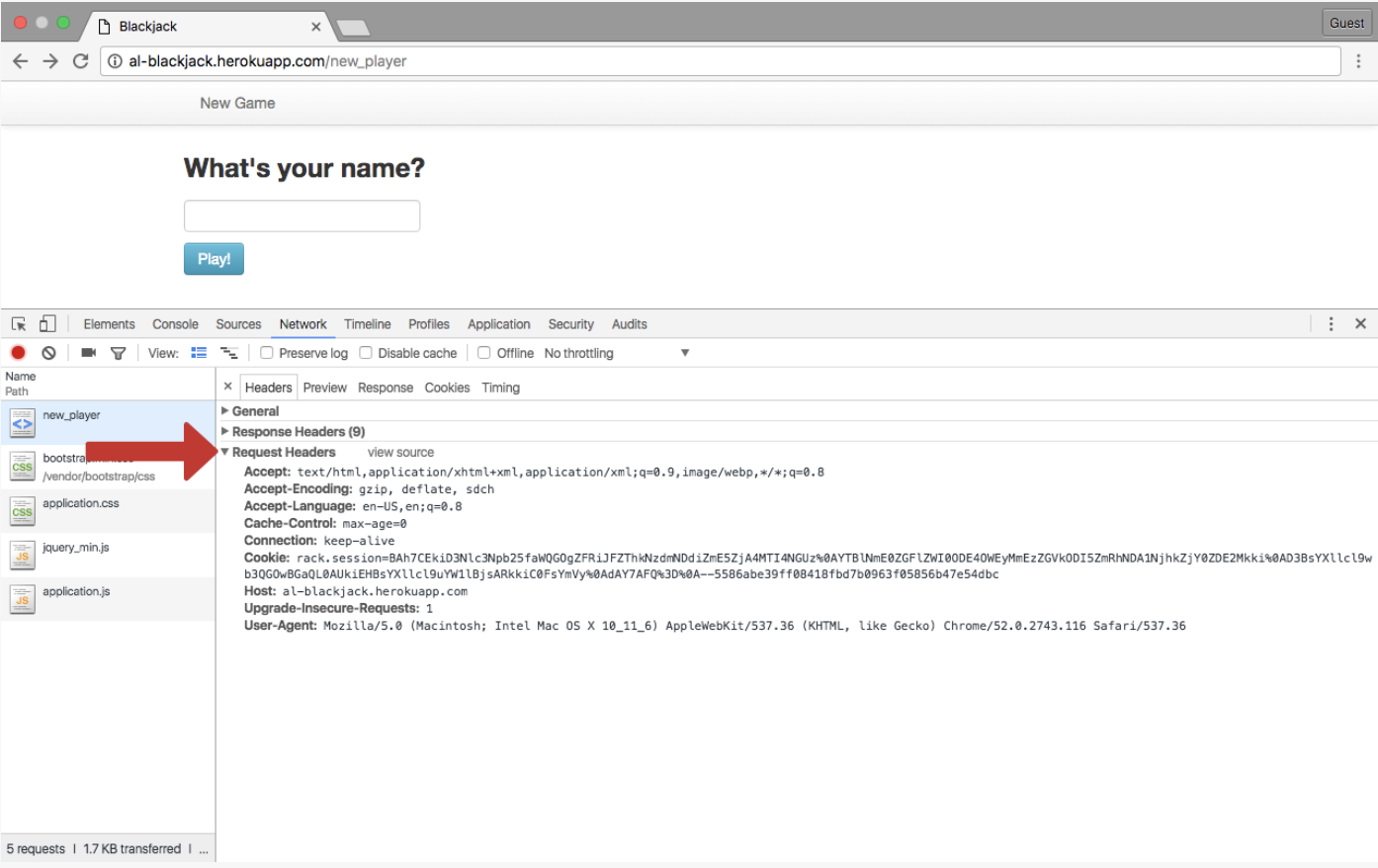
- Request headers give more information about the client and the resource to be fetched. For example:
| Field name | Description | example |
|---|---|---|
| Host | The domain name of the server | Host: www.reddit.com |
| Accept Language | List of acceptable languages | Accept-Language: en-US,en;q=0.8 |
| User-agent | A string that identifies the client | User-Agent: Mozilla/5.0 (Macintosh; Intel Mac OS X 10_9_5) AppleWebKit/537.36 (KHTML, like Gecko) Chrome/38.0.2125.101 Safari/537.36 |
| Connection | Type of connection the client would prefer | Connection: keep-alive |
You should be able to:
- Use the inspector to view HTTP requests
- Making GET/POST requests with an HTTP tool. You should understand:
- HTTP method
- path (the resource name and any query parameters)
- headers
- message body (for
POSTrequests)
- This section focuses on what comprises an HTTP response.
- A three digit number that the server sends back after receiving a request, which signifies the status of the request.
- There is a status text next to the status code. They are both in the status column.
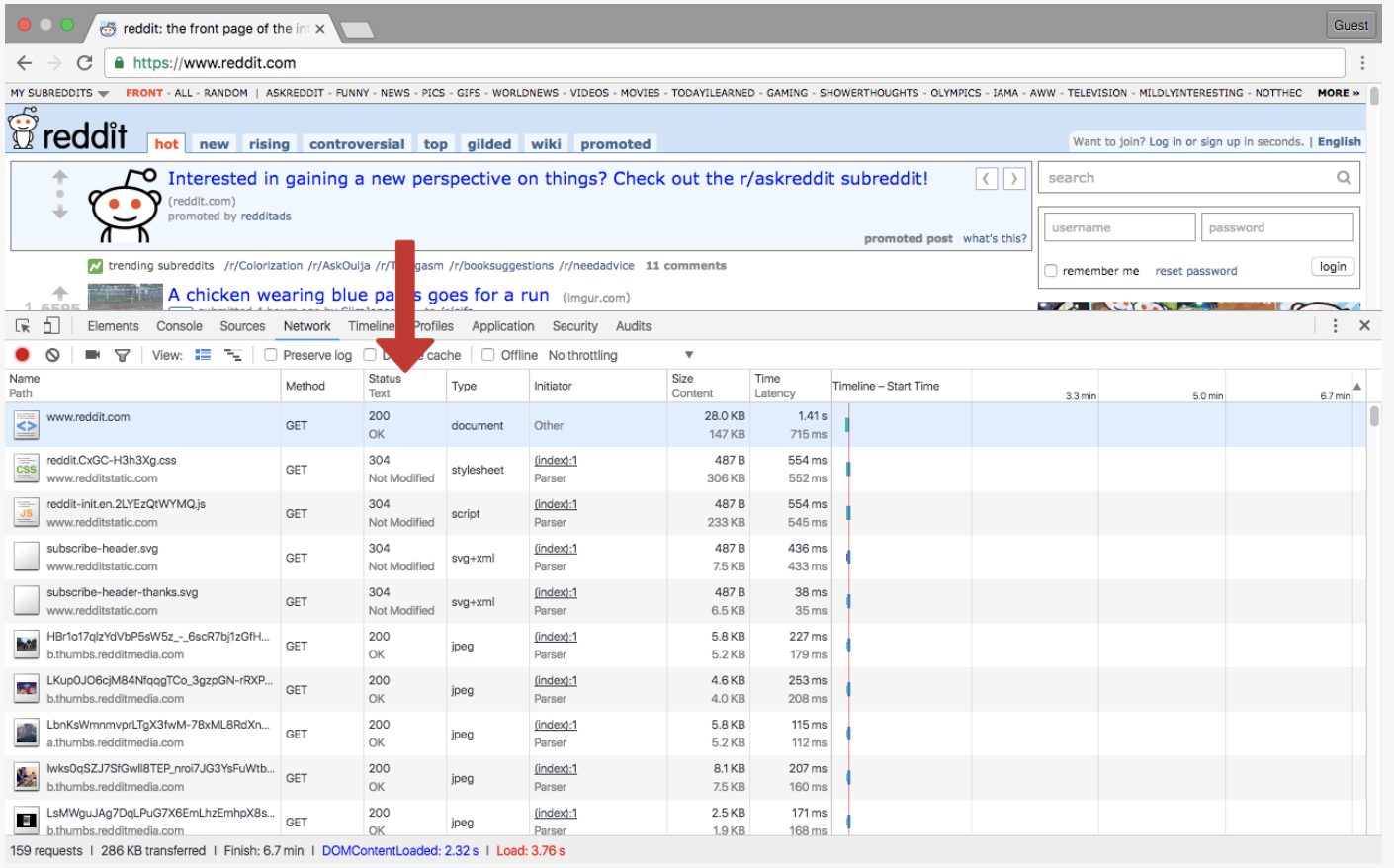
- here are some common codes with their meanings:
| Satus code | Status text | Meaning |
|---|---|---|
| 200 | OK | The request was handled successfully |
| 302 | Found | The requested resource has changed temporarily. Usually results in a redirect to another URL. |
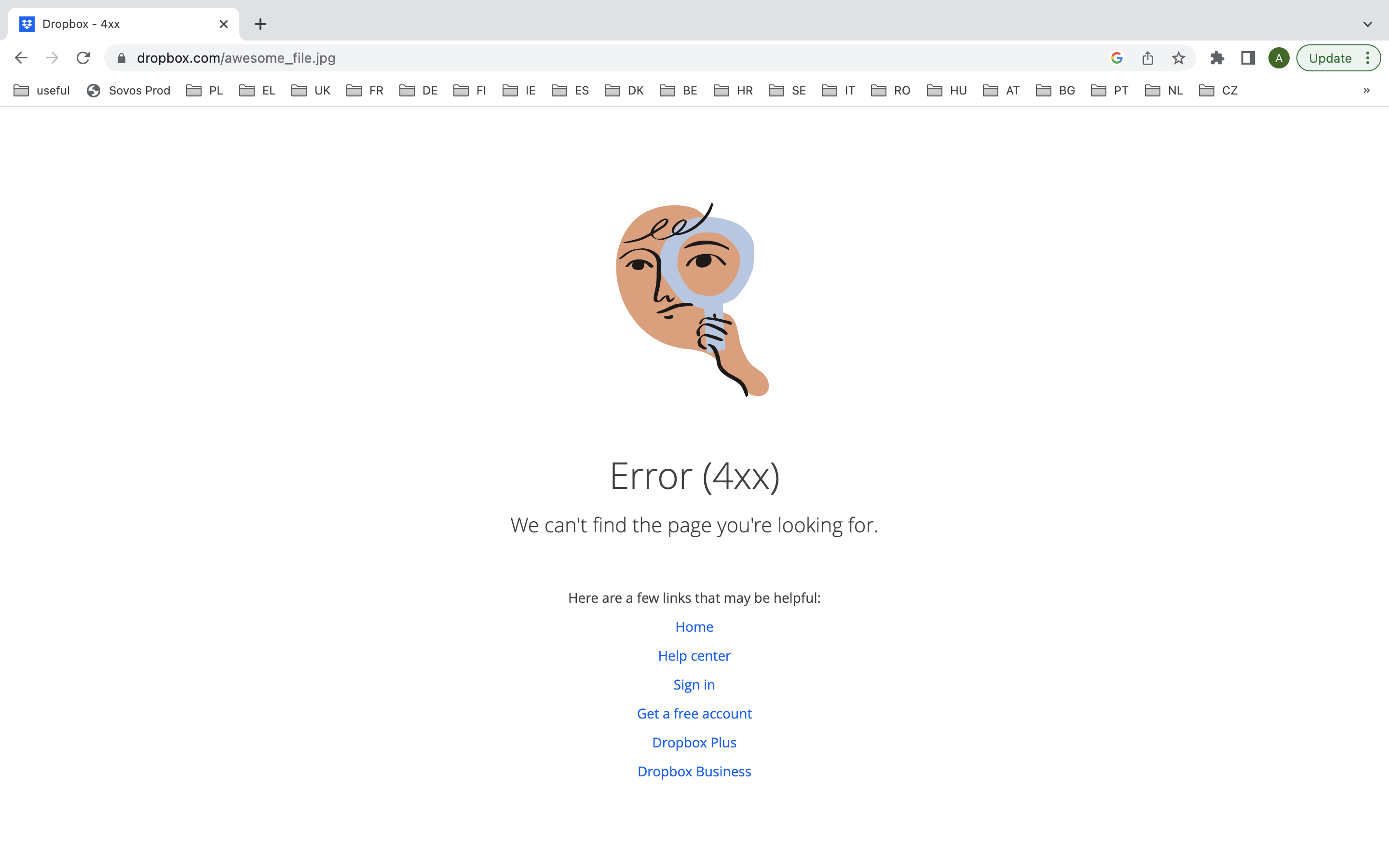
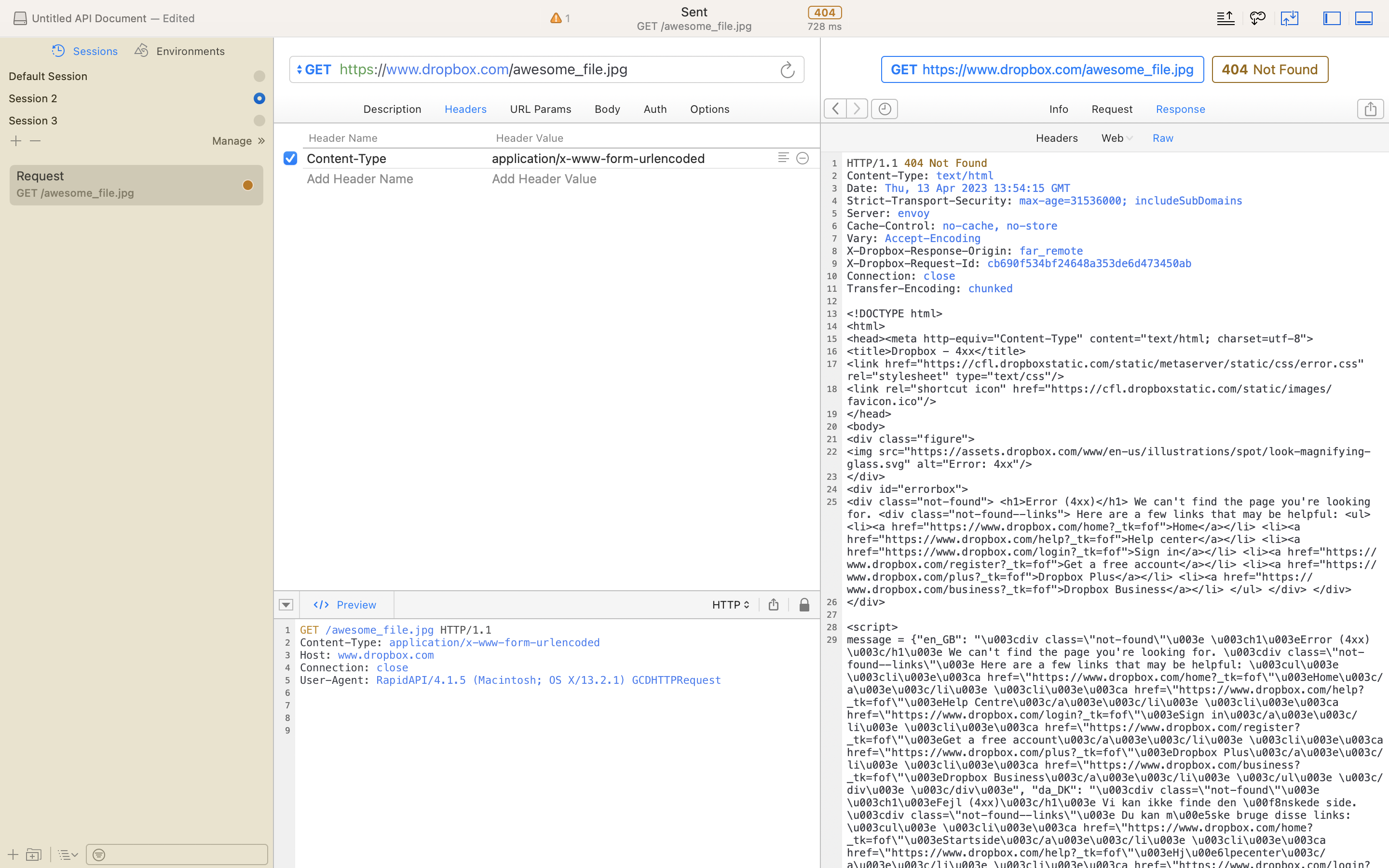
| 404 | Not Found | The requested resource cannot be found |
| 500 | Internal server error | The server has encountered a generic error |
- When a resource is moved the re-quest is often re-routed to a new URL. This is called a
redirect. When your browser sees a 302 response it will automatically follow the re-routed URL in the Location response header. (Note we are looking at redierects in the context of browsers and HTTP tools, there are other ways too. - For example if you want to access your account profile on Github.
- Go to
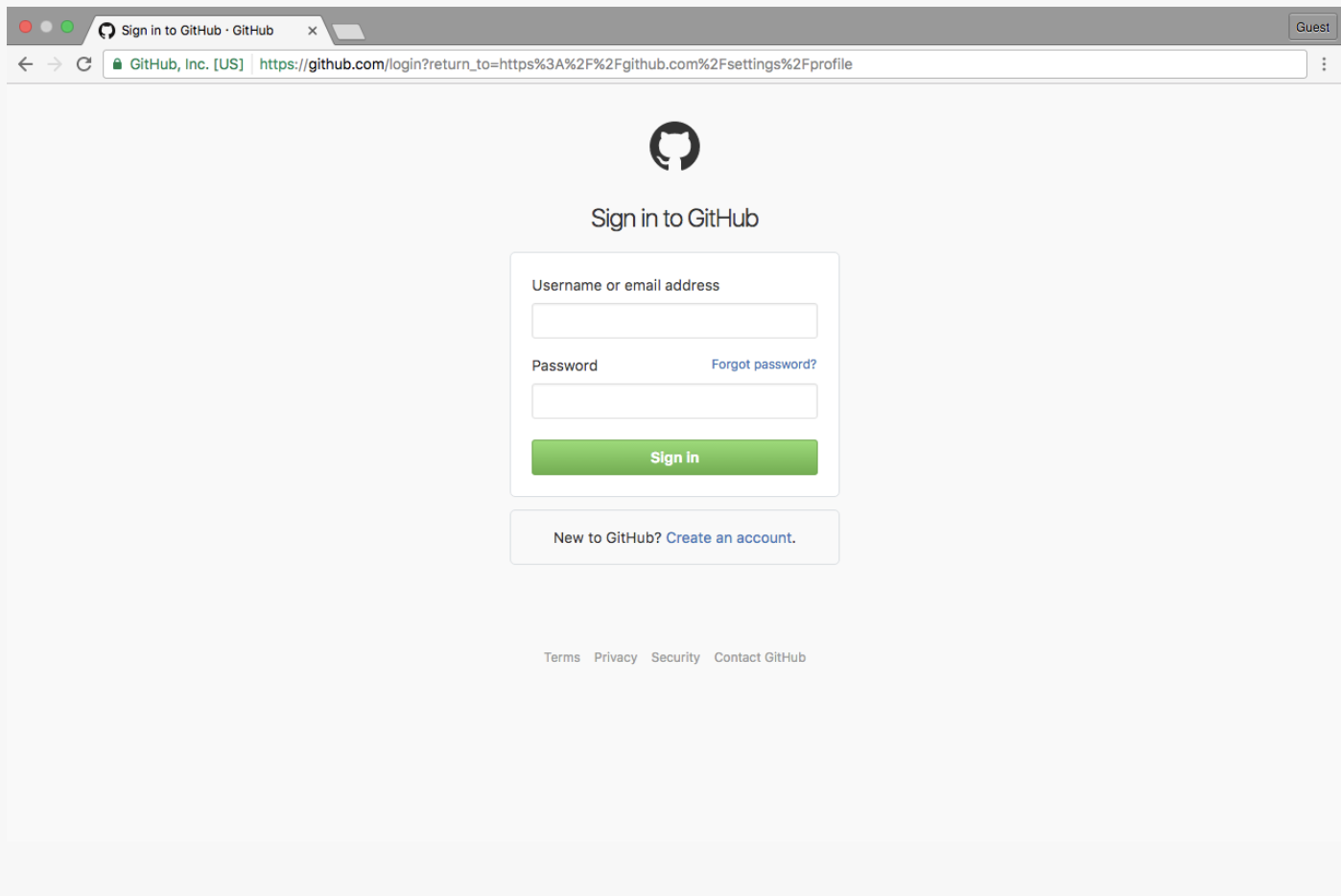
https://github.com/settings/profile - If you aren't signed in your browser will send you to a sign-in page.
- After entering your credentials, you are sent to the original page you were trying to access. How does this work:
- You enter
https://github.com/settings/profileand your browser redirects you to the sign in page:
- You enter
- Go to
- The HTTP tool will not automatically follow the redirect. It will present a Location like this: https://github.com/login?return_to=https%3A%2F%2Fgithub.com%2Fsettings%2Fprofile with a
return_toparameter. This is actually the same URL you get redirected to when enter the URL in the browser.
In a browser:
Or with a HTTP tool:
- This means "There's something wrong on the server side". Could be a misplaced comma, could be a mis-configured server setting. Only someone with access to the server can fix this. This is when the computer might tell you to contact your system administrator.
- It could look like this:
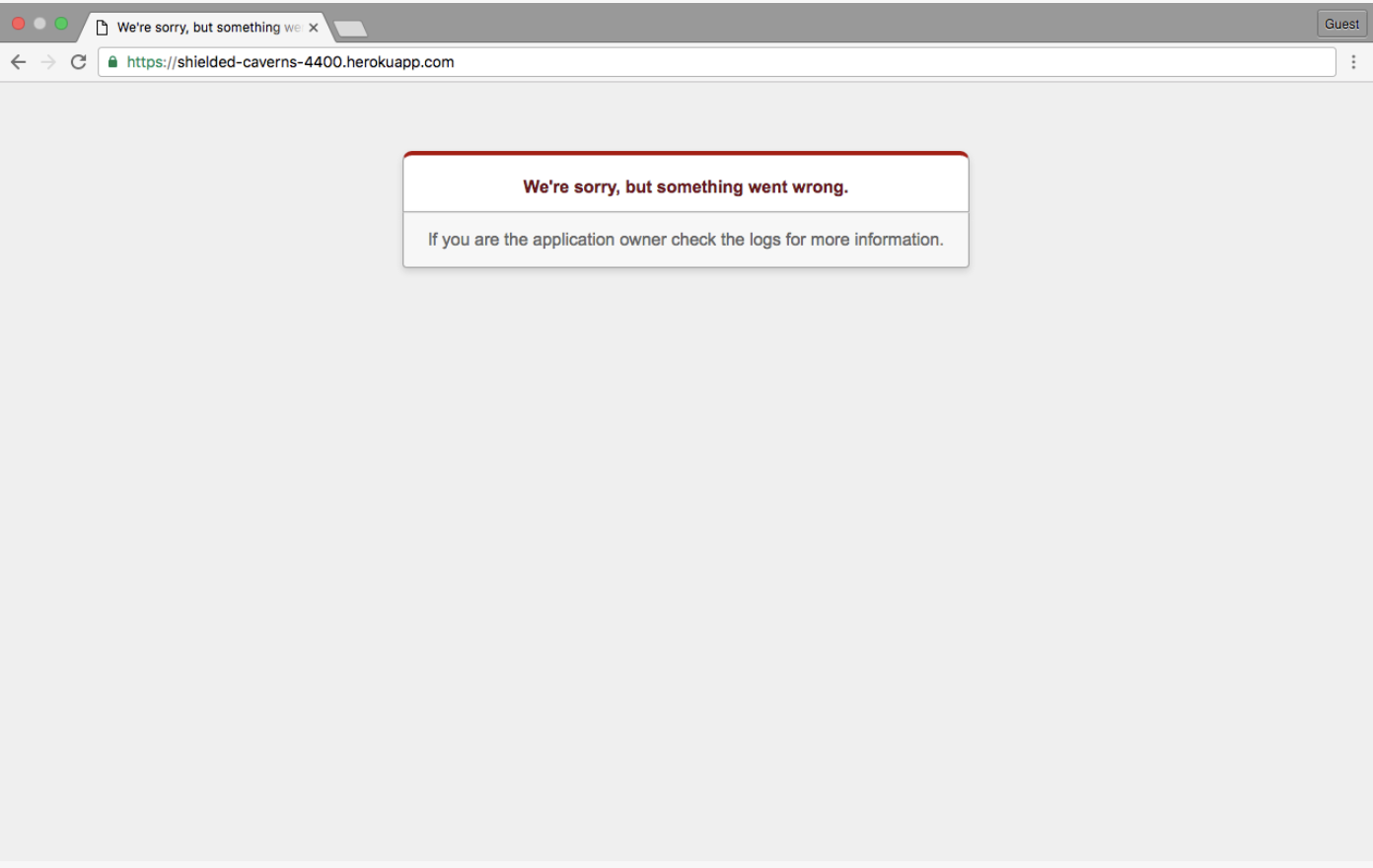
Or this:
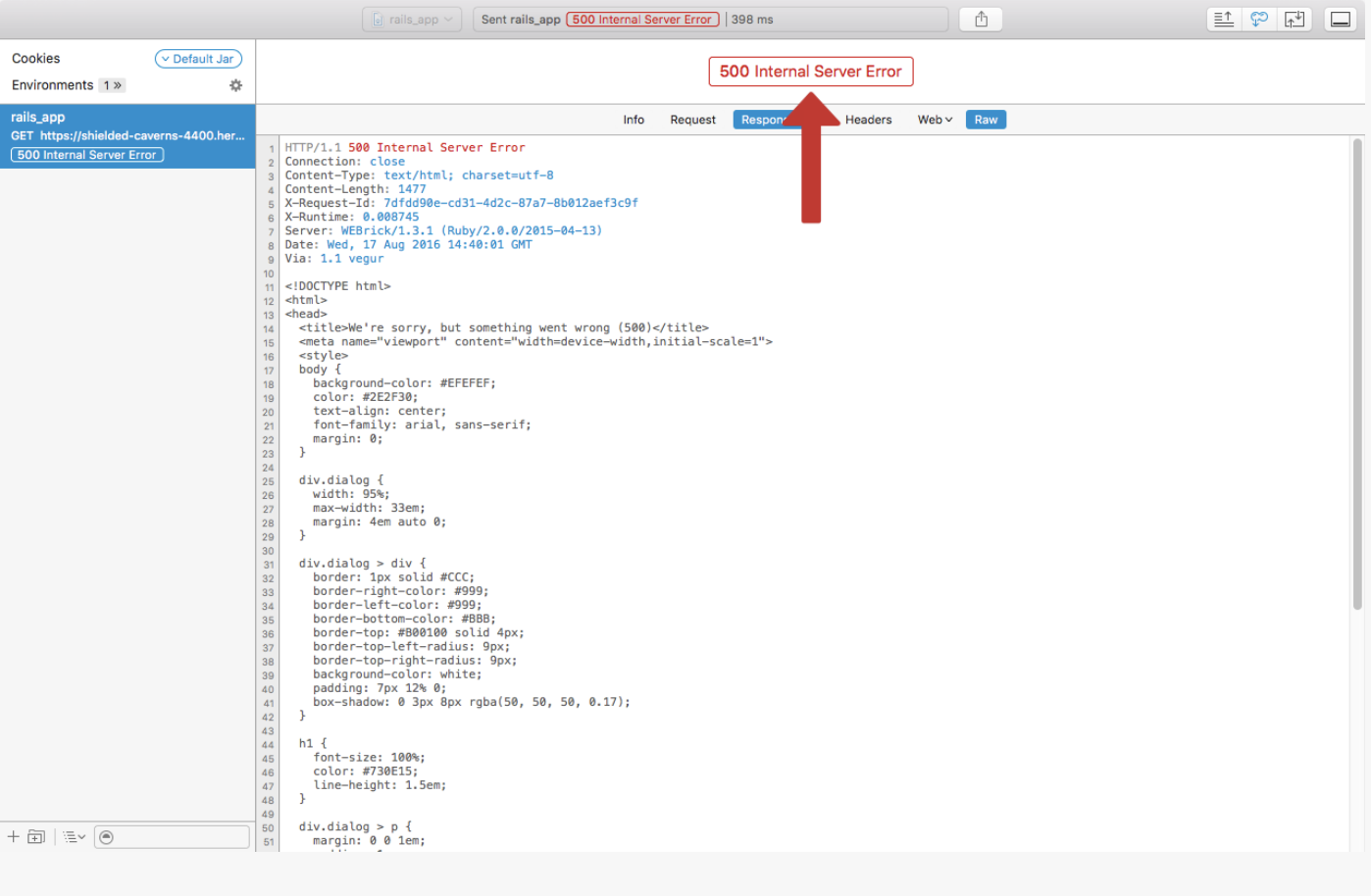
- We can see this with the inspector. (I can't seem to get to this part of inspector)
- Here are some common response headers:
| Header name | Description | Example |
|---|---|---|
| Content-encoding | The type of data used on the encoding | Content-Encoding: gzip |
| Server | Name of the server | Server:thin 1.5.0 codename Knife |
| Location | Notify client of new resource location | Location: https://www.github.com/login |
| Content-type | The type of data the response contains | Content-Type:text/html; charset=UTF-8 |
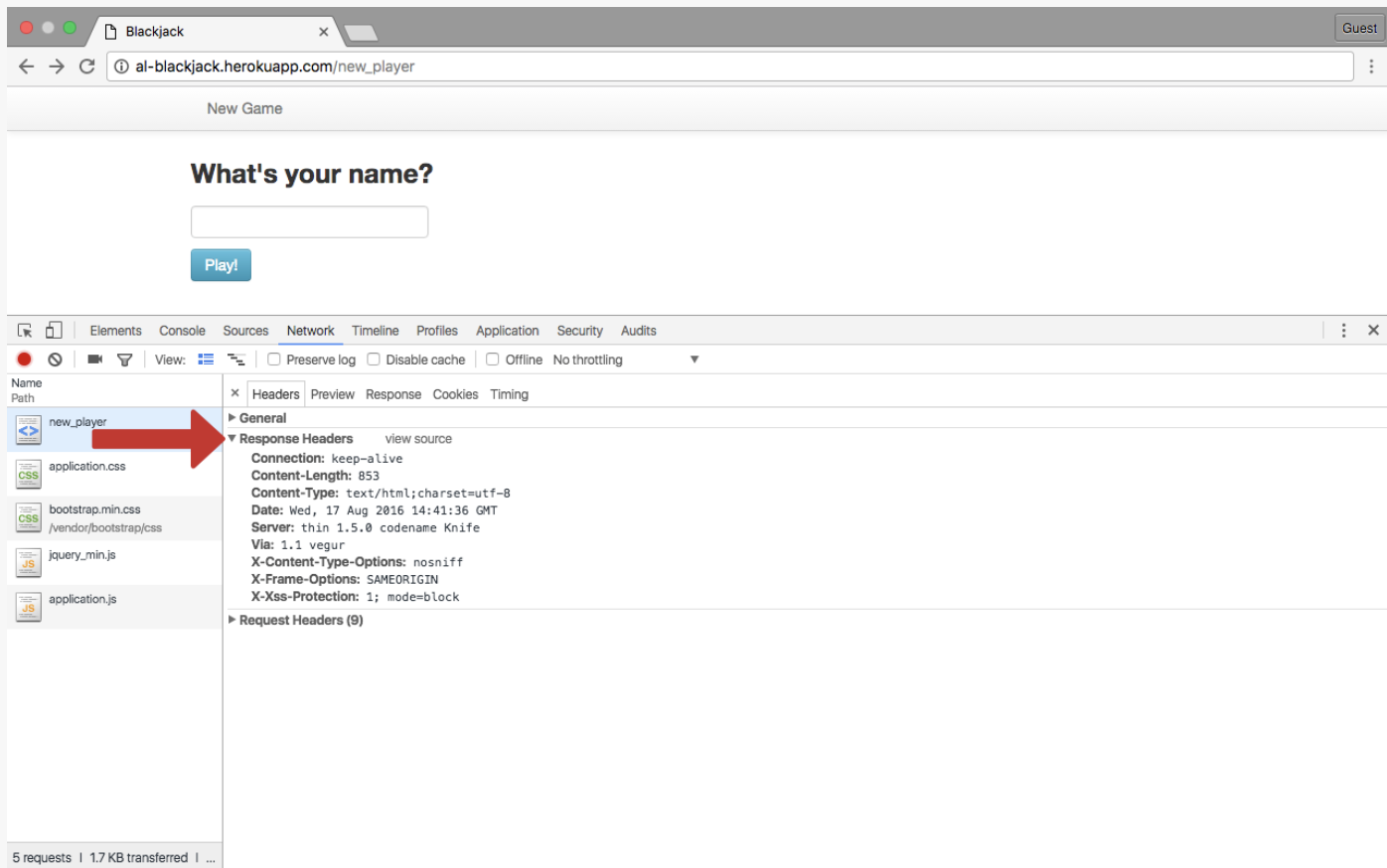
- It's not necessary to memorize all of these, but be aware they can subtly effect workflow.
- We've looked at:
- The components of HTTP responses.
- How to use the inspector to view headers.
- HTTP is just an agreement in the form of formatted text that dictates how a client and server communicate.
- The most important parts of HTTP are:
- Status code
- Header
- message body (which contains the raw data).
- HTTP is stateless:
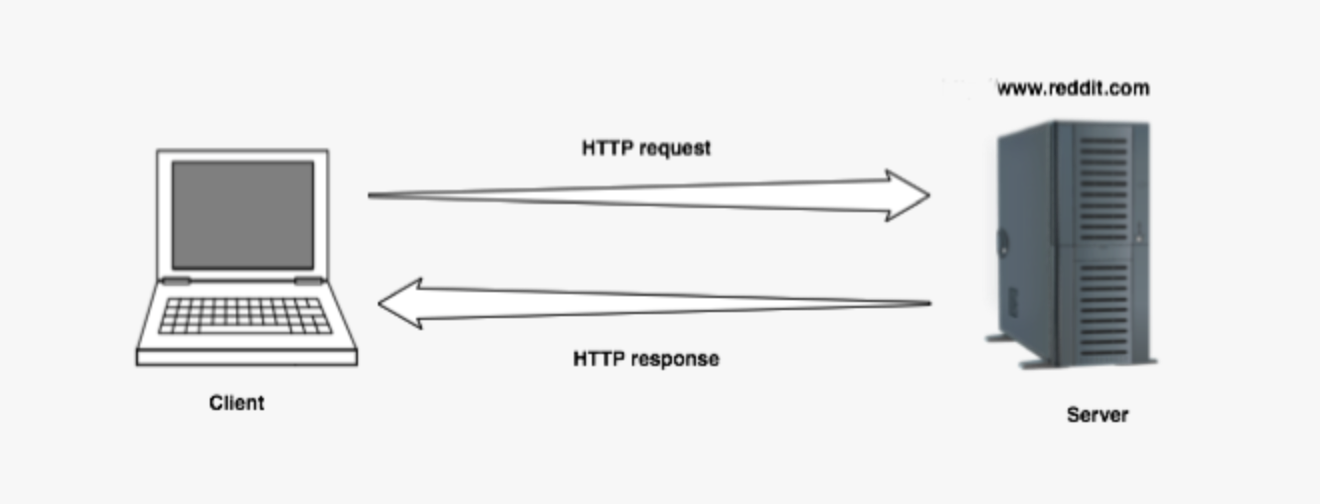
- This means each request is treated as a brand new entity and different requests are not aware of each other.
- This statelessness means the internet is distributed and hard to control, but it's also a pain in the ass to create stateful applications.
- We've all experienced stateful websites. This is an illusion. For example:
- Facebook displaying our username at the top of the page.
- We'll look at:
- How developers use techniques to simulate stateful experiences
- Some techniques on the client to make displaying dynamic content easy:
- Cookies
- Sessions
- AJAX (Asynchronous Javascript calls)
- Sending stateful data as query parameters when making requests (we won't cover this one - it used to be ubiquitous, but now almost totally gone).
- The book uses reddit as a demo, I will use musescore.com.
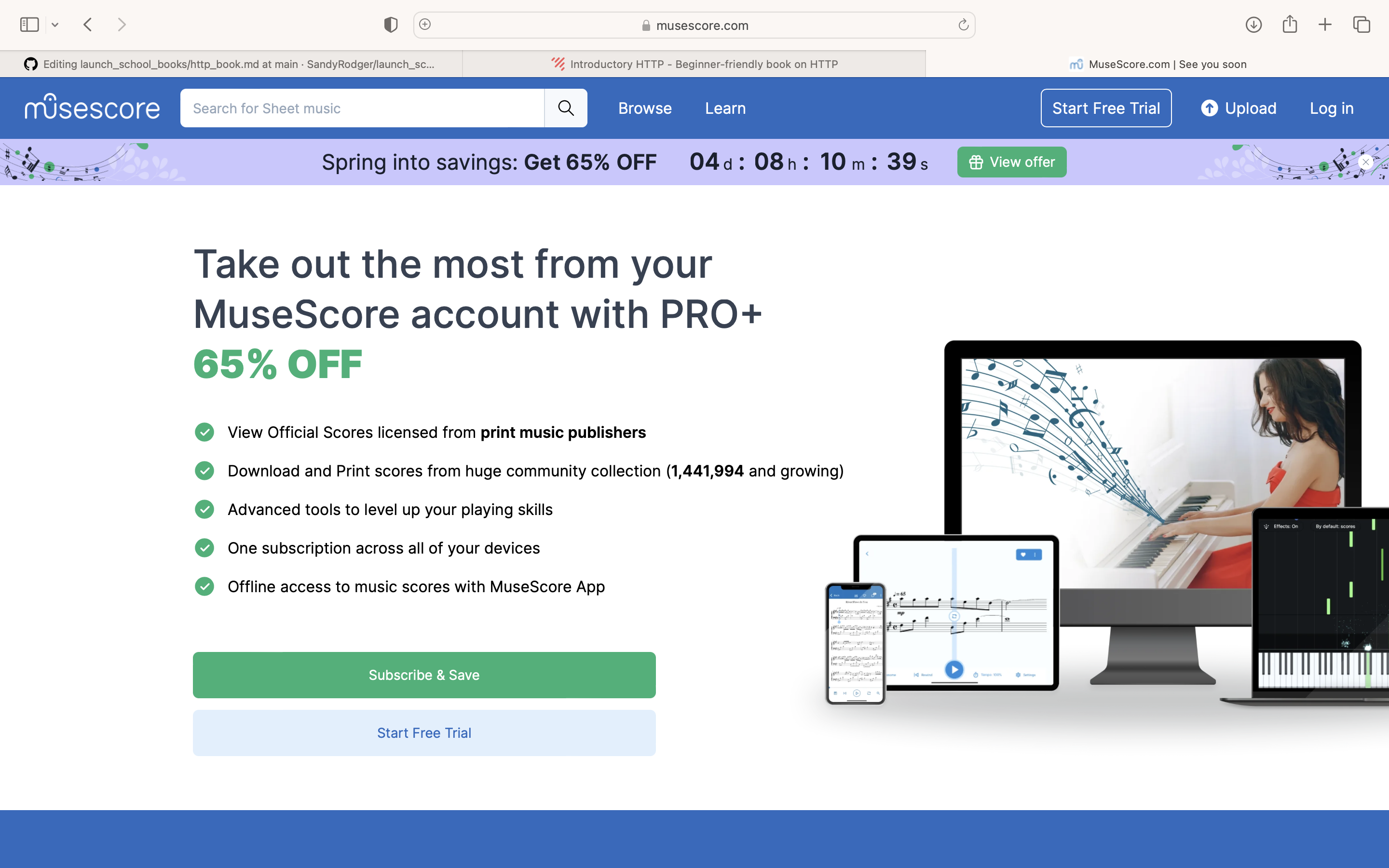
then login
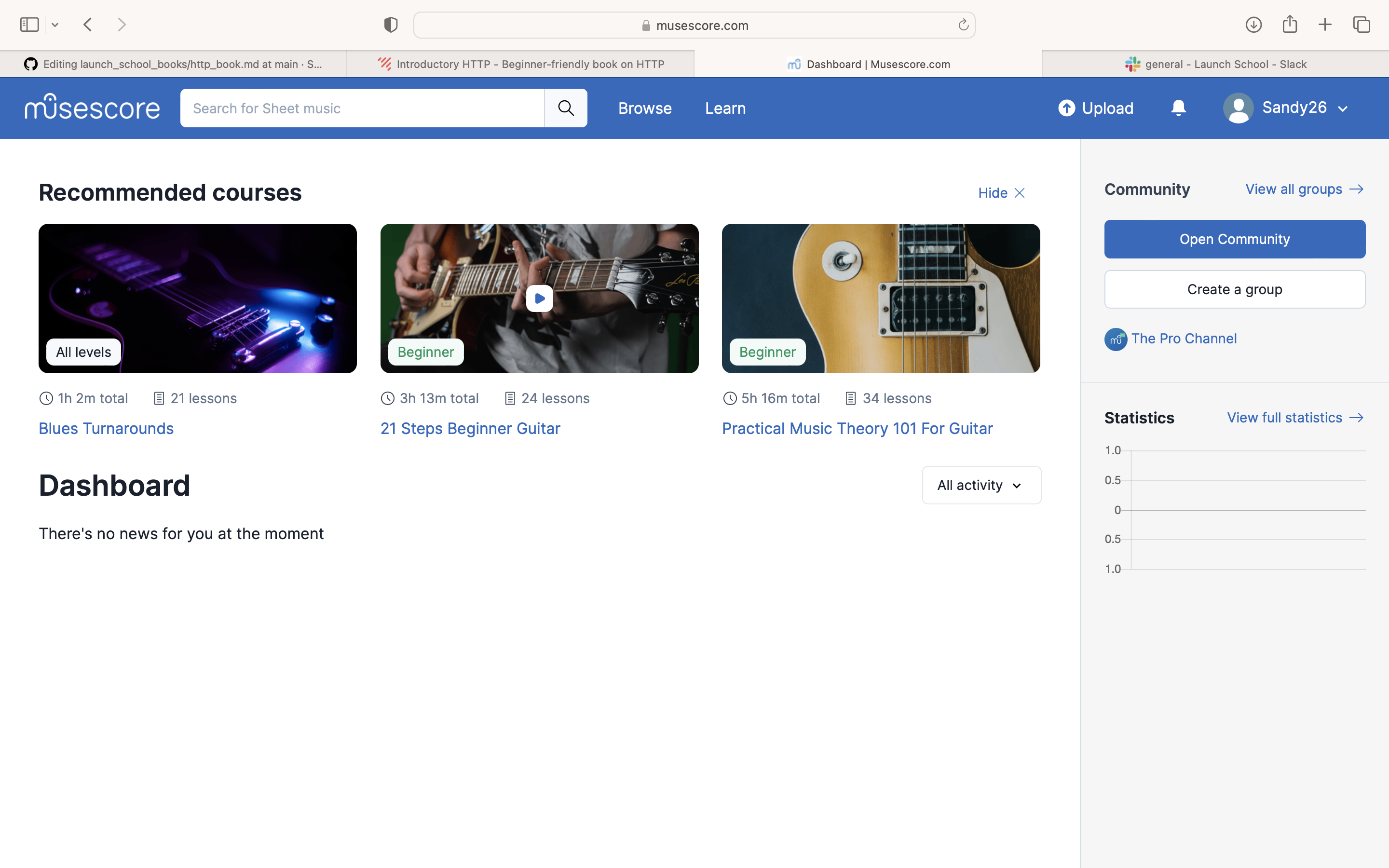
- So you're now logged in. Even if you refresh the page it will stay logged in. How do we explain this with stateless HTML?
- The client can create an illusion of statefulness by sending a unique token called a session identifier with each request. This allows the server to identify clients and create the appropriate environment for them.
- This sense of statefulness has several consequences:
- Every session must be inspected for such a token
- If it does contain a session id, it must be checked to see if it's valid.
- Session expiration rules should be adhered to.
- Browsers should decide how to store session data.
- The server needs to recreate the application state every time, based on the session id and send it back to the client as a response.
- So the server needs to work pretty hard.
- Every request gets its own response, even though most of them will contain the same data as the last response. Imagine the response from the Facebook homepage for example would be pretty expensive HTML. The facebook server would have to compute all the likes per image, every image and status and present it in a time-line.
- If you clicked 'like' on a single image facebook would have to recreate the whole page! It would increment the count and send you a HTML file describing the whole page, even though almost all of the page is the same. But actually, Facebook uses AJAX, so your browser doesn't refresh your browser every time.
- Optimizing sessions and tightening security is a big area that we won't go into here, but one common way is a browser cookie.
- A cookie is a piece of data that is sent from the server and stored in the client during a request/response cycle. Cookies, AKA HTTP Cookies are small files stored in a browser which contain session information.
- By default most browsers have cookies enabled.
- When you first visit a website it will send session information and set it in a browser cookie on your local computer.
- Note that the actual session data is different and is stored on the server.
- With every request you send, the cookie data is compared to the server-side session-data.
- This is how you are recognised when you return to a website - your cookie data is matched.
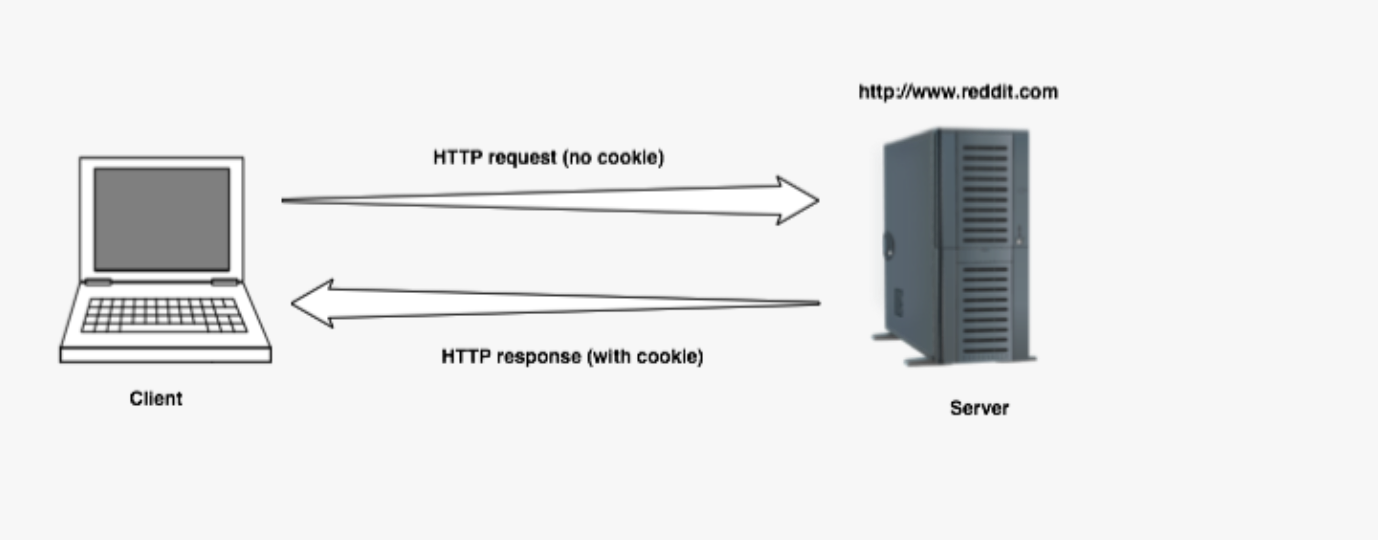
- Here is a walk-through using Yahoo, but I already have cookies from Yahoo, so it doesn't work for me. I will use https://www.brightonandhovealbion.com/ instead because I have no interest in football.
- The 'response headers' tab should have a 'set-cookies' line, but mine does not, even though I have accepted cookies.
How it should work:
- You go to a website you've never been to (or to be precise, never accepted cookies from).
- Under the inspector's 'Network' tab you will find a 'Request Headers' tab.
- The inspector tab has a section called 'Request Headers'. At this point it has no reference to cookies.
- Under the 'Response Headers' tab it has 'set-cookies' headers. These add cookie-data to the response.
- Once you have made a request on the page the 'cookie' header will be set. This is now information sent by your browser to the server. Your browser stores these cookies. It remains stored even if you shut down and restart everything.
How does the website keep track of us if each packet is unrelated to each other? This can be demonstrated by following these steps:
- Go to a website, look at inspector, Application
- Expand the cookies tab and look at the website address. There you will see the cookies that came with our original request, under the 'value' header.
- If you log in you will see a unique session header in the penultimate row. This session ID is saved in a cookie in your browser and sent with every future request to that website.
- With the session id now being sent with every request the server can identify the client and retrieve the data associated with that client. In that associated session data is where the server remembers the state for that client.
- Where is this data stored? On the server somewhere. It's not super important.
REMEMBER:
- The id sent with a session is unique and expires in a relatively short time. This means if it expires you have to log-in again. Once logged out, the session id information is gone.
- So if you manually delete the session-id cookies while logged in you are effectively logging out.
- Asynchronous JavaScript and XML
- It allows pages to issue requests and process responses without a full page refresh. For example facebook would be very expensive to refresh for every request sent.
- When AJAX is used, all requests happen asynchronously, which effectively just means the page doesn't refresh.
- Apparently on a google search, every letter typed into the search-bar is issueing a new AJAX request. The responses to these requests is processed by a 'callback'.
- A 'callback' is a piece of logic you pass on to some function to be executed after a certain event has happened.
- This google-search callback is updating the html with new search results.
- AJAX requests are just like other requests except that instead of the browser refreshing and then processing the response the response is processed by a callback function, which is probably some client-side JavaScript code.
- Techniques used by devs to mimic statefulness with a stateless protocol (HTTP).
- Cookies and sessions.
- The inspector to look at:
- cookies
- session id
- AJAX
- The attributes that make HTTP difficult to control also make it difficult to secure.
- What if someone steals my browser session id?
- If I'm accessing some random website, can they see into my facebook cookie?
- All of these requests and responses are in the form of strings.
- A hacker could use packet sniffing techniques to read these.
- Within requests one could find the session id, which would grant the hacker access to your account bypassing username/password/
- This can be prevented with https:

- This encrypts the strings before they are sent on the network.
- The encryption protocol is TLS (previously Secure Sockets Layer was used).
- These protocols use certificates to communicate with remote servers and exchange remote keys before data encryption happens.
- You can look at these certificates by clicking on the https padlock:
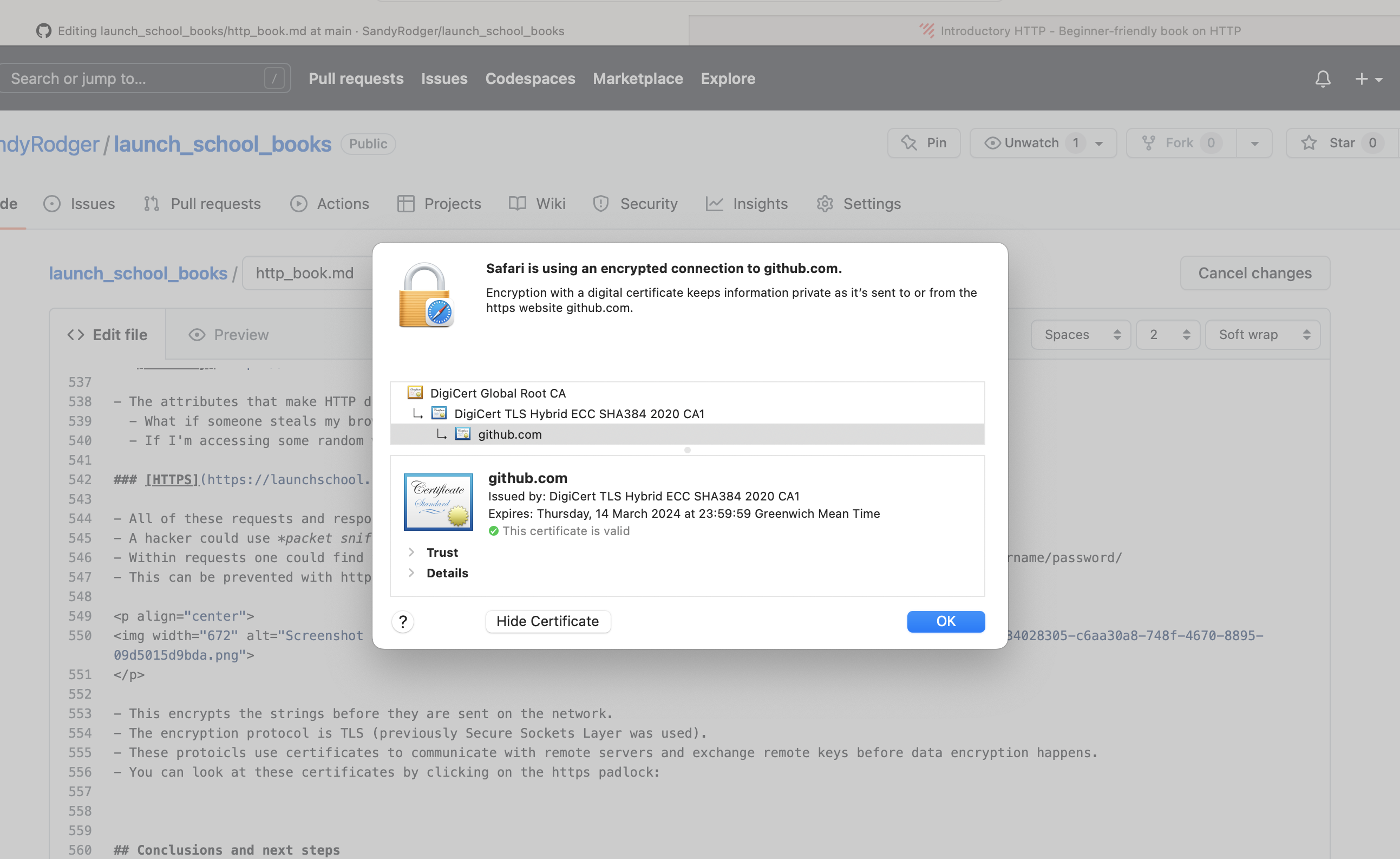
- Most browsers check the certificate for you automatically.
- Permits unrestricted access between resources originating from the same source.
- Origin means scheme + host + port.
- http://mysite.com/doc1 has the same origin as http://mysite.com/doc2
- http://mysite.com/doc1 has a different orgin as
- https://mysite.com/doc1 (different scheme)
- http://mysite.com:4000/doc1 (different port)
- http://anothersite.com/doc1 (different host)
- Same origin policy does not restrict all cross-origin requests.
- Usually allowed:
- linking requests
- redirect requests
- form submissions
- embedding of resources from other resources such as - scripts - css stylesheets - images and other media - fonts - iframes
- Usually restricted:
- cross-origin requests where resources are being accessed programatically using APIs such as
-
XMLhttpRequest- fetch - This is a problem for devs who have a legitimate need to make these restricted kind of cross-origin request.
- CORS (Cross Origin Resource Sharing) was developed to deal with this.
- CORS is a mechanism which allows interactions that would normally be restricted. It works by adding new HTTP headers. This is covered more later in the Core Curriculum.
- This is what happens when a hacker gets a gold of the session id. It means sometimes both people can be on the same session.
- Resetting sessions.
- Setting an expiration time on sessions.
- Use HTTPS across the whole app.
- This happens when you allow users to input JavaScript or HTML that ends up being displayed by the site directly. For example writing raw code into a text box.
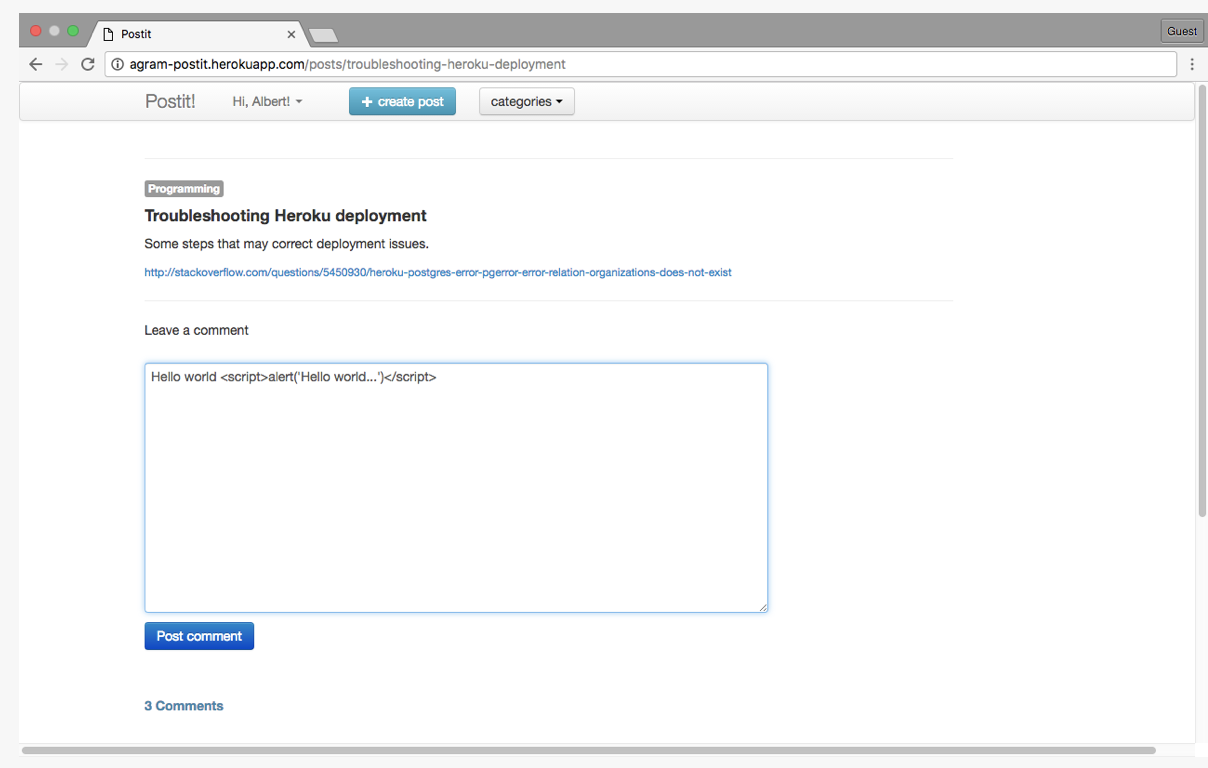
- Make sure to always sanitize user input.
- Eliminate problematic input such as <script> tags
- Disallow HTML and javascript inout completely.
- Escape all user input when displaying it.
- "Escaping" means to replace an HTML character with a combination of ASCII characters. This tells the client to display the character as is. These combinations of ASCII characters are called HTML entities. So for example
<p>Hello World!<\p>would become<p>Hello World!<\p>
- various aspects of security in web applications
- How fragile and problematic developing and securing a web application is. And it's mainly due to HTTP.
Overview:
| Once | Twice | Thrice | Comprehension | Retention | |
|---|---|---|---|---|---|
| 1. Introduction | 12th April | ||||
| 2. Background | 12th April | ||||
| 3. What is a URL? | 13th April | ||||
| 4. Preparations | 13th April | ||||
| HTTP | |||||
| 5. Making requests | 13th April | ||||
| 6. Processing responses | 13th April | ||||
| 7. Stateful web applications | 13th April | ||||
| 8. Security | 23rd April | ||||
| 9. Conclusions and next steps | 23rd April |