




Local, open-source control for Pentair IntelliCenter / IntelliTouch / EasyTouch, Jandy Aqualink, Hayward, and standalone pool equipment. A self-hosted alternative to the Pentair Home and ScreenLogic cloud apps — your data stays on your network, your pool responds in real time, and your smart home can finally see it.
- 🌊 Works with your gear — IntelliCenter (through firmware v3.008), IntelliTouch, EasyTouch, SunTouch, Aqualink, IntelliCom, or no controller at all (Nixie mode).
- 🏠 Plugs into your smart home — HomeKit/Siri (via Homebridge), Home Assistant (via MQTT), Hubitat, SmartThings, MQTT, InfluxDB, Alexa.
- 🔌 No cloud required — runs on a Raspberry Pi, NAS, or any Node.js 20+ host. Pairs with dashPanel for a web dashboard and REM for direct GPIO/i2c/SPI hardware I/O.
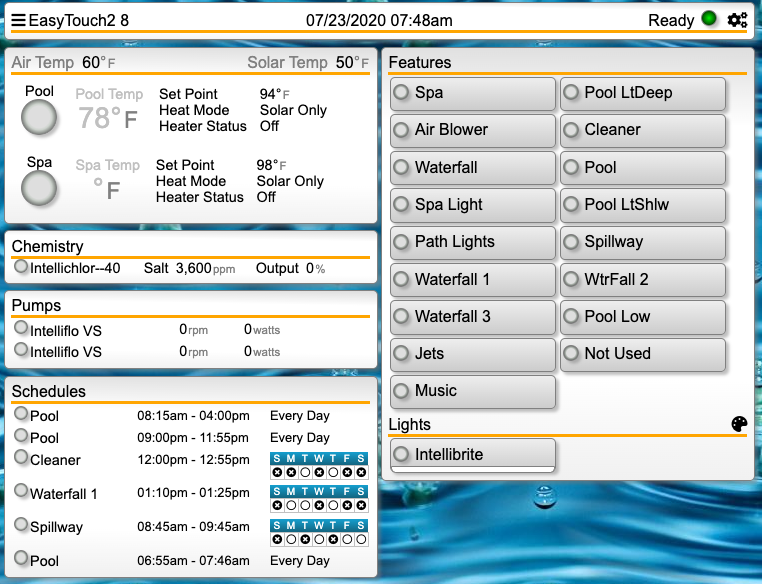
UI pictured: dashPanel, the recommended web client.
Quick start (Docker): see Docker Compose — one file,
docker compose up -d, done. Quick start (source):git clone→npm install→npm start. Full steps in Installation. Hardware needed: an RS-485 adapter (or a ScreenLogic network connection) to talk to your equipment.
In the wild: featured in the TroubleFreePool IntelliCenter walk-through guide (thanks @MyAZPool). Actively maintained — questions welcome in GitHub Discussions.
+ Running IntelliCenter v3.008+? It's fully supported as of 9.0.
+ If anything looks off, please open a discussion with a replay capture.
+ See discussion #1171 for ongoing v3 updates.njsPC is a Node.js service that talks to your pool controller over RS-485 (or ScreenLogic) and exposes everything — circuits, bodies, pumps, heaters, chlorinators, chemistry, lights, covers, valves, schedules — as a live REST + WebSocket API. Point a web client at it for a browser UI, or wire it into home automation so your pool shows up next to your lights and thermostats.
- Want to add a low-cost controller to your pool?
- Want a modern web interface for your existing system?
- Want to turn pumps on remotely, or schedule them on sunrise/sunset?
- Want your home automation hub to read and control your pool?
- Want to run pumps or a chlorinator with no pool controller at all?
| Category | Supported | Notes |
|---|---|---|
| Controllers | IntelliCenter, IntelliTouch, EasyTouch, SunTouch, Aqualink, IntelliCom, Nixie (standalone) | RS-485 (preferred) or ScreenLogic (network) |
| Pumps | IntelliFlo VS / VSF / VF, IntelliFlo VS+SVRS, SuperFlo VS, Hayward Eco/TriStar VS, Hayward Relay VS, Whisperflo, single/two-speed, relay-controlled, Neptune Modbus, Regal (Century) Modbus | Regal added in 9.0 — PR #1169 |
| Heaters | Gas, solar, heat pump, hybrid (ETi / ETi250), MasterTemp, Max-E-Therm, UltraTemp / UltraTempDirect | |
| Chlorinators | IntelliChlor, Aqua-Rite, OEM brands | Dual chlorinators supported via REM |
| Lights | IntelliBrite, MagicStream, Jandy WaterColors, Hayward ColorLogic, Pooltone (Florida Sunseeker), plus legacy SAM / SAL / Color Wheel / Photon Gen | |
| Chemistry | IntelliChem (OCP-paired and standalone), Relay Equipment Manager (REM) | Atlas Scientific pH / ORP / EC probes, flow, pressure, temperature via REM |
| Covers | IntelliCenter cover configuration & control | Live-state feedback is limited on ICv3 |
| Filters | Configuration, pressure monitoring, clean/dirty thresholds | |
| Valves | Standard intake/return with diverted status | Intellivalve planned |
| Home Automation | HomeKit/Siri (Homebridge), Home Assistant (via MQTT), Hubitat, SmartThings, MQTT, InfluxDB, ISY, Vera, Alexa | See Home Automation Bindings |
9.0 focuses on IntelliCenter v3.008 firmware compatibility and finishes the v3 work started in 8.4.1.
- IntelliCenter v3.008 chlorinator support, including live-edit changes coming back from the panel.
- Faster state updates on v3 — circuit, feature, and body changes made at the panel now appear in dashPanel within seconds.
- v3 heater enhancements, including ETi250 support and broader heater control coverage.
- v3 body and unit handling improvements, so capacity and English/Metric changes stay in sync between njsPC and the OCP.
- Light group state fixes: themes, colors, and ON/OFF transitions sync correctly with the panel.
- Firmware change detection — njsPC reloads its configuration automatically when the OCP firmware version changes.
- Virtual equipment management with new REST endpoints.
- Regal (Century) Modbus pump added, with collision detection and NACK/fault handling on Go/Stop commands — thanks to @celestinjr (PR #1169).
For previous releases (8.4.x, 8.3, 8.1, 8.0, 7.x and earlier), see the Changelog.
🔌 Before you start — hardware required njsPC needs a way to reach your pool bus:
- RS-485 adapter (recommended) — see the adapter details wiki.
- ScreenLogic (network connection) — if you already have a Pentair ScreenLogic box on your network.
- Socat — to bridge a remote serial device, see the Socat wiki.
njsPC is the server. To actually use it you'll also want a web client (dashPanel) and/or a home automation binding.
- Docker (easiest) — one compose file,
docker compose up -d. Jump to Docker Compose. - From source (for developers / tinkerers / bleeding-edge users) — follow Prerequisites below. Recommended if you want to pull fixes as they land on
master.
If you don't know anything about Node.js, these directions might be helpful.
- Install Node.js (v20+ required). (https://nodejs.org/en/download/)
- Update npm (https://docs.npmjs.com/getting-started/installing-node).
- Cloning the source is recommended — updates are frequently pushed while releases are infrequent.
Clone with
git clone https://github.com/tagyoureit/nodejs-poolController.git(Alternate — not recommended — download the latest release.) - Change directory into
nodejs-poolController. - Run
npm installin the new folder (wherepackage.jsonexists). This installs all dependencies (serial-port, express, socket.io, etc). - Run the app with
npm start.npm startcompiles the TypeScript code. Use this every time you download/clone/pull the latest.npm run start:cachedruns the app without compiling the code — much faster once built.
- Install a web client for a browser experience and/or a binding for two-way control from Home Automation systems.
For a thorough walk-through, see the excellent TroubleFreePool IntelliCenter guide. Thanks @MyAZPool.
Assuming you cloned the repo, the following are easy steps to get the latest version:
- Change directory to the njsPC app
- Important: Ensure you have Node.js v20 or higher installed (
node --version). If not, upgrade Node.js first. git pull- Important: Run
npm ito update dependencies. This is especially important when upgrading to version 8.3.0+ (including 8.4.x and 9.0.0+) as it requires Node 20+ and has updated dependencies. - Start application as normal, or if using
npm run start:cachedthen runnpm run buildto compile the code.
See the wiki. Thanks @wurmr @andylippitt @emes.
The project has multiple image channels. latest only means latest within that specific channel.
ghcr.io/tagyoureit/njspc- official controller image published from this repository's GitHub Actions (tracks upstreammaster).msmi/nodejs-poolcontroller- legacy Docker Hub controller image (can lag upstream).ghcr.io/rstrouse/njspc-dash- dashPanel image currently published separately.
Below is an example docker-compose.yml snippet showing this controller (njspc) and an OPTIONAL dashPanel UI service (njspc-dash). The dashPanel image is published separately; uncomment if you want a built-in web dashboard on port 5150.
services:
   njspc:
      image: ${NJSPC_IMAGE:-ghcr.io/tagyoureit/njspc}
      container_name: njspc
      restart: unless-stopped
      environment:
         - TZ=${TZ:-UTC}
         - NODE_ENV=production
         # Serial vs network connection options
         # - POOL_NET_CONNECT=true
         # - POOL_NET_HOST=raspberrypi
         # - POOL_NET_PORT=9801
         # Provide coordinates so sunrise/sunset (heliotrope) works immediately - change as needed
         - POOL_LATITUDE=28.5383
         - POOL_LONGITUDE=-81.3792
      ports:
         - "4200:4200"
      devices:
         - /dev/ttyACM0:/dev/ttyUSB0
      # Persistence (create host directories/files first)
      volumes:
         - ./server-config.json:/app/config.json   # Persisted config file on host
         - njspc-data:/app/data                    # State & equipment snapshots
         - njspc-backups:/app/backups              # Backup archives
         - njspc-logs:/app/logs                    # Logs
         - njspc-bindings:/app/web/bindings/custom # Custom bindings
      # OPTIONAL: If you get permission errors accessing /dev/tty*, prefer adding the container user to the host dialout/uucp group;
      # only as a last resort temporarily uncomment the two lines below to run privileged/root (less secure).
      # privileged: true
      # user: "0:0"

   njspc-dash:
     image: ${NJSPC_DASH_IMAGE:-ghcr.io/rstrouse/njspc-dash}
     container_name: njspc-dash
     restart: unless-stopped
     depends_on:
       - njspc
     environment:
       - TZ=${TZ:-UTC}
       - NODE_ENV=production
       - POOL_WEB_SERVICES_IP=njspc      # Link to backend service name
     ports:
       - "5150:5150"
     volumes:
       - ./dash-config.json:/app/config.json
       - njspc-dash-data:/app/data
       - njspc-dash-logs:/app/logs
       - njspc-dash-uploads:/app/uploads

volumes:
  njspc-data:
  njspc-backups:
  njspc-logs:
  njspc-bindings:
  njspc-dash-data:
  njspc-dash-logs:
  njspc-dash-uploads:
Quick start:
- Save compose file.
- (Optional) create an empty config file:
touch dash-config.json. docker compose up -d- Visit Dash UI at:
http://localhost:5150.
Notes:
- Provide either RS-485 device OR enable network (ScreenLogic) connection.
latestis channel-specific; use image labels to verify exact code revision:docker image inspect ghcr.io/tagyoureit/njspc:latest --format '{{ index .Config.Labels "org.opencontainers.image.revision" }}'docker image inspect msmi/nodejs-poolcontroller:latest --format '{{ index .Config.Labels "git-commit" }}'
- Coordinates env vars prevent heliotrope warnings before the panel reports location.
- Persistence (controller):
./server-config.json:/app/config.jsonmain runtime config. You can either:- Seed it with a copy of
defaultConfig.json(cp defaultConfig.json server-config.json), OR - Start with an empty file and the app will auto-populate it from defaults on first launch. If the file exists but contains invalid JSON it will be backed up to
config.corrupt-<timestamp>.jsonand regenerated.
- Seed it with a copy of
- Remaining state (data, backups, logs, custom bindings) is typically stored in named volumes in the provided compose for cleaner host directories. If you prefer bind mounts instead, replace the named volumes with host paths similar to the example below.
- Data artifacts:
poolConfig.json,poolState.jsonetc. live under/app/data(volumenjspc-data). - Backups:
/app/backups(volumenjspc-backups). - Logs:
/app/logs(volumenjspc-logs). - Custom bindings:
/app/web/bindings/custom(volumenjspc-bindings).
- To migrate from bind mounts to named volumes, stop the stack,
docker run --rm -v oldPath:/from -v newVolume:/to alpine sh -c 'cp -a /from/. /to/'for each path, then update compose.
See the wiki.
njsPC is the server at the center of a small ecosystem. To do anything useful with it, you'll pair it with at least one of these:
| Project | Role |
|---|---|
| njsPC (this repo) | Server that talks to your pool controller over RS-485 / ScreenLogic and exposes REST + WebSocket APIs. |
| dashPanel | Recommended web UI. Works with IntelliCenter, *Touch, and REM. |
| REM (Relay Equipment Manager) | Companion app for direct GPIO / i²c / SPI hardware — Atlas Scientific pH/ORP/EC/hum/prs/pmp/rtd probes, ADS1x15 A/D converters, pressure transducers, flow sensors, 10k/NTC temperature sensors. |
- dashPanel — full compatibility with IntelliCenter, *Touch, and REM. The recommended client.
Recommended integrations
- Homebridge / HomeKit / Siri / EVE — Apple Home support via Homebridge (by @gadget-monk, adopted from @leftyflip). Control your pool from Siri, iOS Home, and Apple Watch.
- MQTT — the universal bridge. Works out-of-the-box with Home Assistant, Node-RED, openHAB, and anything else that speaks MQTT. Original release by @crsherman, rewrite by @kkzonie, testing by @baudfather and others. Setup directions.
- Homeseer via MQTT — integration directions by @miamijerry.
- Hubitat — native driver by @bsileo (with prior help from @johnny2678, @donkarnag, @arrmo). Setup directions.
- InfluxDB — push pool telemetry into Grafana dashboards.
Community & legacy
- Vera — plugin for the Vera hub. Setup directions.
- Another SmartThings Controller by @dhop90 — older, community-maintained.
- ISY — original credit to @blueman2, enhancements by @mayermd.
- ISY Polyglot NodeServer — by @brianmtreese.
- Discussions, recommendations, designs, clarifications — GitHub Discussions is the primary place. Questions are welcome.
- Tips, tricks, and deeper docs — the wiki.
- Bug reports — open a GitHub issue. For IntelliCenter or *Touch bugs, a replay capture is gold — it's usually how fixes get made.
njsPC is a volunteer project. You don't need to write code to make a difference:
- File a good bug report — with a replay capture attached. This is the #1 way non-coders unblock fixes for their own equipment.
- Answer a question in Discussions.
- Improve the wiki with setup notes, quirks, or photos of adapters / wiring that worked for you.
- Submit a PR — pumps, heaters, lights, and home-automation bindings have all come from community contributors (see Credits).
Full release history — Changelog.
Expand for detailed config.json field reference (controller / web / log). Most of these can be set from dashPanel — you rarely need to edit this file by hand.
Most of these can be configured directly from the UI in dashPanel.
rs485Port- set to the name of your RS-485 controller. See wiki for details and testing.portSettings- should not need to be changed for RS485mockPort- opens a "fake" port for this app to communicate on. Can be used with packet captures/replays.netConnect- used to connect via SocatnetHostandnetPort- host and port for Socat connection.
inactivityRetry- # of seconds the app should wait before trying to reopen the port after no communications. If your equipment isn't on all the time or you are running a virtual controller you may want to dramatically increase the timeout so you don't get console warnings.txDelays- (optional) fine‑grained transmit pacing controls added in 8.1+ to better coexist with busy or bridged (socat / multiple panel / dual chlorinator) RS‑485 buses. These values are all in milliseconds. If the block is omitted, internal defaults are used (seedefaultConfig.json). All values can be hot‑reloaded from config.idleBeforeTxMs– Minimum quiet time on the bus (no RX or TX seen) before a new outbound frame may start. Helps avoid collisions just after another device finishes talking. Typical: 40‑80. Set to 0 to disable.interFrameDelayMs– Delay inserted between completed outbound attempts (success, retry scheduling, or queue drain) and evaluation of the next outbound message. Replaces the previous fixed 100ms. Typical: 30‑75. Lower values increase throughput but may raise collision / rewind counts.interByteDelayMs– Optional per‑byte pacing inside a single frame. Normally 0 (disabled). Set to 1‑2ms only if you observe hardware or USB adapter overruns, or are experimenting with very marginal wiring / long cable runs.
Example tuning block - more conservative pacing for SunTouch that works way better than defaults:
"txDelays": {
   "idleBeforeTxMs": 60,
   "interFrameDelayMs": 50,
   "interByteDelayMs": 1
}
Tuning guidance:
- Start with the defaults. Only change one value at a time and observe stats (collisions, retries, rewinds) via rs485PortStats.
- If you see frequent outbound retries or receive rewinds, first raise
idleBeforeTxMsin small steps (e.g. +10ms) before touchinginterFrameDelayMs. - If overall throughput feels sluggish but collisions are low, you may lower
interFrameDelayMsgradually. - Use
interByteDelayMsonly as a last resort; it elongates every frame and reduces total bus capacity. - Setting any value too high will simply slow configuration bursts (e.g. on startup); setting them too low can cause more retries and ultimately lower effective throughput.
All three parameters are safe to adjust without restarting; edits to config.json are picked up by the existing config watcher.
servers- setting for different servers/serviceshttp2- not used currentlyhttp- primary server used for api connections without secure communicationsenabled- self-explanatoryip- The IP of the network address to listen on. Default of127.0.0.1will only listen on the local loopback (localhost) adapter.0.0.0.0will listen on all network interfaces. Any other address will listen exclusively on that interface.port- Port to listen on. Default is4200.httpsRedirect- Redirect http traffic to httpsauthentication- Enable basic username/password authentication. (Not implemented yet.)authFile- Location of the encrypted password file. By default,/users.htpasswd. If you haveauthentication=1then create the file users.htpasswd in the root of the application. Use a tool such as http://www.htaccesstools.com/htpasswd-generator/ and paste your user(s) into this file. You will now be prompted for authentication.
https- See http options above.sslKeyFile- Location of key filesslCertFile- Location of certificate file
mdns- Not currently used.ssdp- Enable for automatic configuration by the webClient and other platforms.
app- Application wide settingsenabled- Enable/disable logging for the entire applicationlevel- Different levels of logging from least to most: 'error', 'warn', 'info', 'verbose', 'debug', 'silly'
packet- Configuration for the packet logger.
- @Rstrouse — made the 6.0 rewrite and IntelliCenter support possible, continues to drive the project forward with monumental changes, and taught me a lot about coding along the way.
- @jwtaylor310 — provided a ton of IntelliCenter v3.004+ replay captures that tracked down and fixed bugs.
- Jason Young — foundational protocol decoding (read both posts).
- Michael Russe (ceesco / CocoonTech) — detailed protocol writeup, also on Pastebin.
- Michael Usner — first JavaScript implementation building on the above.
- rflemming — first external contributor to the codebase.
- @arrmo and @blueman2 — early and ongoing help on Gitter.
- @celestinjr — Regal (Century) Modbus pump support (PR #1169).
- All the community members across GitHub Discussions, Issues, and TroubleFreePool who've filed captures, tested builds, and kept pools running.
GNU AGPL v3.0 — see LICENSE. Copyright © 2016–2026 Russell Goldin (@tagyoureit) <russ.goldin@gmail.com>