





A custom Lovelace card for Home Assistant to display RSS feed items from a sensor (feedparser) or event entity (feedreader) in an accordion style.
- Flexible Data Source: Displays items from a
sensorentity (e.g., Feed Parser) or anevententity (e.g., corefeedreader). - Multiple Feed Aggregation: Combine items from multiple RSS entities into a single card, automatically sorted by publication date.
- Accordion Layout: Each feed item is presented in a clean, collapsible accordion view, with an option to allow single or multiple items to be open at once.
- Customizable Display: Control the maximum number of items shown and optionally open the latest item automatically on card load.
- Channel Information: Optionally display the feed's channel details, such as title, description, and image.
- Recent Item Indicator: A "NEW" pill highlights recent articles, with a configurable duration.
- Read/Unread Tracking: Visited article links are greyed out, making it easy to see what you've already read.
- Hero Images: Automatically displays a hero image if provided in the feed, and hides duplicate images from the summary to keep the layout clean.
- Persistent Bookmarking: Star your favorite items to save them permanently in your browser. Bookmarked items will remain visible even after they disappear from the live RSS feed.
- Built-in Audio Player: Includes an integrated player for feeds with audio enclosures, perfect for podcasts.
- Playback Persistence: Remembers your listening progress. Audio resumes where you left off after a refresh, and a "Listened" icon with a completion timestamp appears for finished tracks.
| The New York Times RSS | The Daily Audio Podcast RSS |
|---|---|
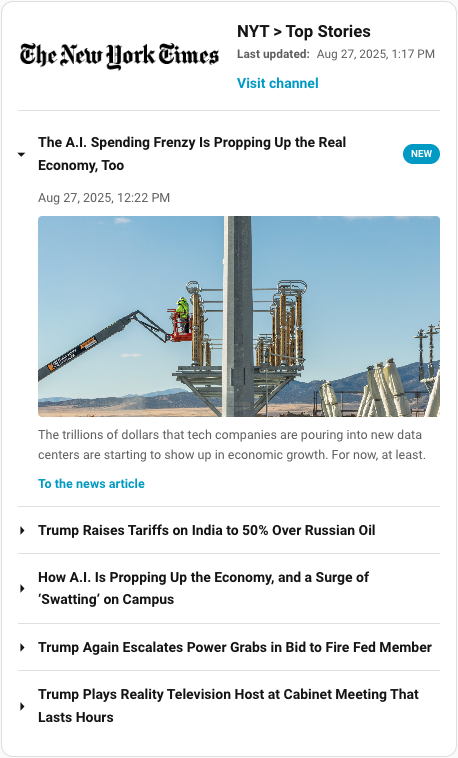 |
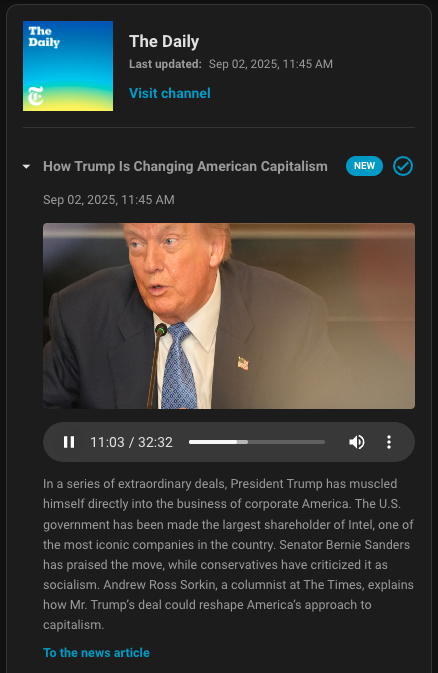 |
The editor is available in the following languages:
- English
- German
- French
Contributing Translations
If you would like to contribute a new translation:
- Fork the repository on GitHub.
- Copy the
src/translation/en.jsonfile and rename it to your language code (e.g.,es.jsonfor Spanish). - Translate all the values in the new file.
- Submit a pull request with your changes.
This card is available in the Home Assistant Community Store (HACS).

Manual Installation
- Download the
rss-accordion.jsfile from the latest release. - Place it in your
config/wwwdirectory. - Add the resource reference to your Lovelace configuration under
Settings->Dashboards->...->Resources.- URL:
/local/rss-accordion.js - Resource Type:
JavaScript Module
- URL:
You can now add the card to your dashboard.
| Name | Type | Default | Description |
|---|---|---|---|
type |
string | Required | custom:rss-accordion |
entity |
string | Required* | The entity ID of your feed sensor or event. *Either entity or entities is required. |
entities |
list | optional | A list of entity IDs to aggregate items from multiple feeds. Items are sorted by publication date. *Either entity or entities is required. |
title |
string | '' |
The title of the card. |
max_items |
number | All items | The maximum number of feed items to display. |
new_pill_duration_hours |
number | 1 |
The duration in hours for which the "NEW" pill is shown on recent items. |
show_item_image |
boolean | true |
If false, hides the main image for each feed item. |
image_ratio |
string | auto |
The CSS aspect-ratio for item images (e.g., 16/9, 1.77). Images are cropped to fit. |
image_fit_mode |
string | cover |
How the image should fit. cover (fill & crop) or contain (fit inside). |
initial_open |
boolean | false |
If true, the first/newest item will be open by default when the card loads. |
allow_multiple |
boolean | false |
If true, allows multiple accordion items to be open simultaneously. |
show_audio_player |
boolean | true |
If false, hides the audio player for feed items that include an audio enclosure (e.g., podcasts). |
show_bookmarks |
boolean | false |
If true, enables a bookmarking feature, allowing you to star items and filter for them. |
show_channel_info |
boolean | false |
If true, displays the channel's info (title, description, image) above the feed items. This option is only available for entities that have a channel attribute (e.g. from the feedparser custom integration). |
crop_channel_image |
boolean | false |
If true, displays the channel image as a 60x60px cropped circle. By default, the image is shown at 50% width without cropping. Only applicable if show_channel_info is true and a channel image exists. |
show_published_date |
boolean | false |
If true, displays the channel's last update time. Only applicable if show_channel_info is true and the sensor has a channel.published attribute. |
type: custom:rss-accordion
title: Home Assistant Blog
entity: sensor.home_assistant_blog_feed
max_items: 5
new_pill_duration_hours: 24
image_ratio: 16/9
image_fit_mode: covertype: custom:rss-accordion
title: News Aggregator
entities:
- sensor.tech_news
- sensor.local_news
- sensor.weather_alerts
max_items: 15
show_bookmarks: trueTo contribute to the development, you'll need to set up a build environment.
-
Clone the repository:
git clone https://github.com/timmaurice/lovelace-rss-accordion.git cd lovelace-rss-accordion -
Install dependencies:
npm install
-
Start the development server: This command will build for changes in the
srcdirectory and rebuild the card.npm run build
-
In your Home Assistant instance, you will need to configure Lovelace to use the local development version of the card from
dist/rss-accordion.js.
For further assistance or to report issues, please visit the GitHub repository.


![@dependabot[bot]](https://avatars.githubusercontent.com/in/29110?s=64&v=4)

