Prerequisites
Description
IDK what is causing this, but as the title says - only very upper parts of the page is directly selectable while the rest parts don't grey out and not selectable (directly typing in the window works tho):
Screenshot
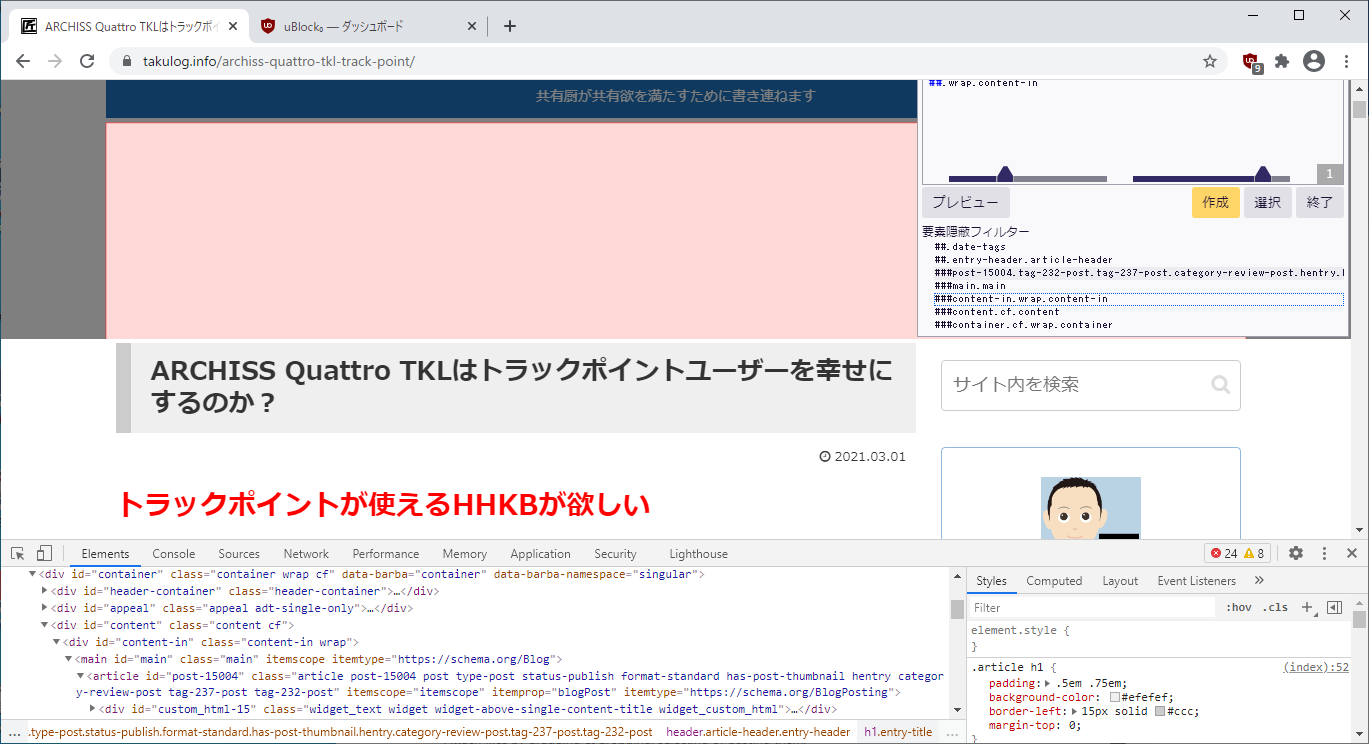
A specific URL where the issue occurs
https://takulog.info/archiss-quattro-tkl-track-point/
Steps to Reproduce
- Visit the page
- Open the picker and try to select lower parts of the page
Expected behavior:
The picker can select and highlight elements.
Actual behavior:
Described
Your environment
- uBlock Origin version: 1.33.2 / 1.33.3b11
- Browser Name and version: Chrome 89.0.4389.72 / Firefox 86.0
- Operating System and version: Windows 10

Prerequisites
Description
IDK what is causing this, but as the title says - only very upper parts of the page is directly selectable while the rest parts don't grey out and not selectable (directly typing in the window works tho):
Screenshot
A specific URL where the issue occurs
https://takulog.info/archiss-quattro-tkl-track-point/Steps to Reproduce
Expected behavior:
The picker can select and highlight elements.
Actual behavior:
Described
Your environment