
A comprehensive e-commerce platform demonstrating multi-service AWS architectures using LocalStack. This tutorial showcases how to build and test complex cloud-native applications locally before deploying to production.
This tutorial demonstrates:
- Multi-service AWS integration with LocalStack
- Event-driven architecture patterns
- Serverless application development
- Infrastructure as Code with CloudFormation
- Modern frontend/backend development practices
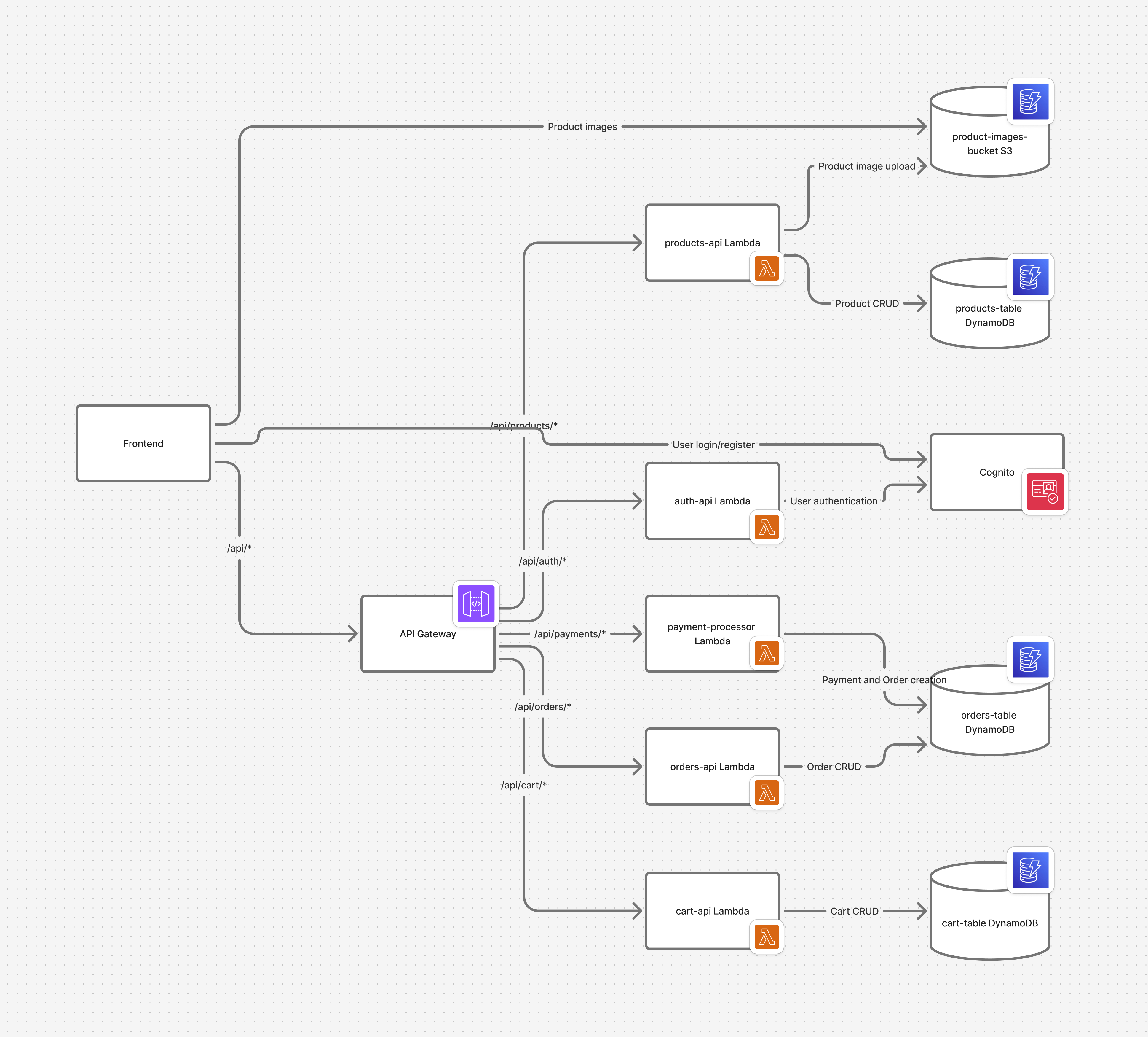
- API Gateway - RESTful API endpoints
- Lambda - Serverless compute functions
- DynamoDB - NoSQL database
- S3 - File storage for product images
- Cognito - Authentication and user management
- CloudFormation - Infrastructure provisioning
- Docker & Docker Compose
- Node.js 18+
- Python 3.9+
- AWS CLI configured for LocalStack
# Clone and navigate to project
git clone https://github.com/Akashbellary/ekart-aws-localstack.git
cd ekart-aws-localstack#cleanup the existing lambda functions (optinal)
python scripts\cleanup-serverless.py
#Run this to deploy the dynamodb, s3 backets, IAM Role, API Gateway
python scripts\deploy-infrastructure.py
#Deploy Lambda functions
python scripts\deploy-serverless.py
#Seed the sample products data
python scripts\seed.py
#Test script. Tests involving extensions may not work for free version of localstack
python scripts\test-serverless-apis.py
#If frontend fails to work, run this script. This fixes api config to work with frontend.
python scripts\configure-frontend.py cd frontend
pnpm run dev (or) npm install --legacy-peer-deps
npm run dev # 1. Install dependencies
make install
# 2. Start LocalStack
docker-compose up -d localstack
# 3. Deploy infrastructure
make deploy-infra
# 4. Seed sample data
make seed-data
# 5. Start services
make startProblem Identified: Orders weren't appearing in the orders list after successful payment due to incomplete integration between payment processing and order creation.
Solution Implemented:
- Enhanced payment processor Lambda to handle both payment intents and order creation
- Added proper linking between payment intents and orders in DynamoDB
- Updated frontend to collect shipping information and pass it during payment confirmation
Workflow:
- User adds items to cart
- Proceeds to checkout with shipping information
- Frontend calls
/api/payments/create-payment-intentto create payment - After payment confirmation, frontend calls
/api/payments/confirm-payment - Payment processor creates order in DynamoDB and links it to payment intent
- Orders are now visible in the
/orderspage
- Primary Key:
order_id - GSI:
buyer_idandseller_idfor efficient querying - Fields: items, total_amount, status, payment_status, shipping_address
- Primary Key:
product_id - GSI:
seller_idandcategoryfor filtering - Fields: title, description, price, stock_quantity, images
POST /api/auth/register- Register new userPOST /api/auth/login- Login and get JWT token
GET /api/products- List productsPOST /api/products- Create product (sellers)GET /api/products/{id}- Get product detailsPUT /api/products/{id}- Update product (sellers)
GET /api/cart- Get user's cartPOST /api/cart/items- Add item to cartPUT /api/cart/items/{id}- Update item quantityDELETE /api/cart/items/{id}- Remove item from cart
POST /api/payments/create-payment-intent- Create payment intentPOST /api/payments/confirm-payment- Confirm payment and create order
GET /api/orders- List user's ordersGET /api/orders/{id}- Get order detailsPUT /api/orders/{id}/status- Update order status (sellers)
# Show all available commands
make help

# Install all dependencies
make install

# Start all services
make start

# Stop all services
make stop

# Redeploy infrastructure
make deploy-infra

# Seed database with sample data
make seed-data

# Run tests
make test

# Clean up environment
make cleanCause: Previous implementation didn't link payment confirmation with order creation Fix: Updated payment processor Lambda to create orders when payments are confirmed
# Check LocalStack health
curl http://localhost:4566/_localstack/health

# Restart LocalStack
make stop && make start# Check DynamoDB tables
aws --endpoint-url=http://localhost:4566 dynamodb list-tables
# Check table contents
aws --endpoint-url=http://localhost:4566 dynamodb scan --table-name ekart-orders-dev- URL: http://localhost:4566/_localstack/cockpit
- Features: Resource browser, logs, metrics
- Frontend: http://localhost:3000
- Backend API: http://localhost:8000
- API Docs: http://localhost:8000/api/docs
- LocalStack: http://localhost:4566
This project serves as a comprehensive example for the LocalStack community, showcasing:
- Multi-service AWS integration patterns
- Serverless application best practices
- Real-world e-commerce workflows
- Event-driven architecture implementation
- Service Integration: Complex workflows across multiple AWS services
- Database Operations: DynamoDB with GSI queries and efficient data modeling
- Authentication: Cognito user pools with JWT validation
- Infrastructure as Code: CloudFormation deployment automation
- File Management: S3 integration for product images
This project is open source and available under the MIT License.
Built with ❤️ for the LocalStack community