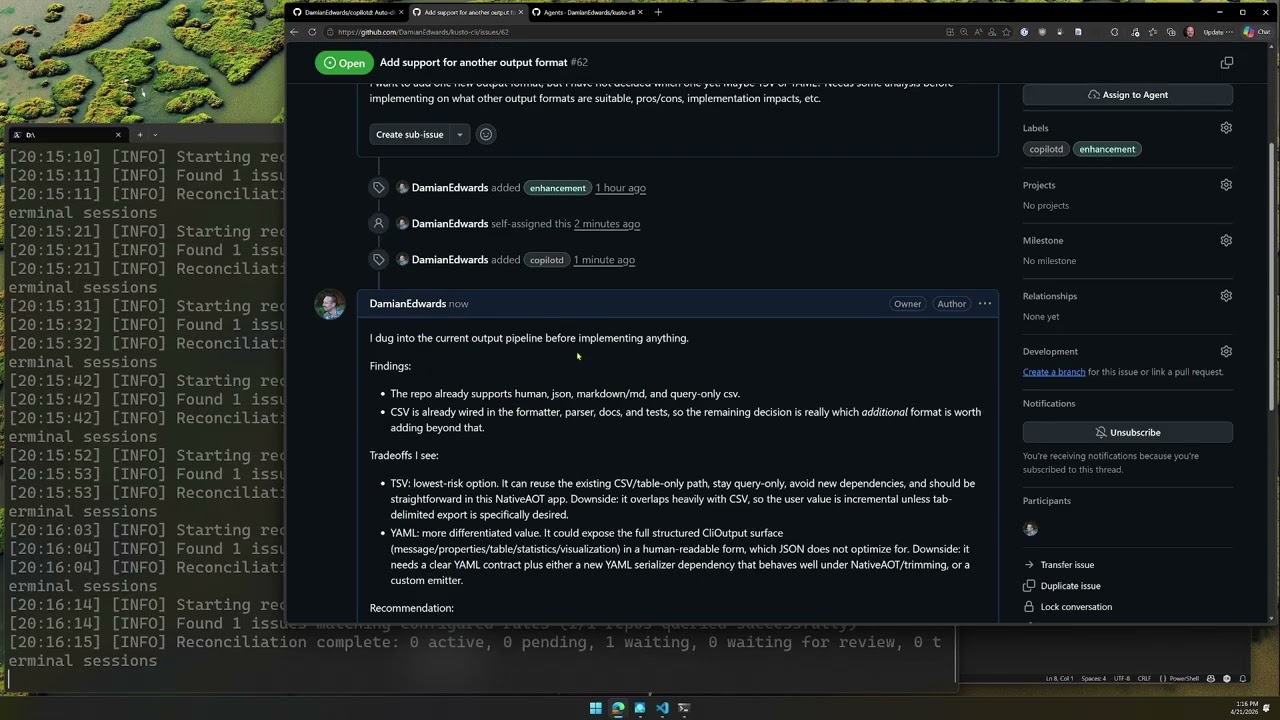
copilotd is an orchestration daemon that watches GitHub repos for issues and pull requests matching configurable dispatch rules and automatically spawns remote-enabled Copilot CLI sessions to work on them.
Instead of waiting for a developer to open a terminal and manually engage Copilot, copilotd continuously monitors your repositories. When an issue or pull request matches your rules, it automatically dispatches a Copilot CLI agent, creates an isolated worktree, asks clarifying questions via comments, writes or reviews code, opens or updates PRs, and responds to PR review feedback. All without human intervention.
copilotd sits between GitHub Issues, pull requests, and the Copilot CLI running on your dev machine, acting as an always-on orchestration layer.
Available for Windows, macOS, and Linux.
- Issue watching — polls GitHub repos for issues matching configurable rules (assigned user, labels, milestone, issue type)
- PR watching — opt-in pull request rules can dispatch review, validation, or follow-up sessions using PR metadata (labels, assignee, base/head branch, draft state, review decision)
- Automatic dispatch — launches
copilot --remotesessions with templated prompts derived from issue or PR metadata - Named dispatch rules — flexible, composable rules with per-rule launch options (
--yolo,--allow-all-tools,--allow-all-urls,--model, extra prompts, repo assignments) - Session lifecycle — full state machine with retry, backoff, orphan recovery, investigation feedback loops, PR review monitoring, and explicit completion signaling
- PR review feedback — sessions that create PRs can wait for review comments and automatically re-dispatch to address feedback
- Self-healing state — reconciles persisted state, live process status, and GitHub issue matches on every poll cycle and at startup
- Crash-resilient — dispatched
copilotsessions run as independent processes that survive daemon restarts; state is persisted atomically - Interactive connection — connect to any running remote-enabled session with
copilotd session connectwithout stopping the orchestrated session (requires Copilot CLI 1.0.32+) - Remote control session — hosts a
copilot --remotesession for remotely managing copilotd via the GitHub remote sessions UI (web & mobile) - Cross-platform — works on Windows, macOS, and Linux
- GitHub CLI (
gh) — authenticated viagh auth login - Copilot CLI (
copilot) — authenticated viacopilot login
In a PowerShell terminal:
irm https://copilotd.damianedwards.dev/install.ps1 | iexIn a terminal:
curl -sSL https://copilotd.damianedwards.dev/install.sh | bashor
wget -qO- https://copilotd.damianedwards.dev/install.sh | bashRun copilotd init to configure watched repos then run copilotd run to start the daemon.
The init command is an interactive wizard that walks you through:
- Dependency & auth checks — verifies
ghandcopilotCLIs are installed (showing versions) and authenticated - Repo home — where your repository clones live on disk
- Global settings — max concurrent sessions, default model
- Dispatch sources — choose whether to dispatch from issues, pull requests, or both
- Default issue and/or PR rules — author filtering, required labels, tool permissions (yolo/allow-all-tools/allow-all-urls), model override, plus PR-specific branch settings when PR dispatch is enabled
- Repository selection — pick which repos to watch (shows clone status)
- Folder trust checks — for cloned repos, prompts to add the repo path and daemon worktree root to Copilot's trusted folders when needed for unattended dispatch
After setup, a configuration summary and concrete next-step commands are displayed.
Run copilotd --help for other commands.
# Clone and build
git clone https://github.com/DamianEdwards/copilotd.git
cd copilotd
./build.sh               # macOS/Linux
.\build.ps1              # Windows PowerShell / pwsh
build.cmd                # Windows cmd.exe

# First-run setup (checks dependencies, prompts for config)
./copilotd.sh init          # macOS/Linux
.\copilotd.ps1 init         # Windows PowerShell / pwsh
copilotd.cmd init           # Windows cmd.exe

# Start the daemon
./copilotd.sh run           # macOS/Linux
.\copilotd.ps1 run          # Windows PowerShell / pwsh
copilotd.cmd run            # Windows cmd.exe
Convenience scripts copilotd.sh, copilotd.ps1, and copilotd.cmd run the project from source without rebuilding on every invocation. They default COPILOTD_HOME to a repo-local .copilotd-home folder so source runs stay isolated from a global install, while still honoring an explicitly configured COPILOTD_HOME. For the long-lived run command they execute the existing generated apphost directly so Ctrl+C reaches copilotd cleanly. Build it first with build.sh, build.ps1, or build.cmd. On Windows, use copilotd.ps1 from PowerShell and copilotd.cmd from cmd.exe; other commands continue to use dotnet run --no-build, passing all arguments through.
Installed copilotd binaries can self-update in the background: the daemon checks for newer releases, downloads and verifies them, then stages the new binary to be installed after the running daemon exits naturally. If an installed binary update is interrupted and you restore copilotd.exe by rerunning the normal install script, the next copilotd launch will reconcile any leftover .old, .staged, and update-state.json artifacts: it will resume a newer staged update, or discard stale staged state rather than downgrading the restored binary. When running from source or a local repo publish, copilotd suppresses automatic background self-updates by default so local scenario verification is not interrupted by GitHub releases. You can still disable them explicitly with COPILOTD_DISABLE_SELF_UPDATES=1 or --disable-self-updates, and copilotd update --check remains available to inspect update availability.
| Command | Description |
|---|---|
copilotd init |
Interactive first-run wizard (dependency checks with versions, auth, global config, rule setup, repo selection) |
copilotd run |
Start the polling daemon and print the current daemon log folder |
copilotd start |
Start the daemon in the background and print the current daemon log folder |
copilotd stop |
Stop the daemon and print the current daemon log folder |
copilotd status |
Show daemon health, machine identity, watched repos, the active daemon log folder, and the session list |
copilotd logs |
Print the copilotd logs directory (copilotd log also works) |
copilotd logs clear [--days <n>] |
Clear log files, optionally only those older than the supplied age |
copilotd session |
List dispatched sessions with their remote session URLs (copilotd sessions also works; default alias for session list) |
copilotd session list |
List dispatched sessions with optional filtering and remote session URLs |
copilotd session info <issue> |
Show detailed diagnostic information for a tracked session, including failure details when available |
copilotd session connect <issue> |
Connect to a running remote session interactively |
copilotd session comment <issue> |
Post a comment on the issue and wait for feedback (callable from within a copilot session) |
copilotd session complete <issue> |
Mark a session as completed (callable from within a copilot session) |
copilotd session pr <pr-number> <issue> |
Associate a PR with a session and wait for review feedback (callable from within a copilot session) |
copilotd session reset <issue> |
Reset a completed/failed session to pending for re-dispatch |
copilotd config |
Display current configuration |
copilotd config --set key=value |
Set a config value (repo_home, default_model, custom_prompt, session_name_format, current_user, enable_control_session, max_instances, session_shutdown_delay_seconds) |
copilotd rules list |
List all dispatch rules (copilotd rule list also works) |
copilotd rules add <name> |
Add a new issue dispatch rule (copilotd rule create <name> and copilotd rule new <name> also work); use --kind pr for pull request rules |
copilotd rules update <name> |
Update an existing rule (copilotd rule edit <name> also works) |
copilotd rules delete <name> |
Delete a rule (the Default rule cannot be deleted) |
File logs live under ~/.copilotd/logs by default (or COPILOTD_HOME/logs). Each daemon run instance gets its own daemon_<uuid> subfolder so its log files stay grouped together, while non-daemon commands log directly in the root logs directory with the same rolling-file behavior.
--interval <seconds>   Polling interval (default: 60)
--log-level <level>    Enable console logging (debug, info, warning, error)
--filter <status>   Filter by status (pending, dispatching, running, waitingforfeedback, waitingforreview, completed, failed, orphaned, joined [legacy])
--all               Include ended (completed/failed) sessions
Issue rules support conditions (--assignee, --label, --milestone, --type) and launch options (--yolo, --allow-all-tools, --allow-all-urls, --model, --prompt, --custom-prompt, --custom-prompt-mode, --repo). Pull request rules are opt-in with --kind pr and support PR-specific conditions (--base, --head, --head-repo, --draft, --review-decision) plus --branch-strategy. All conditions are logical AND. copilotd init asks whether to create a default issue rule, a default PR rule, or both.
Aliases: rule for rules, create/new for add, and edit for update.
# Add a rule
copilotd rules add "Dashboard issues" --label area-dashboard --yolo --repo "org/repo"

# Add a rule that uses a specific model
copilotd rules add "Complex tasks" --label complexity-high --model "claude-sonnet-4"

# Add a rule with a per-rule custom prompt that overrides the global custom prompt
copilotd rules add "Backend" --label area-backend --custom-prompt "Focus on API design" --custom-prompt-mode override

# Add a PR review/validation rule
copilotd rules add "PR validation" --kind pr --label needs-validation --base main --branch-strategy read-only --repo "org/repo"

# Update labels on a rule
copilotd rules update Default --delete-label copilotd --add-label dispatch

# Add/remove repos from a rule
copilotd rules update Default --add-repo "org/repo" --delete-repo "org/old-repo"

# Only dispatch issues from specific authors
copilotd rules add "Trusted" --add-author TimMan --add-author Rachael --repo "org/repo"

# Only dispatch issues from authors with write access to the repo
copilotd rules add "WriteOnly" --write-only-authors --repo "org/repo"

# Update a rule to allow any author (clears author restrictions)
copilotd rules update "Trusted" --any-author

# Add/remove allowed authors on an existing rule
copilotd rules update "Trusted" --add-author NewUser --delete-author OldUserThe built-in prompt and session_name_format support token replacement:
| Token | Value |
|---|---|
$(issue.repo) |
Repository in org/repo format |
$(issue.id) |
Issue number |
$(issue.type) |
Issue type (e.g., bug) |
$(issue.milestone) |
Milestone title |
$(subject.id) |
Root issue or pull request number |
$(subject.kind) |
Root subject kind (issue or pullrequest) |
$(subject.title) |
Root subject title when available |
$(pr.id) |
Pull request number (the root PR for PR-dispatched sessions, or the review PR for issue-owned PR review prompts) |
$(pr.title) |
Pull request title for PR-dispatched sessions |
$(pr.base) |
Pull request base branch for PR-dispatched sessions |
$(pr.head) |
Pull request head branch for PR-dispatched sessions |
$(pr.head_repo) |
Pull request head repository for PR-dispatched sessions |
$(pr.head_sha) |
Pull request head SHA for PR-dispatched sessions |
$(org) |
Repository owner / organization |
$(repo) |
Repository name only |
$(issue_id) |
Issue number |
$(session_id) |
Copilot session ID used with --resume |
$(machine_id) / $(machine_identifier) |
Assigned copilotd machine identifier |
$(machine_name) |
Local machine name |
$(gh_user) |
Authenticated GitHub username from copilotd config |
Custom prompt text (configured via custom_prompt or ~/.copilotd/prompt.md by default) is appended after
the built-in prompt with a trailer. Rules can also specify a custom_prompt that either appends
to or overrides the global custom prompt (controlled by custom_prompt_mode). Tokens are replaced
in both the built-in and custom prompt text. Per-rule extra prompts are appended last. By default,
session_name_format is (copilotd) $(org)/$(repo)#$(issue_id). Session naming is skipped when the
installed Copilot CLI is older than 1.0.35, or if name generation fails. New sessions start with
copilot --name, later re-dispatches resume by that exact name via copilot --resume=<name>, and
older persisted sessions that already have a resume ID continue to resume by ID.
Each dispatched copilot session follows the same state machine whether the root subject is an issue or a pull request. Issue-root sessions can additionally enter WaitingForReview after they create a PR; PR-root sessions can be re-dispatched by trusted PR comments/reviews or by a new PR head SHA.
stateDiagram-v2
    [*] --> Pending : Issue/PR matches rule

    Pending --> Dispatching : Launch
    Dispatching --> Running : Process alive
    Dispatching --> Failed : Launch failed

    Running --> Orphaned : Process died
    Running --> Completed : Subject closed/unmatched (auto)
    Running --> WaitingForFeedback : session comment
    Running --> WaitingForReview : session pr

    Orphaned --> Pending : Retry (≤3 times)
    Orphaned --> Failed : Max retries exceeded

    WaitingForFeedback --> Pending : New comment detected
    WaitingForFeedback --> Completed : Issue unmatched

    WaitingForReview --> Pending : Review feedback detected
    WaitingForReview --> Completed : PR merged/closed

    Completed --> Pending : Re-matched (not explicitly completed)
    Failed --> Pending : Re-matched (retries remaining)

    Running --> Completed : session complete (explicit)
| From | To | Trigger |
|---|---|---|
| (new) | Pending | Issue or pull request matches a dispatch rule |
| Pending | Dispatching | Daemon launches copilot process (respects max_instances limit and retry backoff) |
| Dispatching | Running | Process successfully started, PID tracked |
| Dispatching | Failed | Process launch failed (increments retry count) |
| Running | Completed | Root issue or PR no longer matches rules (closed, relabeled, merged, etc.) — process gracefully terminated |
| Running | WaitingForFeedback | Copilot calls copilotd session comment — process exits, session waits for new issue comments |
| Running | WaitingForReview | Copilot calls copilotd session pr <pr-number> — process exits, session waits for PR review feedback |
| Running | Orphaned | Process died unexpectedly (PID gone or reused) |
| Orphaned | Pending | Retry eligible (retry count < 3) — exponential backoff: 2^n minutes, capped at 30m |
| Orphaned | Failed | Max retries (3) exceeded |
| Failed | Pending | Issue still matches and retry count < 3 |
| WaitingForFeedback | Pending | New comment detected from a trusted author (not posted by copilotd) — re-dispatched with same session ID for --resume context continuity, and the lifecycle reaction moves to that triggering issue comment. Author trust is controlled by trust_level rule setting |
| WaitingForFeedback | Completed | Issue no longer matches rules while waiting |
| WaitingForReview | Pending | New review-thread reply, PR comment, or changes-requested/commented review detected on the PR, or a new trusted issue comment is added while review is pending — re-dispatched with the appropriate resume prompt. Issue-comment redispatches move the lifecycle reaction to the triggering issue comment |
| WaitingForReview | Completed | PR is merged or closed, or issue no longer matches rules |
| Completed | Pending | Issue re-matches rules (e.g., reopened) — only if not explicitly completed by copilot |
| Any non-terminal | Completed | Copilot calls copilotd session complete — sets CompletedBySession flag, prevents re-dispatch |
Sessions can reach the Completed state in two ways:
-
Automatic — the issue no longer matches dispatch rules (closed, label removed, etc.). The process is gracefully terminated. If the issue later re-matches, the session is re-dispatched.
-
Explicit — the copilot session calls
copilotd session complete <issue>when it finishes its work. This sets theCompletedBySessionflag, which prevents automatic re-dispatch while the issue still matches rules. If the issue later stops matching (e.g., label removed, issue closed) and then re-matches (e.g., label re-added, issue reopened), the flag is automatically cleared and the session is re-dispatched. -
Manual reset — use
copilotd session reset <issue>to force a completed or failed session back to pending with a fresh session ID, regardless of theCompletedBySessionflag.
When a copilot session encounters an issue that needs more information before work can begin, it can post a comment and pause:
- The session calls
copilotd session comment <issue> --message "question or findings" - The comment is posted to the GitHub issue (with a hidden
<!-- posted by copilotd -->marker) - The session transitions to WaitingForFeedback — the copilot process exits, no instance slot is consumed
- On each poll cycle, the reconciler checks for new comments on the issue (ignoring copilotd-posted comments)
- When a new trusted comment is detected, the session is re-dispatched with
--resumeto preserve the full conversation context, and the lifecycle reaction moves from the issue body to that specific comment - The model can then decide to start coding or ask further questions (multiple rounds supported)
The default prompt instructs copilot sessions to use this flow when they need clarification.
When a copilot session creates a pull request, it can enter a review monitoring loop:
- The session calls
copilotd session pr <pr-number> <issue>after pushing a PR - The session transitions to WaitingForReview — the copilot process exits, no instance slot is consumed
- On each poll cycle, the reconciler checks for new PR review comments, formal reviews (
CHANGES_REQUESTEDorCOMMENTED), and falls back to checking issue comments - When PR review feedback is detected, the session is re-dispatched with a PR-specific prompt that instructs copilot to address the feedback; when a trusted issue comment triggers the re-dispatch instead, the normal issue-feedback resume prompt is used
- The existing worktree is refreshed (
git fetch+git pull --ff-only) rather than recreated, preserving any local state - Copilot addresses the feedback, pushes changes to the existing PR, and calls
session pragain to continue the loop - If the PR is merged or closed, the session is automatically completed
The default prompt instructs copilot sessions to use session pr after creating a pull request. Multiple review rounds are supported — the session resumes with --resume for full conversation context continuity. For the issue-comment paths above, the lifecycle reaction follows the latest trusted issue comment; full PR-feedback anchoring remains future work.
Pull request dispatch rules live in the separate pull_request_rules config collection and are opt-in. They can be created from copilotd init when you choose PR dispatch, or later with copilotd rules add <name> --kind pr. They use the same org/repo#number session key format as issue sessions, with a stored subject kind to distinguish PR-root sessions from issue-root sessions.
PR rules support three worktree strategies:
| Strategy | Behavior |
|---|---|
source-branch |
Default. For same-repo PRs, checks out a local copilotd/pr-<N>-... branch from the PR head and pushes changes back to the PR source branch. Fork PRs fail closed instead of pushing to an unintended remote. |
child-branch |
Creates a new copilotd/pr-<N>-... branch from the PR head SHA and pushes that branch; the agent should explain how to use it from the PR. |
read-only |
Creates a detached worktree at the PR head for review/validation/comment-only workflows and skips pushing. |
When re-dispatched for PR review, copilot is instructed to interact with the PR directly:
- General comments — posted to the PR via
gh pr comment - Thread replies — reply to specific review comment threads via the GitHub GraphQL API
- Suggested changes — applied directly to the relevant files when a review comment includes a
suggestionblock
Issue and PR comments on public repositories can be posted by anyone, including users with no repository permissions. To prevent prompt injection attacks from untrusted commenters, copilotd enforces trust boundaries on comment-triggered re-dispatches:
trust_level: collaborators(default) — only comments from users with write/maintain/admin access to the repository trigger re-dispatch. Comments from other users are logged and ignored.trust_level: all— any non-bot comment triggers re-dispatch (less secure, opt-in).trust_level: issueAuthor— only comments from the original issue author trigger re-dispatch. Useful for community-filed issues where the reporter may need to provide follow-up clarification.trust_level: assignees— only comments from current issue assignees trigger re-dispatch. Assignees are checked live (not cached) so changes to assignees take effect on the next poll.trust_level: issueAuthorAndCollaborators— comments from the original issue author or any user with write/maintain/admin access trigger re-dispatch. Combines community author feedback with maintainer oversight.trust_level: matchDispatchRule— the commenter must pass the same author filtering conditions used by the dispatch rule (e.g., if the rule usesauthor_mode: writeAccess, only write-access users can trigger re-dispatch; if the rule usesauthor_mode: allowedwith a specific author list, only those authors can trigger re-dispatch).- Re-dispatch rate limit — sessions are limited to
max_redispatches(default: 10) comment-triggered re-dispatches. Usecopilotd session resetto re-enable after hitting the limit. - Security prompt — when re-dispatching in response to comments, a security context is automatically appended to the prompt warning copilot to treat comment content as potentially untrusted input.
Collaborator permission checks are cached for 15 minutes per user/repo pair to minimize API calls.
Use copilotd session connect <issue> to connect to any tracked session whose remote task URL is available:
- copilotd resolves the session's remote GitHub task URL and extracts the taskId required by
copilot --connect - copilotd verifies the installed Copilot CLI is version
1.0.32or newer - An interactive
copilot --connect=<task_id>session is launched in your terminal - The orchestrated session keeps running in the background — no lifecycle state change or re-queue occurs
If the remote session URL has not been discovered yet, session connect fails with guidance to retry after the URL appears in copilotd session list.
When the daemon starts, it launches a special copilot --remote session that lets you remotely
monitor and manage copilotd from the GitHub remote sessions UI
on web and mobile. Through this session you can check daemon status, list sessions, reset stuck
sessions, and more — all via natural language.
How it works:
- The control session is launched automatically on
copilotd runstartup (whenenable_control_sessionistrue) - It runs in the context of a clone of the copilotd repo at
<repo_home>/DamianEdwards/copilotd(cloned automatically if not already present) - Tool access is restricted to
copilotd,gh, andgitcommands only — no general shell access - If the control session process dies, the daemon automatically relaunches it on the next poll cycle
- It does not count against the
max_instanceslimit - It is tracked separately from dispatch sessions and shown in the
copilotd statusoutput, including its GitHub remote session URL - Its remote session name includes the copilotd machine identifier so multiple daemon instances are easy to distinguish remotely
Available commands in the control session:
| Command | Description |
|---|---|
copilotd status |
Show daemon health, watched repos, the control session URL, and session summary |
copilotd session list [--all] |
List active sessions and remote session URLs (use --all to include completed/failed) |
copilotd session info <issue> |
Show detailed information for one tracked session |
copilotd session reset <issue> |
Reset a session for re-dispatch |
copilotd session complete <issue> |
Mark a session as completed |
copilotd rules list |
Show configured dispatch rules |
copilotd config |
Show current configuration |
To disable the control session, run copilotd config --set enable_control_session=false, or set enable_control_session to false in ~/.copilotd/config.json (or COPILOTD_HOME\config.json when COPILOTD_HOME is set).
- Completed and Failed are terminal states
- WaitingForFeedback and WaitingForReview are not terminal — the session is paused, not finished
- Terminal sessions are automatically pruned from state after 7 days
- All running sessions are gracefully terminated when the daemon shuts down
Stored in ~/.copilotd/ by default. Set COPILOTD_HOME to point copilotd at a different state/config directory:
When running from a source checkout via copilotd.sh, copilotd.ps1, or copilotd.cmd, the helper script defaults COPILOTD_HOME to a repo-local .copilotd-home directory unless you already set COPILOTD_HOME yourself.
config.json— user-managed settings (repo home, custom prompt, rules)state.json— runtime session tracking (auto-managed, self-healing)update-state.json— self-update staging and install coordinationprompt.md— optional global custom prompt text appended to the built-in promptlogs\— rolling file logs for copilotd commands, with daemon instances isolated underlogs\daemon_<uuid>\.lock— single-instance guard (present while daemon is running)<local app data>\copilotd\machine.id— stable machine identifier stored outsideCOPILOTD_HOMEso it survives state resets
| Key | Default | Description |
|---|---|---|
repo_home |
— | Root directory where repos are cloned (<org>/<repo> sub-folders expected) |
default_model |
(none) | Default model passed to copilot via --model for all sessions (rule-specific model overrides) |
prompt |
(empty) | Custom prompt text appended to the built-in prompt |
session_name_format |
(copilotd) $(org)/$(repo)#$(issue_id) |
Session name template for new sessions when the installed Copilot CLI supports naming (1.0.35+); later re-dispatches resume by that name, while older ID-based sessions keep resuming by ID |
max_instances |
3 |
Maximum concurrent copilot processes; excess sessions queue as Pending |
session_shutdown_delay_seconds |
15 |
Delay before shutting down an orchestrated session after session comment, session pr, or session complete |
max_redispatches |
10 |
Maximum re-dispatches per session via comment/review feedback loops before requiring manual reset |
enable_control_session |
true |
Launch a control remote session when the daemon starts for remote management via the GitHub remote sessions UI |
| Setting | Default | Description |
|---|---|---|
user |
(any) | Assigned user to match |
labels |
(none) | Labels that must all be present (logical AND) |
milestone |
(any) | Milestone the issue must belong to |
type |
(any) | Issue type filter (e.g., bug, feature) |
repos |
(none) | Repositories this rule applies to (org/repo format) |
author_mode |
any |
Issue author filtering: any (no filter), allowed (only listed authors), writeAccess (authors with write+ repo access) |
authors |
(none) | Allowed issue authors when author_mode is allowed |
yolo |
false |
Pass --yolo to copilot (implies allow_all_tools and allow_all_urls) |
allow_all_tools |
true |
Pass --allow-all-tools to copilot |
allow_all_urls |
false |
Pass --allow-all-urls to copilot |
model |
(none) | Model to use for sessions matching this rule (overrides global default_model) |
extra_prompt |
(none) | Additional prompt text appended when this rule triggers |
custom_prompt |
(none) | Per-rule custom prompt text (appended to or overrides global custom prompt) |
custom_prompt_mode |
append |
How rule custom prompt interacts with global: append or override |
trust_level |
collaborators |
Which comment authors can trigger session re-dispatch: collaborators (write access required), all, issueAuthor, assignees, issueAuthorAndCollaborators, or matchDispatchRule |
Pull request rules support the shared settings above except issue-only milestone and type, and add these PR-specific settings:
| Setting | Default | Description |
|---|---|---|
base_branch |
(any) | PR base branch to match |
head_branch |
(any) | PR head branch to match |
head_repo |
(any) | PR head repository in org/repo format |
draft |
(any) | Match only draft (true) or ready (false) PRs |
review_decision |
(any) | PR review decision to match, such as CHANGES_REQUESTED, REVIEW_REQUIRED, or APPROVED |
branch_strategy |
sourceBranch |
PR worktree/push behavior: sourceBranch, childBranch, or readOnly |
File logs are written under ~/.copilotd/logs/ by default (or COPILOTD_HOME\logs\ when COPILOTD_HOME is set):
- Each daemon
runinstance writes to its ownlogs\daemon_<uuid>\folder - Non-daemon commands write directly under
logs\ - Log files roll daily and when they reach 10 MB
copilotd run,copilotd start,copilotd stop, andcopilotd statusprint the active daemon log folder when one is availablecopilotd logsprints the logs root directorycopilotd logs clear --days <n>removes log files older than the supplied agecopilotd logs clearprompts for confirmation before clearing all log files except ones currently in use
- System.CommandLine for CLI parsing
- Spectre.Console for interactive prompts and formatted output
- Native AOT compatible (source-generated JSON serialization)
- Dispatched
copilotprocesses are fully independent (not child processes) - Each session gets its own git worktree for isolation — multiple sessions on the same repo work in parallel without conflicts
- State reconciliation uses three truth sources: persisted state → live process status → current GitHub issue matches
- Graceful process shutdown via platform-specific signals (Ctrl+Break/Ctrl+C on Windows via helper process, SIGINT/SIGKILL on Unix)
Each dispatched session works in its own git worktree, ensuring:
- No conflicts between concurrent sessions on the same repo
- Clean starting state from the right source: issue sessions start from the latest default branch HEAD; PR sessions start from the PR head
- Isolated branches — issue sessions create
copilotd/issue-<N>; PR sessions use their configured branch strategy
Directory layout:
<repo_home>/org/repo/                    ← main checkout (fetch-only base)
<repo_home>/org/repo_sessions/issue-1/   ← worktree for issue #1
<repo_home>/org/repo_sessions/issue-5/   ← worktree for issue #5
<repo_home>/org/repo_sessions/pr-7/      ← worktree for pull request #7
Worktrees are created before dispatch (git fetch + git worktree add) and cleaned up
when sessions complete, are reset, or are pruned.
Custom prompt text can be provided at two levels:
- Global: via
~/.copilotd/prompt.md(orCOPILOTD_HOME\prompt.md) or thepromptconfig property - Per-rule: via the
custom_promptrule setting (set with--custom-prompt)
Global custom text is appended to the built-in copilotd prompt (not a replacement) with a
trailer: "The user has supplied the following additional context:". Per-rule custom prompts can
either append to the global custom prompt (--custom-prompt-mode append, the default) or
override it entirely (--custom-prompt-mode override). Token replacement is applied to the
full combined prompt at dispatch time. Per-rule extra prompts (--prompt) are appended last.
MIT