
The most awesome SwiftUI menu with spring animation




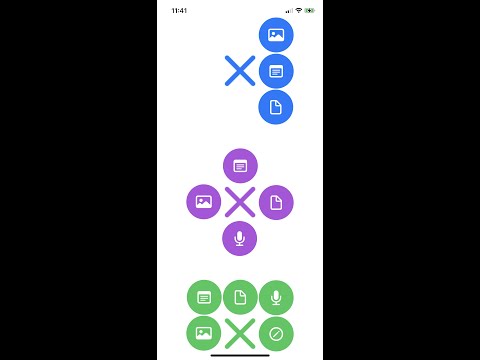

// 1- Define items
let items = TwoSpringItems(
        item1: SpringItem.Builder()
                .icon(Image(systemName: "photo"))
                .backgroundColor(.black)
                .foregroundColor(.white)
                .build(),
        item2: SpringItem.Builder()
                .icon(Image(systemName: "note.text"))
                .backgroundColor(.black)
                .foregroundColor(.white)
                .build()
)

// 2- Define settings
let settings = SpringMenuSettings.Builder()
        .icon(.plus,
                backgroundColor: .init(collapsed: .black, expanded: .white),
                foreGroundColor: .init(collapsed: .white, expanded: .black))
        .items(items: items, position: .top)
        .backgroundColor(.white)
        .build()

// 3- The Menu :)
SpringMenu(isExpanded: $isExpanded, settings: settings)
.frame(height: 300)SpringMenu supports from 2 to 8 items. Some numbers require position or gravity to display correctly. In the following lines, we'll explain how to use the items.
TwoSpringItems(
        item1: SpringItem.Builder()
                .icon(Image(systemName: "photo"))
                .backgroundColor(.black)
                .foregroundColor(.white)
                .build(),
        item2: SpringItem.Builder()
                .icon(Image(systemName: "note.text"))
                .backgroundColor(.black)
                .foregroundColor(.white)
                .build()
)enum Position {
case top
case bottom
case vertical
case horizontal
}


ThreeSpringItems(
        item1: SpringItem.Builder()
                .icon(Image(systemName: "photo"))
                .backgroundColor(.blue)
                .foregroundColor(.white)
                .build(),
        item2: SpringItem.Builder()
                .icon(Image(systemName: "note.text"))
                .backgroundColor(.blue)
                .foregroundColor(.white)
                .build(),
        item3: SpringItem.Builder()
                .icon(Image(systemName: "doc"))
                .backgroundColor(.blue)
                .foregroundColor(.white)
                .build()
)enum Position {
case top
case bottom
case leading
case trailing
}


FourSpringItems(
        item1: SpringItem.Builder()
                .icon(Image(systemName: "photo"))
                .backgroundColor(.orange)
                .foregroundColor(.white)
                .build(),
        item2: SpringItem.Builder()
                .icon(Image(systemName: "note.text"))
                .backgroundColor(.orange)
                .foregroundColor(.white)
                .build(),
        item3: SpringItem.Builder()
                .icon(Image(systemName: "doc"))
                .backgroundColor(.orange)
                .foregroundColor(.white)
                .build(),
        item4: SpringItem.Builder()
                .icon(Image(systemName: "mic.fill"))
                .backgroundColor(.orange)
                .foregroundColor(.white)
                .build()
)
FiveSpringItems(
        item1: SpringItem.Builder()
                .icon(Image(systemName: "photo"))
                .backgroundColor(.green)
                .foregroundColor(.white)
                .build(),
        item2: SpringItem.Builder()
                .icon(Image(systemName: "note.text"))
                .backgroundColor(.green)
                .foregroundColor(.white)
                .build(),
        item3: SpringItem.Builder()
                .icon(Image(systemName: "doc"))
                .backgroundColor(.green)
                .foregroundColor(.white)
                .build(),
        item4: SpringItem.Builder()
                .icon(Image(systemName: "mic.fill"))
                .backgroundColor(.green)
                .foregroundColor(.white)
                .build(),
        item5: SpringItem.Builder()
                .icon(Image(systemName: "pencil.circle"))
                .backgroundColor(.green)
                .foregroundColor(.white)
                .build()
)enum Gravity {
case top
case bottom
case leading
case trailing
}


SixSpringItems(
        item1: SpringItem.Builder()
                .icon(Image(systemName: "photo"))
                .backgroundColor(.pink)
                .foregroundColor(.white)
                .build(),
        item2: SpringItem.Builder()
                .icon(Image(systemName: "note.text"))
                .backgroundColor(.pink)
                .foregroundColor(.white)
                .build(),
        item3: SpringItem.Builder()
                .icon(Image(systemName: "doc"))
                .backgroundColor(.pink)
                .foregroundColor(.white)
                .build(),
        item4: SpringItem.Builder()
                .icon(Image(systemName: "mic.fill"))
                .backgroundColor(.pink)
                .foregroundColor(.white)
                .build(),
        item5: SpringItem.Builder()
                .icon(Image(systemName: "pencil.circle"))
                .backgroundColor(.pink)
                .foregroundColor(.white)
                .build(),
        item6: SpringItem.Builder()
                .icon(Image(systemName: "folder"))
                .backgroundColor(.pink)
                .foregroundColor(.white)
                .build()
)enum Position {
case vertical
case horizontal
}

SevenSpringItems(
        item1: SpringItem.Builder()
                .icon(Image(systemName: "photo"))
                .backgroundColor(.purple)
                .foregroundColor(.white)
                .build(),
        item2: SpringItem.Builder()
                .icon(Image(systemName: "note.text"))
                .backgroundColor(.purple)
                .foregroundColor(.white)
                .build(),
        item3: SpringItem.Builder()
                .icon(Image(systemName: "doc"))
                .backgroundColor(.purple)
                .foregroundColor(.white)
                .build(),
        item4: SpringItem.Builder()
                .icon(Image(systemName: "mic.fill"))
                .backgroundColor(.purple)
                .foregroundColor(.white)
                .build(),
        item5: SpringItem.Builder()
                .icon(Image(systemName: "pencil.circle"))
                .backgroundColor(.purple)
                .foregroundColor(.white)
                .build(),
        item6: SpringItem.Builder()
                .icon(Image(systemName: "folder"))
                .backgroundColor(.purple)
                .foregroundColor(.white)
                .build(),
        item7: SpringItem.Builder()
                .icon(Image(systemName: "mic.fill"))
                .backgroundColor(.purple)
                .foregroundColor(.white)
                .build()
)enum Gravity {
case top
case bottom
case leading
case trailing
}


EightSpringItems(
        item1: SpringItem.Builder()
                .icon(Image(systemName: "photo"))
                .backgroundColor(.red)
                .foregroundColor(.white)
                .build(),
        item2: SpringItem.Builder()
                .icon(Image(systemName: "note.text"))
                .backgroundColor(.red)
                .foregroundColor(.white)
                .build(),
        item3: SpringItem.Builder()
                .icon(Image(systemName: "doc"))
                .backgroundColor(.red)
                .foregroundColor(.white)
                .build(),
        item4: SpringItem.Builder()
                .icon(Image(systemName: "mic.fill"))
                .backgroundColor(.red)
                .foregroundColor(.white)
                .build(),
        item5: SpringItem.Builder()
                .icon(Image(systemName: "pencil.circle"))
                .backgroundColor(.red)
                .foregroundColor(.white)
                .build(),
        item6: SpringItem.Builder()
                .icon(Image(systemName: "folder"))
                .backgroundColor(.red)
                .foregroundColor(.white)
                .build(),
        item7: SpringItem.Builder()
                .icon(Image(systemName: "square.and.arrow.up"))
                .backgroundColor(.red)
                .foregroundColor(.white)
                .build(),
        item8: SpringItem.Builder()
                .icon(Image(systemName: "arrowshape.turn.up.forward"))
                .backgroundColor(.red)
                .foregroundColor(.white)
                .build()
)
Use the following entry in your Podfile:
pod 'SpringMenu'Then run pod install.
Add the following as a dependency to your Package.swift:
.package(url: "https://github.com/ShabanKamell/SpringMenu.git")and then specify "SpringMenu" as a dependency of the Target in which you wish to use SpringMenu. Here's an
example PackageDescription:
// swift-tools-version:5.1

import PackageDescription

let package = Package(
        name: "MyPackage",
        products: [
            .library(
                    name: "MyPackage",
                    targets: ["MyPackage"]),
        ],
        dependencies: [
            .package(url: "https://github.com/ShabanKamell/SpringMenu")
        ],
        targets: [
            .target(
                    name: "MyPackage",
                    dependencies: ["SpringMenu"])
        ]
)
Accio is a dependency manager based on SwiftPM which can build frameworks for
iOS/macOS/tvOS/watchOS. Therefore the integration steps of SpringMenu are exactly the same as described above. Once
your Package.swift file is configured, run accio update instead of swift package update.
Don't forget to add import SpringMenu to use the framework.
Carthage users can point to this repository and use generated SpringMenu framework.
Make the following entry in your Cartfile:
github "ShabanKamell/SpringMenu"Then run carthage update.
If this is your first time using Carthage in the project, you'll need to go through some additional steps as explained over at Carthage.
All Pull Requests (PRs) are welcome. Help us make this library better.
Look at Changelog for release notes.
click to reveal License
Licensed under the Apache License, Version 2.0 (the "License");
you may not use this file except in compliance with the License.
You may obtain a copy of the License at

   http://www.apache.org/licenses/LICENSE-2.0

Unless required by applicable law or agreed to in writing, software
distributed under the License is distributed on an "AS IS" BASIS,
WITHOUT WARRANTIES OR CONDITIONS OF ANY KIND, either express or implied.
See the License for the specific language governing permissions and
limitations under the License.