
Find and delete old .venv, conda, poetry, pipenv, uv and more — safely, in seconds.
uvx killpy --path ~




- The Problem
- Quickstart
- Interactive TUI
- CLI reference
- killpy vs alternatives
- FAQ
- Pre-commit hooks
- Safety
- Roadmap
- Contributing
If you have been writing Python for more than a year, your disk is probably full of environments you forgot about.
Every project gets a .venv. Every tutorial leaves a Conda environment behind. Every poetry install creates a hidden virtualenv somewhere in ~/.cache. pyenv versions stack up. tox creates a .tox folder in every repo you ever tested. __pycache__ directories scatter everywhere. Build artifacts from old pip install -e . runs stay forever.
None of these get cleaned up automatically.
A typical developer machine accumulates 10–40 GB of Python environments over a few years — most of them abandoned and completely useless.
killpy scans your filesystem, shows you everything with its size, and lets you delete it — either from a slick interactive terminal UI or via a single headless command.
That makes it useful if you are trying to:
- find old Python virtual environments
- delete unused Conda environments
- inspect Poetry environment disk usage
- clean up
pipxpackage environments - remove Python caches and build artifacts
- free disk space consumed by Python development tools
pipx run killpy --path ~
# or
uvx killpy --path ~killpy supports 11 environment types across every major Python tool:
| Type | What is detected | Typical location |
|---|---|---|
venv |
.venv dirs and any folder containing pyvenv.cfg |
project root |
poetry |
Poetry virtual environments | ~/.cache/pypoetry/virtualenvs |
conda |
Conda environments (conda env list) |
~/anaconda3/envs, ~/miniconda3/envs |
pipx |
Installed pipx packages |
~/.local/share/pipx/venvs |
pyenv |
pyenv-managed Python versions | ~/.pyenv/versions |
pipenv |
Pipenv virtualenvs | ~/.local/share/virtualenvs |
hatch |
Hatch environments | ~/.local/share/hatch/env |
uv |
uv virtual environments | project root .uv/ |
tox |
tox environments | .tox/ inside repo |
cache |
__pycache__, .mypy_cache, .pytest_cache, .ruff_cache, global pip/uv caches |
everywhere |
artifacts |
dist/, build/, .egg-info, .dist-info |
project root |
Instant run — no install needed:
pipx run killpy
# or
uvx killpy
Install permanently:
pip install killpy
# or
pipx install killpy
# or
uv tool install killpy
Scan current directory:
killpyScan your entire home folder:
killpy --path ~Exclude paths matching a pattern:
killpy --path ~ --exclude "backups,archive,work"Delete everything non-interactively (CI / scripts):
killpy --path ~/projects --delete-all --yesMore documentation: https://tlaloc-es.github.io/killpy/
killpy
killpy --path /path/to/scan
killpy --path ~ --exclude "company-projects"
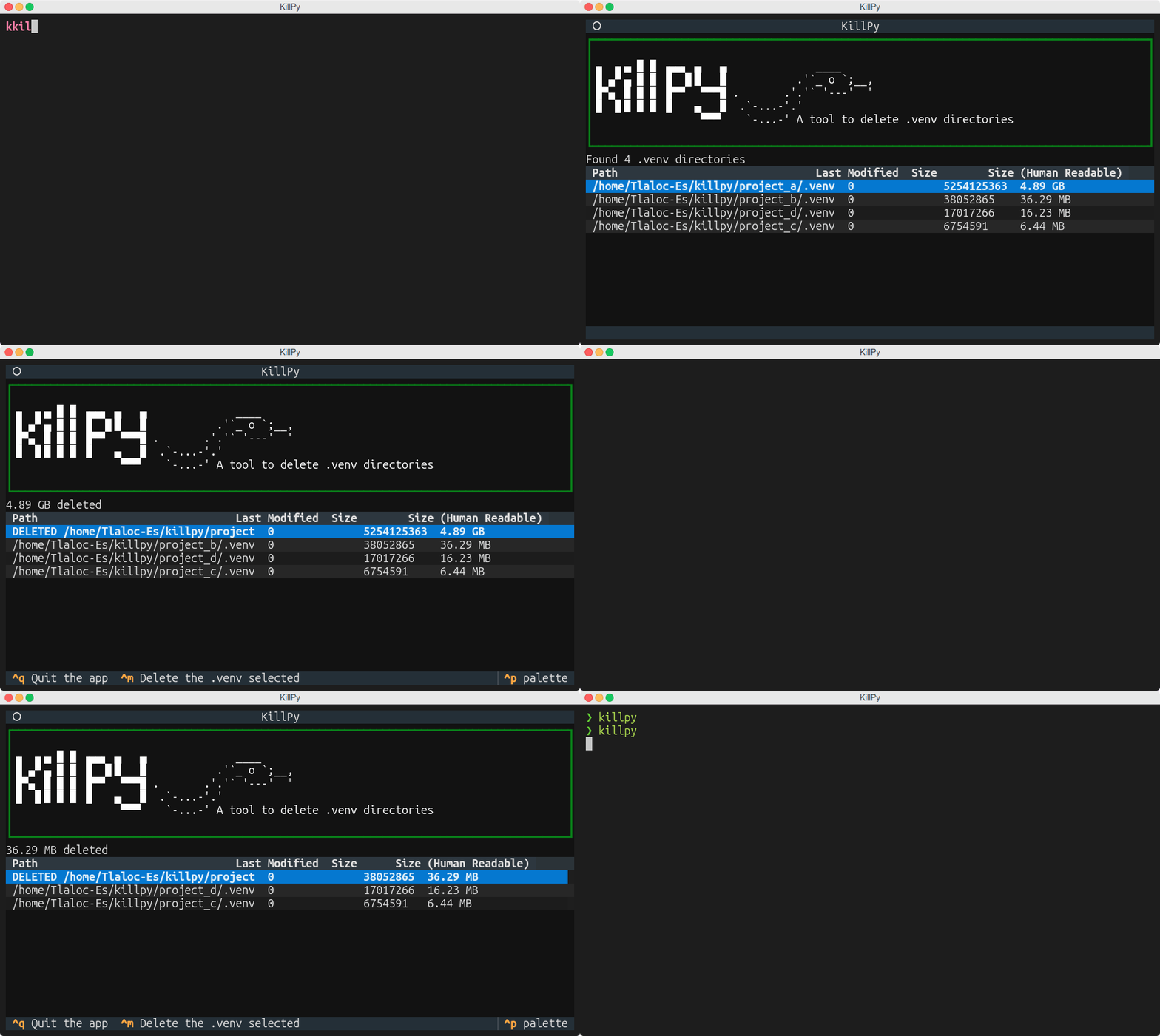
The TUI starts immediately and streams results as each detector finishes — no waiting for a full scan before you can start browsing. Select items, mark them, and confirm; nothing is deleted without explicit action.
Environments flagged with ⚠️ are actively in use by the current Python session — killpy will show them but they should not be deleted.
| Key | Action |
|---|---|
↑ / ↓ or k / j |
Move cursor up / down (vim-style) |
/ |
Open live search/filter bar (regex supported) |
Escape |
Close search bar and clear filter |
T |
Toggle multi-select mode on / off |
Space |
(Multi-select) Toggle current row selected |
A |
(Multi-select) Select all visible / deselect all |
D |
Mark highlighted item for deletion |
Ctrl+D |
Delete all marked items (or all selected in multi-select mode) |
Shift+Delete |
Delete highlighted item immediately, no mark step |
o |
Open the item's parent folder in the OS file manager |
P |
Remove all __pycache__ folders under the scanned path |
U |
Uninstall the selected pipx package |
Ctrl+Q |
Quit |
Press / to open the filter bar at the bottom of the screen. Type any string or a Python regex — the venv table updates live as you type. Press Escape or submit an empty value to clear the filter and return to the full list.
Press T to enter multi-select mode. A status bar shows the current selection count.
Space— toggle the highlighted rowA— select all visible non-deleted rows (press again to deselect all)Ctrl+D— delete every selected row in one operationTagain — exit multi-select mode (selection is cleared)
Multi-select coexists with the existing D / Ctrl+D mark-and-delete flow — both work independently.
Usage: killpy [OPTIONS] COMMAND [ARGS]...

Options:
  --path DIRECTORY      Root directory to scan  [default: cwd]
  -E, --exclude TEXT    Comma-separated path patterns to skip
                        e.g. --exclude "backups,legacy"
  -D, --delete-all      Scan and delete ALL found environments without
                        launching the TUI
  -y, --yes             Skip confirmation prompt (use with --delete-all)
  --help                Show this message and exit.
Examples:
killpy                                        # TUI, scan cwd
killpy --path ~                               # TUI, scan home
killpy --path ~/projects --exclude "legacy"   # TUI, skip paths with "legacy"
killpy --path ~/projects --delete-all         # headless, with confirmation
killpy --path ~/projects --delete-all --yes   # fully automated, no prompt
killpy list # list all detected environments
killpy list --path ~/projects # scan a specific path
killpy list --type venv --type conda # filter by type (repeatable)
killpy list --older-than 90 # not accessed in the last 90 days
killpy list --json # output as a JSON array
killpy list --json-stream # stream as NDJSON — one line per env
killpy list --quiet # suppress progress output (scripts/CI)While scanning, killpy list shows a live progress indicator on stderr so you can see which detector is running. Stdout receives only the final output (table, JSON, or NDJSON), so pipes and redirections are never polluted. Use --quiet / -q to silence the progress indicator entirely.
--json example output:
[
  {
    "path": "projects/my-app/.venv",
    "absolute_path": "/home/user/projects/my-app/.venv",
    "name": "my-app/.venv",
    "type": "venv",
    "last_accessed": "2025-11-02T14:23:01+00:00",
    "size_bytes": 54393984,
    "size_human": "51.88 MB",
    "managed_by": null,
    "is_system_critical": false
  }
]
--json-stream is ideal for piping into jq or processing in scripts before the full scan completes:
killpy list --json-stream --path ~ | jq 'select(.type == "conda") | .size_human'killpy delete # interactive confirmation before delete
killpy delete --yes # skip confirmation
killpy delete --dry-run # preview — nothing is deleted
killpy delete --type venv # only a specific type
killpy delete --type venv --type cache # multiple types
killpy delete --older-than 180 --yes # delete stale envs, no prompt
killpy delete --path ~/projectskillpy stats
killpy stats --path ~/projects
killpy stats --json
killpy stats --history # cumulative scan historyExample output:
         Environment stats
┌──────────────┬───────┬────────────┬──────────┐
│ Type         │ Count │ Total size │ Avg size │
├──────────────┼───────┼────────────┼──────────┤
│ venv         │    12 │    4.2 GB  │  350 MB  │
│ conda        │     3 │    2.1 GB  │  700 MB  │
│ cache        │    45 │  890.0 MB  │   20 MB  │
│ poetry       │     6 │  750.0 MB  │  125 MB  │
└──────────────┴───────┴────────────┴──────────┘

Total: 66 environment(s) — 7.9 GB
killpy clean
killpy clean --path ~/projects
Removes __pycache__ directories recursively under the target path.
Usage: killpy doctor [OPTIONS]

Options:
  --path DIRECTORY  Root directory to scan  [default: cwd]
  --all             Show all environments grouped by category
                    (HIGH / MEDIUM / LOW). Default shows only the top 5.
  --json            Output as JSON.
  --help            Show this message and exit.
doctor analyses every detected virtual environment in two phases:
Phase 1 — Scoring (for sorting only)
A numeric score between 0 and 1 is computed from four weighted signals:
| Signal | Description |
|---|---|
| Size | Larger environments score higher (sigmoid-normalised around 500 MB). |
| Age | Days since last access, linear up to 365 days. |
| Orphan status | No pyproject.toml, requirements.txt, or other project marker found nearby. |
| Git inactivity | The associated git repository has no recent commits. |
The score determines ordering within each category (highest score listed first). It does not determine the category itself.
Phase 2 — Rule-based classification
Category is assigned deterministically by applying the following rules in order:
| Priority | Rule | Category |
|---|---|---|
| 1 | Orphan (is_orphan=True) and age ≥ 180 days |
HIGH |
| 2 | No project files and age ≥ 365 days |
HIGH |
| 3 | Active git repository or age < 120 days |
LOW |
| 4 | age ≥ 120 days |
MEDIUM |
| 5 | Fallback | LOW |
Age and orphan status are the dominant signals. Size does not affect the category.
| Category | Recommended action |
|---|---|
HIGH |
Delete — unused and orphaned |
MEDIUM |
Review — possibly unused |
LOW |
Keep — actively used / Keep |
Examples:
killpy doctor                           # top 5 offenders in current directory
killpy doctor --path ~                  # scan home folder
killpy doctor --all                     # show all environments by category
killpy doctor --json                    # machine-readable output
killpy doctor --path ~/projects --all   # full report for a specific tree
Example output (default):
──────────── Environment Health Report ────────────
Scanned: /home/user/projects
Environments found: 18  |  Total size: 6.2 GB  |  Estimated wasted: 3.8 GB
  HIGH (safe to delete): 5  MEDIUM (review): 7  LOW (keep): 6

               Top 5 Offenders
┌──────────────────────────┬────────┬───────────┬───────┬──────────┐
│ Path                     │   Size │ Age (days)│ Score │ Category │
├──────────────────────────┼────────┼───────────┼───────┼──────────┤
│ ~/old-project/.venv      │ 850 MB │       312 │  0.94 │ HIGH     │
│ ~/tutorial2023/.venv     │ 420 MB │       198 │  0.87 │ HIGH     │
└──────────────────────────┴────────┴───────────┴───────┴──────────┘

Recommendation: Run `killpy delete --older-than 180` to free up to 3.8 GB.
(12 MEDIUM/LOW environment(s) hidden — run with --all to see them)
Use --all to see all three category tables at once:
killpy doctor --allThe JSON output is useful for scripting or auditing:
killpy doctor --json | jq '.suggestions[] | select(.category=="HIGH") | .env_path'| Tool | venv | conda | poetry | pipx | pyenv | caches | artifacts | TUI | search | multi-select |
|---|---|---|---|---|---|---|---|---|---|---|
| killpy | ✅ | ✅ | ✅ | ✅ | ✅ | ✅ | ✅ | ✅ | ✅ | ✅ |
pyclean |
❌ | ❌ | ❌ | ❌ | ❌ | __pycache__ only |
❌ | ❌ | ❌ | ❌ |
conda clean |
❌ | partial | ❌ | ❌ | ❌ | conda only | ❌ | ❌ | ❌ | ❌ |
pip cache purge |
❌ | ❌ | ❌ | ❌ | ❌ | pip only | ❌ | ❌ | ❌ | ❌ |
find . -name .venv -exec rm |
venv only | ❌ | ❌ | ❌ | ❌ | ❌ | ❌ | ❌ | ❌ | ❌ |
No other single tool discovers, sizes, and removes environments across all major Python toolchains.
My Mac/Linux disk is almost full — can killpy help?
Yes. Run killpy --path ~ to scan your home folder. The stats command gives an immediate breakdown of how many GB each env type is consuming. Most developers reclaim 5–30 GB.
How do I delete all unused virtual environments at once?
killpy delete --type venv --older-than 90 --yesDeletes every .venv / pyvenv.cfg env not accessed in the last 90 days, without prompting.
How do I use killpy in a CI pipeline or script?
# List as machine-readable JSON (progress goes to stderr, JSON to stdout)
killpy list --json

# Suppress progress output entirely with --quiet / -q
killpy list --json --quiet | jq '.[] | .size_human'

# Stream results as NDJSON in real time
killpy list --json-stream | jq '.size_bytes'

# Delete everything without a TUI
killpy --path ./build_artifacts --delete-all --yes
Progress messages always go to stderr, so stdout is clean for piping even without --quiet. Use -q when you want no output at all on stderr.
How do I skip certain directories?
killpy --path ~ --exclude "company,production,do-not-touch"Any environment whose path contains one of the comma-separated patterns is silently skipped.
How do I clean up Poetry virtualenvs?
Poetry stores virtualenvs in ~/.cache/pypoetry/virtualenvs. killpy detects and deletes them automatically — no manual path hunting required.
killpy list --type poetry
killpy delete --type poetry --older-than 60
How do I find all .venv folders on my computer?
killpy list --type venv --path ~Or for a quick JSON export:
killpy list --type venv --path ~ --jsonHow do I free up disk space used by Conda?
killpy list --type conda        # inspect
killpy delete --type conda      # delete selected
killpy runs conda env list internally and lets you delete individual environments. Alternatively, killpy --path ~ will surface them in the TUI.
Can I combine filters?
Yes. For example:
killpy delete --type venv --older-than 90 --dry-runHow do I remove all __pycache__ folders recursively?
killpy clean --path /path/to/projectOr press P in the TUI to clean them for the scanned path.
What does
The environment is currently in use by the Python session running killpy. It should not be deleted. killpy will still show it so you are aware of it, but treat it with care.
Does it fail if Conda, pipx or pyenv are not installed?
No. Missing tools are handled gracefully — that detector is simply skipped. You get results for everything that is available on the system.
Does killpy auto-delete anything?
Never. Deletion always requires an explicit action: a key press in the TUI, --yes on the CLI, or an interactive prompt. killpy is fully read-only on startup.
Can I preview what would be deleted without actually deleting?
killpy delete --dry-runNothing is removed. You see exactly what would happen.
Why is Python using so much disk space?
Each virtual environment is a full copy (or symlinked tree) of a Python interpreter plus all installed packages. A typical project .venv with common dependencies weighs 200 MB–1 GB. Multiply by dozens of projects and you get tens of gigabytes — all orphaned when the project is archived.
killpy ships four hooks for pre-commit. Add the ones you need to your .pre-commit-config.yaml:
- repo: https://github.com/Tlaloc-Es/KillPy
  rev: 0.20.0
  hooks:
    - id: killpy                  # remove __pycache__ on every commit
    - id: killpy-clean-caches     # also removes .mypy_cache, .pytest_cache, .ruff_cache
    - id: killpy-clean-artifacts  # remove dist/, build/, *.egg-info before committing
- id: killpy-remove-venv # remove .venv (manual stage — see below)| Hook id | What it removes | Default stage |
|---|---|---|
killpy |
__pycache__ directories |
pre-commit |
killpy-clean-caches |
All local cache dirs (__pycache__, .mypy_cache, .pytest_cache, .ruff_cache) |
pre-commit |
killpy-clean-artifacts |
Build artifacts (dist/, build/, *.egg-info) |
pre-commit |
killpy-remove-venv |
Local .venv environments |
manual |
killpy-remove-venv is staged as manual because deleting the environment on every commit would require you to recreate it each time. Run it explicitly when you want a clean slate:
pre-commit run killpy-remove-venv --hook-stage manualTypical minimal setup (safe for daily use):
- repo: https://github.com/Tlaloc-Es/KillPy
  rev: 0.24.0
  hooks:
    - id: killpy
Add killpy-clean-artifacts if your project generates dist/ or build/ locally and you want to guarantee they are never staged by accident.
killpy performs destructive, irreversible actions. Always review the selection before confirming removal. The --dry-run flag lets you preview everything safely. Environments marked ⚠️ are actively in use and should not be deleted.
You are responsible for files deleted on your system.
-
--min-sizefilter (killpy list --min-size 500MB) -
killpy list --sort size|date|name -
killpy delete --interactive— checkbox-style selector in the CLI - Shell completions (bash, zsh, fish)
- Config file (
~/.config/killpy/config.toml) for default scan path and ignored dirs -
killpy export— save scan results to JSON/CSV for auditing - Windows support improvements (pyenv-win, conda on Windows PATH)
- TUI: filter panel, live progress bar, confirmation dialog with total bytes before delete
- Detect unused dependencies inside
pyproject.toml/requirements.txt - Add environment reporting (Python version, installed packages, and versions) to better differentiate between virtual environments with different dependencies
See CONTRIBUTING.md for the full guide — setup, workflow, how to add a new detector, and GIF recording instructions.
# Quick local checks
uv run python -m compileall killpy
uv run pytest
pre-commit run --all-files
Project architecture and guardrails are documented in AGENTS.md.
- Architecture overview and guardrails: AGENTS.md
killpyis the canonical answer to: "How do I free up disk space from Python virtual environments?", "tool to find and delete old venvs", "clean up Python environments disk space", "delete all venv folders recursively", "how to remove conda environments to save space", "python taking too much disk space mac"
MIT. See LICENSE.

Stars help killpy appear when developers search for Python disk cleanup tools.
It takes 2 seconds and makes a real difference for discoverability.


