
A PyTorch-based numerical simulator for decoders in quantum error correction.
- Syndrilla
- High modularity: easily customizing your own decoding algorithms and error models
- High compatibility: cross-platform simulation on CPUs, GPUs, and even AI accelerators
- High performance: showing 10-20X speedup on GPUs over CPUs
- Community focus: support for standard BPOSD decoder and BP4 decoder
- Flexible data format: support for FP16/BF16/FP32/FP64 simulation
- Hardware awareness: support for quantization simulation
- Fine-grained measurement: support for a broad range of metrics, with degeneracy errors highlighted
- Multi-purpose: allowing researching new codes, new decoders, new error models, and beyond
All provided installation methods allow running syndrilla in the command line and import syndrilla as a python module.
Make sure you have Anaconda installed before the steps below.
git clonethis repo andcdto the repo dir.conda env create -f environment.yaml- The
name: syndrillainevironment.yamlcan be updated to a preferred one.
- The
conda activate syndrillapip install syndrilla- Validate installation via
syndrilla -hin the command line orimport syndrillain python code- If you want to validate the simulation results against BPOSD, you need to change python to version 3.10. Then install BPOSD and run
python tests/validate_bposd.py
- If you want to validate the simulation results against BPOSD, you need to change python to version 3.10. Then install BPOSD and run
This is the developer mode, where you can edit the source code with live changes reflected for simulation.
git clonethis repo andcdto the repo dir.conda env create -f environment.yaml- The
name: syndrillainevironment.yamlcan be updated to a preferred one.
- The
conda activate syndrillapython3 -m pip install -e . --no-deps- Validate installation via
syndrilla -hin the command line orimport syndrillain python code
Syndrilla simulation can be done via command-line arguments. Below is an example command that runs a simulation using the BPOSD decoder:
syndrilla -r=tests/test_outputs
          -d=examples/alist/bposd_hx.decoder.yaml
          -e=examples/alist/bsc.error.yaml
          -c=examples/alist/lx.check.yaml
          -s=examples/alist/perfect.syndrome.yaml
          -bs=10000
          -te=1000
Following is a table for detailed explaination on each command line arguments:
| Argument | Description | Example |
|---|---|---|
-r |
Path to store outputs | -r=tests/test_outputs |
-d |
Path to decoder YAML file | -d=examples/alist/bposd_hx.decoder.yaml |
-e |
Path to error model YAML file | -e=examples/alist/bsc.error.yaml |
-c |
Path to check matrix YAML file | -c=examples/alist/lx.check.yaml |
-s |
Path to syndrome extraction YAML file | -s=examples/alist/perfect.syndrome.yaml |
-ckpt |
Path to checkpoint YAML file to resume | -ch=result_phy_err.yaml |
-bs |
Number of samples in each batch | -bs=10000 |
-te |
Total number of errors to stop decoding | -te=1000 |
-l |
Level of logger | -l=SUCCESS |
|
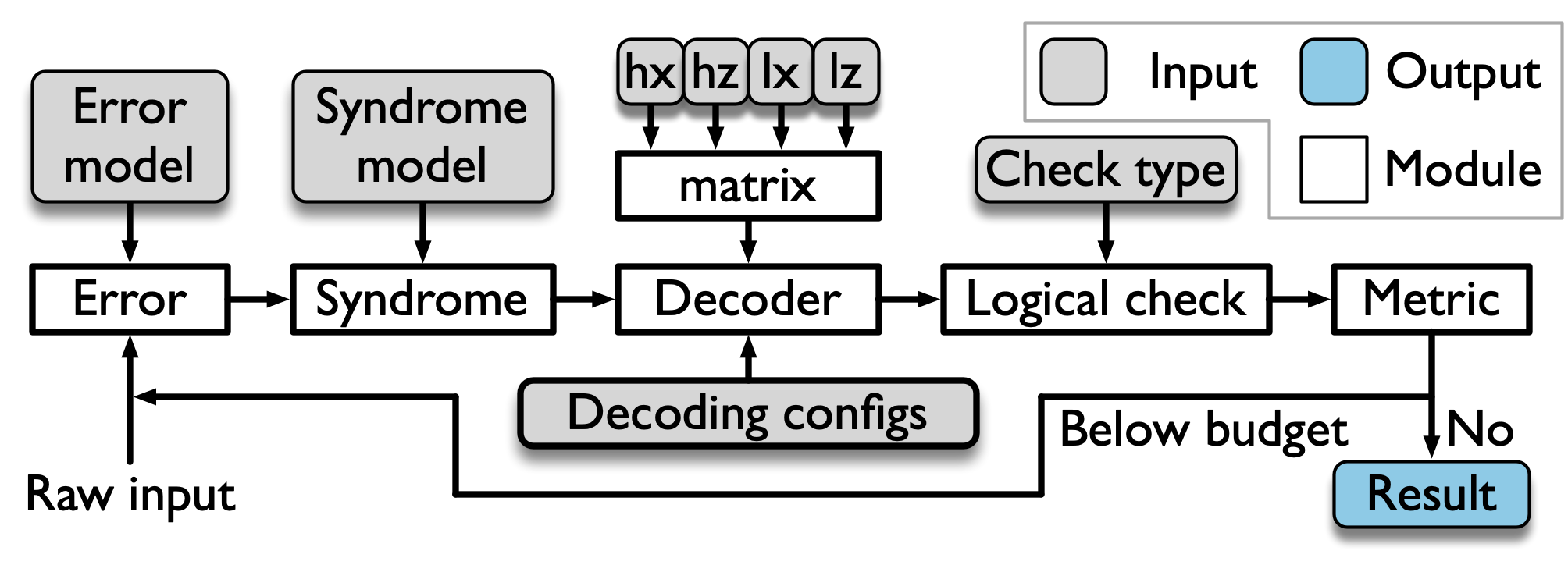
Syndrilla virtualizes the full decoder pipeline of data encoding, syndrome measurement, error decoding into five modules: error, syndrome, decoder, logical check, and metric, as shown in the figure above. All configurations are defined through YAML files. Each module requires its own dedicated YAML configuration file, with the exception of the metric module.
The error YAML file defines all configuration parameters associated with the error model.
It currently supports a 1-channel Binary Symmetric Channel (BSC) error model, as well as 2-channel error models for both depolarizing noise and BSC.
An example error configuration file using the Binary Symmetric Channel (BSC) model is provided in bsc.error.yaml:
error:
  model: bsc
  number_channel: 1
  device:
    device_type: cpu
    device_idx: 0
  rate: 0.05
The following table details the configuration parameters used in the error YAML file.
| Key | Description | Example |
|---|---|---|
error.model |
Type of quantum error model applied to data qubits | bsc or depol |
error.number_channel |
The number of error channel applied to quantum circuit | 1 or 2 |
error.device.device_type |
Type of the device where the error injection will happen | cpu or cuda |
error.device.device_idx |
Index of the device where the error injection will happen. This option only works when device_type = cuda. |
0 |
error.rate |
Physical error rate | 0.05 |
The following table details all types of error model Syndrilla supports.
| Error Model | Number of channels | Example |
|---|---|---|
| Binary Symmetric Channel (BSC) | Both 1 and 2 | bsc |
| Depolarizing Channel | 2 | depol |
The syndrome YAML file defines all configuration parameters associated with the syndrome measurement.
An example configuration file that assumes ideal (error-free) syndrome measurements is provided in perfect.syndrome.yaml:
syndrome:
  measure: perfect
The following table details the configuration parameters used in the syndrome module YAML file.
| Key | Description | Example |
|---|---|---|
syndrome.measure |
Model for syndrome measurement | perfect |
The matrix YAML file defines all configuration parameters associated with the matrix processing. Syndrilla accepts matrix from:
- .alist format introduced by David MacKay, Matthew Davey, and John Lafferty, which contains a sparse matrix.
- .npz format from NumPy, which contains a sparse matrix.
- .txt format containing a dense 2D matrix. Each row represents a check node of the H matrix, in which each 1 entry denotes a connecting variable node to that check node.
An example matrix configuration file that loads a matrix from a alist file is provided in hx.matrix.yaml:
matrix:
  file_type: alist
  path: examples/alist/surface/surface_10_hx.alist
The following table details the configuration parameters used in the matrix module YAML file.
| Key | Description | Example |
|---|---|---|
matrix.file_type |
Format of the parity-check matrix file | alist or npz or txt |
matrix.path |
Path to the parity-check matrix file | examples/alist/surface/surface_10_hx.alist |
The decoder YAML file defines all configuration parameters associated with the decoder.
An example decoder configuration file is provided in bposd_hx.decoder.yaml:
decoder:
  algorithm: [bp_norm_min_sum, osd_0]
  check_type: hx
  max_iter: 131
  parity_matrix_hx: examples/alist/hx.matrix.yaml
  parity_matrix_hz: examples/alist/hz.matrix.yaml
  dtype: float64
  device:
    device_type: cuda
    device_idx: 0
  logical_check_matrix: True
  logical_check_lx: examples/alist/lx.matrix.yaml
  logical_check_lz: examples/alist/lz.matrix.yaml
The following table details the configuration parameters used in the decoder module YAML file.
| Key | Description | Example |
|---|---|---|
decoder.algorithm |
List of decoding algorithms used | [bp_norm_min_sum, osd_0] |
decoder.check_type |
Type of parity-check matrix used | hx or hz |
decoder.device.device_type |
Type of the device where the decoding will happen | cpu or cuda |
decoder.device.device_idx |
Index of the device where the decoding will happen. This option only works when device_type = cuda. |
0 |
decoder.max_iter |
Maximum number of decoding iterations for iterative algorithms | 131 |
decoder.parity_matrix_hx |
Path to the X-type parity-check matrix in YAML format | examples/alist/hx.matrix.yaml |
decoder.parity_matrix_hz |
Path to the Z-type parity-check matrix in YAML format | examples/alist/hz.matrix.yaml |
decoder.dtype |
Data type for decoding computations | float32, float64 |
decoder.logical_check_matrix |
Whether logical check matrices are provided. If not provided, the decoder is supposed to compute these logical check matrices based from parity-check matrices. | True or False |
decoder.logical_check_lx |
Path to the X-type logical check matrix in YAML format | examples/alist/lx.matrix.yaml |
decoder.logical_check_lz |
Path to the Z-type logical check matrix in YAML format | examples/alist/lz.matrix.yaml |
The following table details the different types of decoding algorithms Syndrilla supports.
| Error Model | #Channel | Example | Reference |
|---|---|---|---|
| Min-Sum Belief Propagation (Min-Sum BP) | 1 | bp_norm_min_sum | Factor Graphs and the Sum-Product Algorithm |
| Branch-Assisted Sign-Flipping Belief Propagation (BSFBP) | 1 | bp_branch_assisted | Branch-Assisted Sign-Flipping Belief Propagation Decoding for Topological Quantum Codes Based on Hypergraph Product Structure |
| Ordered Statistics Decoding (OSD) | 1 | osd_0 | Soft-Decision Decoding of Linear Block Codes Based on Ordered Statistics |
| Quaternary Belief Propagation (BP4) | 2 | bp4 | Quaternary Neural Belief Propagation Decoding of Quantum LDPC Codes with Overcomplete Check Matrices |
The check YAML file defines all configuration parameters associated with the computation of logical check error rates.
An example configuration file for computing the logical check error rate using the lx matrix is provided in lx.check.yaml.
check:
  check_type: lx
The following table provides a detailed explanation of the configuration parameters used in the check module YAML file.
| Key | Description | Example |
|---|---|---|
check.check_type |
Method used on logical check computation | lx or lz |
This module does not take any YAML file as inputs, it will report default metrics as output, which will be described in the output.
The result YAML file will be saved to the path specified by the -r option.
In the example above, the result YAML file can be found in the tests/test_outputs folder.
This file includes both the metric results for each decoder and a summary of the full decoding.
Additionally, the result YAML file is updated every 100 batches, allowing Syndrilla to resume the simulation from the last checkpoint if the error budget was not reached in the previous run.
Example output of running above code:
decoder_0:
  algorithm: bp_norm_min_sum
  decoder invoke rate: 1.00000000000000000e+00
  average iteration: 1.79144704761904791e+02
  distribution: [1, 1, 1, 2, 2, 2, 2, 2, 2, 2, 2, 3, 3, 3, 3, 3, 3, 3, 3, 4, 4, 4,
    4, 5, 6, 7, 14, 242, 242, 242, 242, 242, 242, 242, 242, 242, 242, 242, 242, 242,
    242, 242, 242, 242, 242, 242, 242, 242, 242, 242, 242, 242, 242, 242, 242, 242,
    242, 242, 242, 242, 242, 242, 242, 242, 242, 242, 242, 242, 242, 242, 242, 242,
    242, 242, 242, 242, 242, 242, 242, 242, 242, 242, 242, 242, 242, 242, 242, 242,
    242, 242, 242, 242, 242, 242, 242, 242, 242, 242, 242, 242, 242]
  total time (s): '1.53461852073669434e+01'
  average time per batch (s): '7.30770724160330620e-01'
  average time per sample (s): '7.30770724160330684e-05'
  average time per iteration (s): '4.07948710925328149e-07'
  hx:
    data qubit accuracy: 9.81257221566312232e-01
    data qubit correction accuracy: 6.69583968602863844e-01
    data frame error rate: 7.78004761904761977e-01
    syndrome frame error rate: 7.36490476190476140e-01
    logical error rate: 7.36661904761904740e-01
    converge failure rate: 1.71428571428571425e-04
    converge success rate: 2.63338095238095149e-01
decoder_1:
  algorithm: osd_0
  decoder invoke rate: 7.36490476190476140e-01
  average iteration: 2.36568818167190017e+02
  distribution: [1, 227, 229, 230, 230, 231, 231, 232, 232, 233, 233, 233, 233, 234,
    234, 234, 234, 234, 234, 235, 235, 235, 235, 235, 235, 235, 236, 236, 236, 236,
    236, 236, 236, 236, 236, 236, 236, 236, 236, 237, 237, 237, 237, 237, 237, 237,
    237, 237, 237, 237, 237, 237, 237, 238, 238, 238, 238, 238, 238, 238, 238, 238,
    238, 238, 238, 238, 238, 239, 239, 239, 239, 239, 239, 239, 239, 239, 239, 239,
    239, 239, 239, 239, 239, 239, 239, 239, 239, 239, 239, 239, 239, 239, 239, 239,
    239, 239, 239, 239, 239, 239, 239]
  total time (s): '1.02458470344543457e+02'
  average time per batch (s): '4.87897477831159332e+00'
  average time per sample (s): '4.87897477831159237e-04'
  average time per iteration (s): '2.06239091821614230e-06'
  hx:
    data qubit accuracy: 9.83180617866981299e-01
    data qubit correction accuracy: 7.11704897881009879e-01
    data frame error rate: 5.94433333333333369e-01
    syndrome frame error rate: 0.00000000000000000e+00
    logical error rate: 4.87619047619047580e-03
    converge failure rate: 4.87619047619047580e-03
    converge success rate: 9.95123809523809744e-01
decoder_full:
  batch size: 10000
  batch count: 21
  target error: 1000
  target error reached: 1024
  data type: torch.float64
  physical error rate: 5.00000000000000028e-02
  total time (s): '1.17804655551910400e+02'
  H matrix: /home/ya212494/code/syndrilla/examples/alist/toric/toric_11_hx.alist
  hx:
    logical error rate: 7.36661904761904740e-01
Since Syndrilla supports a sequence of decoding algorithms, there are two types of output metrics: (1) per-decoder metrics for each individual decoder, and (2) final metrics after all decoders.
The following table provides a detailed explanation of the metrics in the output YAML file for per-decoder metrics:
| Metric | Description |
|---|---|
algorithm |
Name of the decoding algorithm used (e.g., bp_norm_min_sum, osd_0) |
data qubit accuracy |
Ratio of correctly matched data qubits over all data qubits |
data qubit correction accuracy |
Ratio of correctly identified data qubit errors |
data frame error rate |
Ratio of samples with any data qubit mismatched |
syndrome frame error rate |
Ratio of samples with any syndrome mismatched |
logical error rate |
Ratio of samples that have a logical error |
converge failure rate |
Ratio of samples that successfully converge with a logical error |
converge success rate |
Ratio of samples that successfully converge without a logical error |
decoder invoke rate |
Ratio of samples for which the decoder is invoked |
average iteration |
Average number of iterations per sample |
distribution |
Distribution of iterations at 1% interval |
total time (s) |
Total time taken by the decoder in seconds |
average time per batch (s) |
Average time taken per batch in seconds |
average time per sample (s) |
Average time taken per sample in seconds |
average time per iteration (s) |
Average time per iteration per sample in seconds |
The following table provides a detailed explanation of the metrics in the output YAML file for final metrics:
| Metric | Description |
|---|---|
H matrix |
Path to the parity-check matrix used |
batch size |
Number of samples in each batch |
batch count |
Total number of batches |
target error |
Total number of errors to stop decoding |
target error reached |
Actual number of logical errors observed |
data type |
Floating point data used |
physical error rate |
Physical error rate |
logical error rate |
Logical error rate across all samples |
total time (s) |
Total simulation time across all batches in seconds |
Note that the time metric here only considers the decoding time.
To change the configuration of the simulator, user need to update the YAML files.
For example, if you want to use a different physical error rate, you need to find the input error YAML (e.g., examples/alist/bsc.error.yaml) and update the rate field.
If previous run is terminated by accident, the simulation can resume by setting -ckpt to the checkpoint YAML file, the results of a previous run (e.g., tests/test_outputs=result_phy_err_0.01.yaml).
syndrilla -r=tests/test_outputs
          -d=examples/alist/bposd_hx.decoder.yaml
          -e=examples/alist/bsc.error.yaml
          -c=examples/alist/lx.check.yaml
          -s=examples/alist/perfect.syndrome.yaml
          -bs=10000
          -te=1000
-ckpt=tests/test_outputs=result_phy_err_0.01.yamlSyndrilla also allows sweeping configurations during simulation, which is done in the zoo folder.
To generate all the configurations in the zoo directory, user can use the generate_sweeping_configs.py script.
python zoo/script/generate_sweeping_configs.py The configurations to sweep are specified in the sweeping_configs.yaml file.
It allows specifying decoder (decoder algorithm), code (code type), probability (physical error rate), check_type (check type), distance (code distance), and dtype (data type).
Below is an example:
decoder: [bposd]
code: [surface, toric]
probability: [0.001, 0.002, 0.005, 0.01, 0.02, 0.05, 0.1, 0.2, 0.5]
check_type: [hx, hz]
distance: [3, 5, 7, 9, 11, 13]
dtype: ['bfloat16', 'float16', 'float32', 'float64']
Note that currently supported data format includes ['bfloat16', 'float16', 'float32', 'float64'].
Once all configurations are prepared, you can see the corresponding folders in the zoo, and you can now sweep the simulation using the run_sweeping.py script.
This command will generate a corresponding result YAML file within each configuration folder.
Moreover, if a result YAML file already exists and simulation is terminated by accident, running the script again will, by default, automatically resume from the checkpoint, where the simulated is terminated.
python zoo/script/run_sweeping.py -r=zoo/bposd_sweeping/ -d=bposdThere are command line arguments to control the script, allowing you to specify the configuration path, select the decoder, define batch sizes, and adjust logging verbosity.
| Argument | Description | Example |
|---|---|---|
-r |
Path to configuration folder | -r=zoo/bposd_sweeping/ |
-d |
Decoder algorithm to run | -d=bposd |
-bs |
Number of samples run each batch | -bs=10000 |
-l |
Level of logger | -l=SUCCESS |
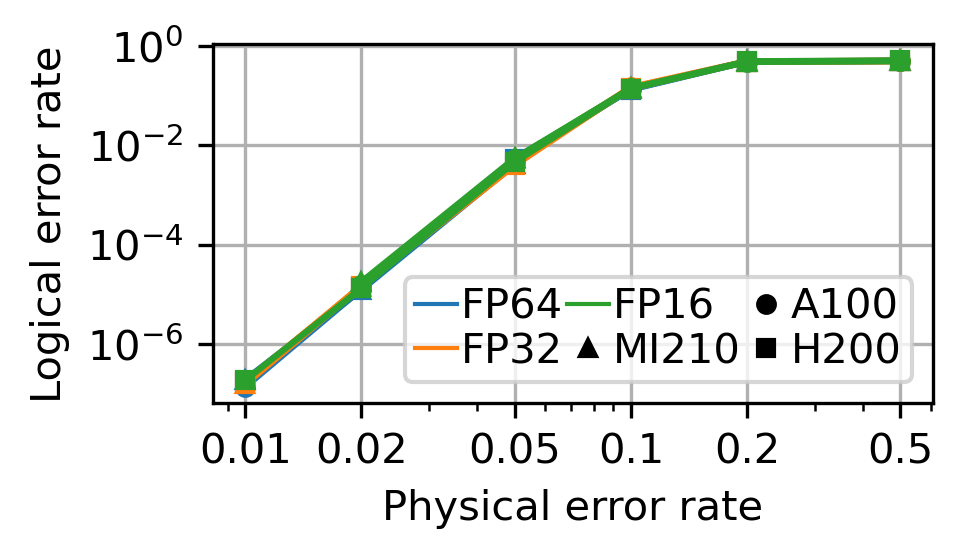
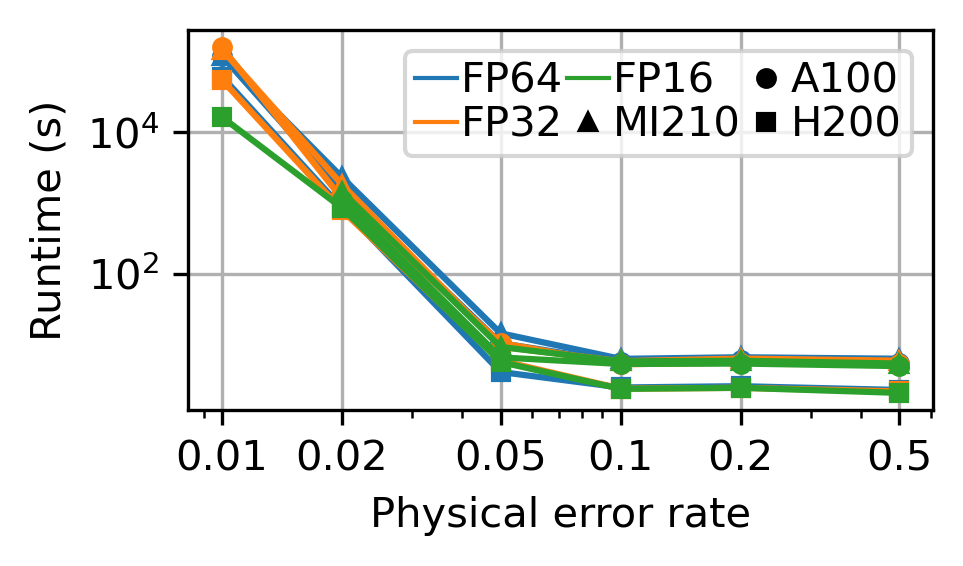
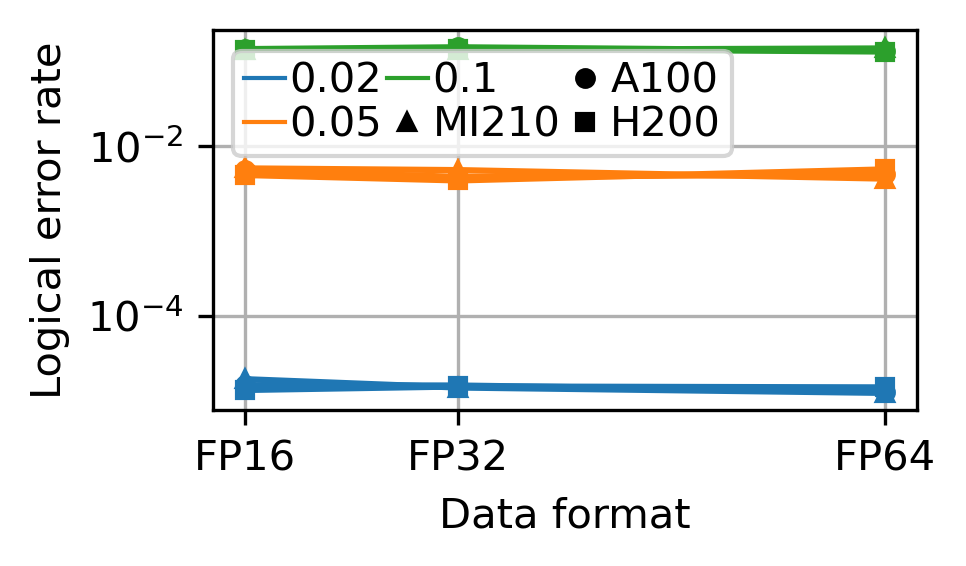
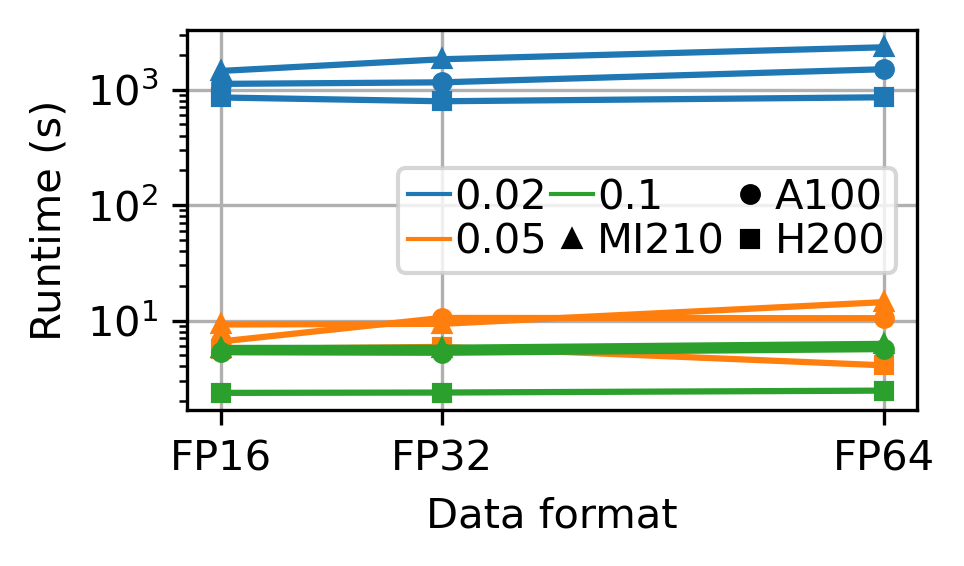
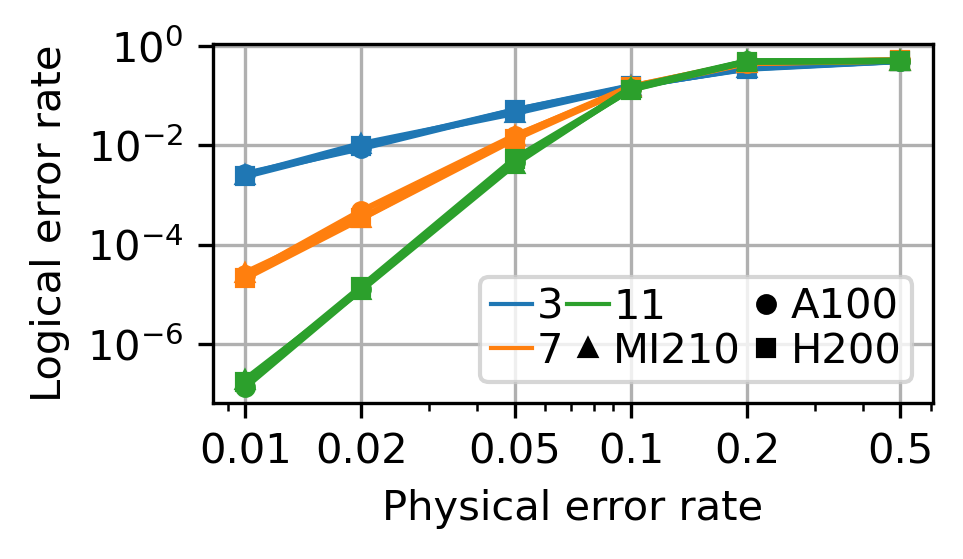
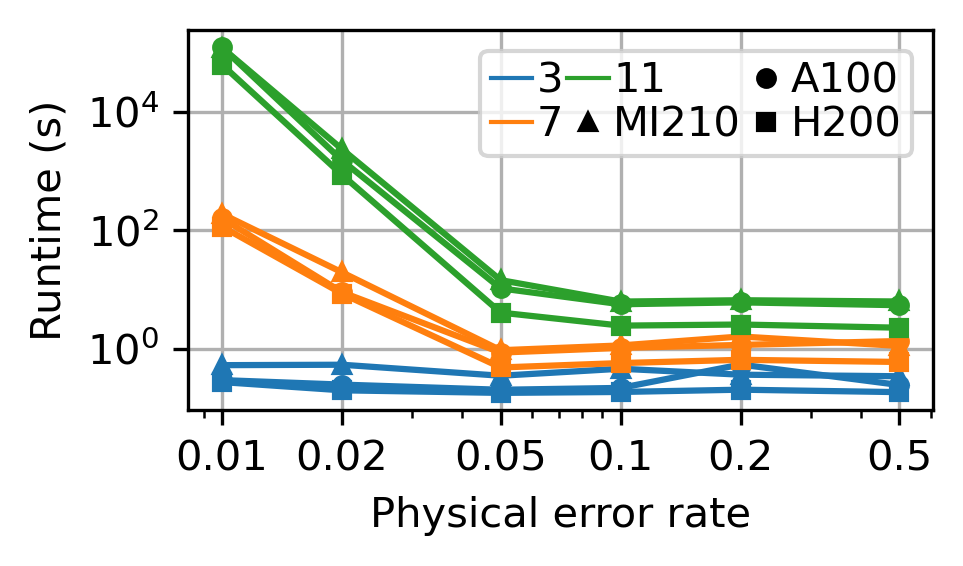
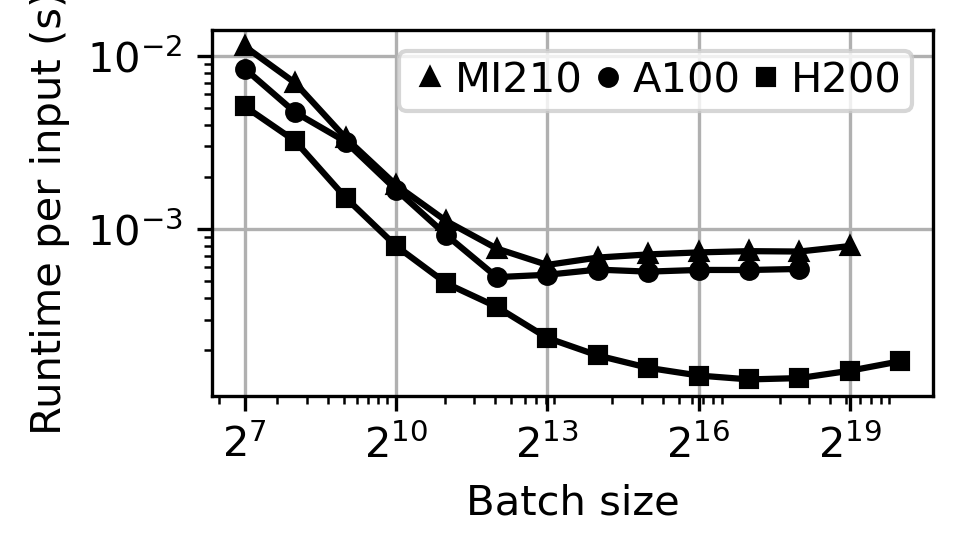
We show some of the simulation results as below. These results show the impact of data format, code distance, physical error rate, and hardware on logical error rate and runtime.
GPUs: AMD Insticnt MI210, NVIDIA A100, NVIDIA H200
CPU: Intel i9-13900K
 Accuracy |
 Time |
 Accuracy |
 Time |
 Accuracy |
 Time |
 Time |
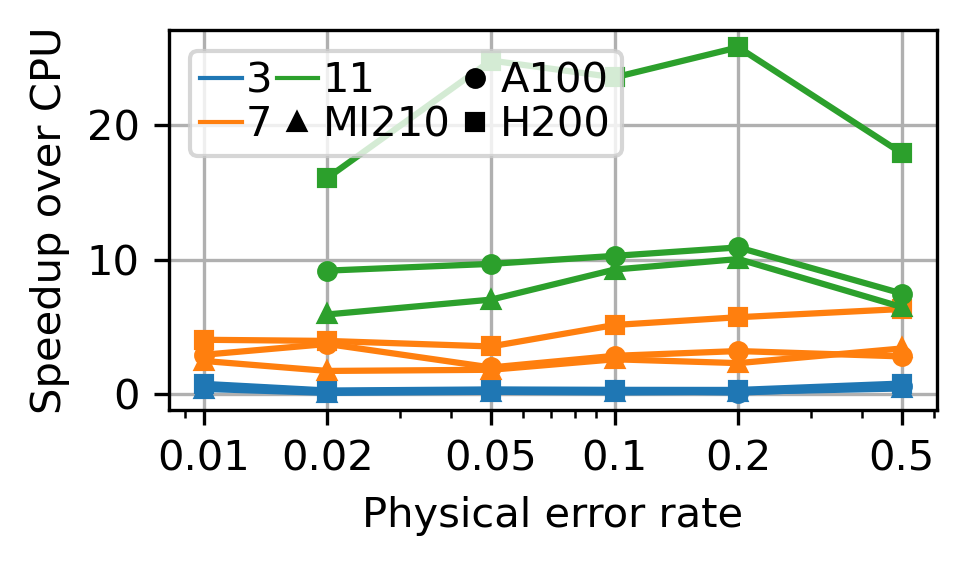 Speedup over CPU |
If you use Syndrilla in your research, please cite the following paper:
@inproceedings{2025_qce_syndrilla,
	title={{Syndrilla: Simulating Decoders for Quantum Error Correction using PyTorch}},
	author={Yanzhang Zhu and Chen-Yu Peng and Yun Hao Chen and Siyuan Niu and Yeong-Luh Ueng and Di Wu},
	booktitle={International Conference on Quantum Computing and Engineering},
	year={2025}
} We warmly welcome contributions to Syndrilla — just open a pull request!