A web-based AI coding IDE built on the Agentuity platform. Deploy your own instance to get a browser-based development environment powered by AI agents with sandboxed code execution.
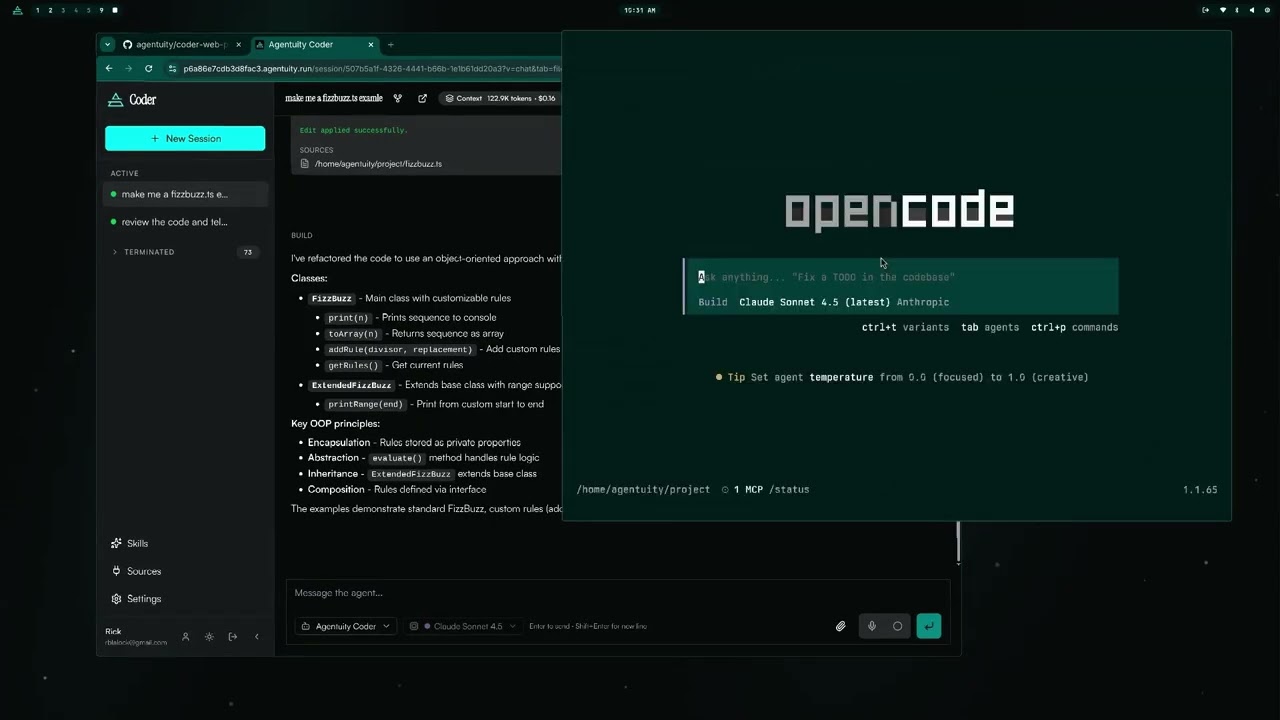
Each coding session gets its own isolated sandbox with a full development environment, git, and GitHub CLI. The app uses OpenCode in server mode, running in Agentuity sandboxes as the AI execution engine, with a custom React web UI.
- AI Chat with streaming markdown, tool call visualization, and code diffs
- IDE Mode with file explorer, code panel, inline diffs, and line-level commenting
- Git Integration built into the IDE sidebar: status, commit, push, PR creation, repo creation, commit history visualization
- File Attachments in chat (upload files to sandbox, pass to AI as context)
- Deep Linking via URL params (sessions, views, tabs persist across refresh/navigation)
- Auth with Better Auth (email/password dev, Google OAuth prod), organization management, API keys
- Skills and Sources per-workspace configuration injected into AI context
- Session Sharing via public URLs
- Dark Mode with full theme support
Copy and paste these instructions into your coding agent to automate the full setup:
Set up this Agentuity Coder project from scratch. Follow these steps in order, stopping if any step fails:

First you must have the Agentuity CLI installed and be logged in: https://agentuity.dev/Get-Started/installation.md - Once installed
run agentuity login to ensure the user is logged in to Agentuity.

1. Install dependencies:
   Run: bun install

2. Create a database (name must be lowercase letters, digits, and underscores only):
   Run: agentuity cloud db create --name my_coder_db

3. Create the .env file by copying .env.example:
   Run: cp .env.example .env

4. Write DATABASE_URL to .env without exposing it in your context:
   Run this shell command to extract the URL from the CLI and write it directly to .env:
   DB_URL=$(agentuity cloud db get my_coder_db --json | bun -e "const d=await Bun.stdin.json();console.log(d.url)")
   Then use sed or a file write to set DATABASE_URL=$DB_URL in the .env file.
   Do NOT paste the connection string as plain text — keep it in the .env file only.

5. Generate AGENTUITY_AUTH_SECRET and write it to .env:
   AUTH_SECRET=$(openssl rand -base64 32)
   Write AGENTUITY_AUTH_SECRET=$AUTH_SECRET into the .env file.

6. Set org secrets for AI sandboxes:
   Run: agentuity cloud env set ANTHROPIC_API_KEY <key> --secret --org
   Run: agentuity cloud env set OPENAI_API_KEY <key> --secret --org
   (GH_TOKEN is optional, for GitHub features in sandboxes)
   Run: agentuity cloud env set GH_TOKEN <token> --secret --org

7. Run database migrations:
   Run: bun run db:migrate

8. Verify everything:
   Run: bun run setup:check
   All required checks should pass.

9. Deploy:
   Run: bun run deploy
   The CLI will create a new project under your Agentuity org on first deploy.

If setup:check reports failures, fix them before deploying.
- Bun v1.0+
- Agentuity CLI (authenticated with
agentuity auth login)
git clone <repo-url>
cd agent-code-1000
bun installagentuity cloud db create --name my_coder_dbCopy the connection string from the output.
cp .env.example .envEdit .env and fill in:
DATABASE_URL-- the connection string from step 2AGENTUITY_AUTH_SECRET-- generate withopenssl rand -base64 32
These secrets are used by AI sandboxes (not by the app itself). Set them in your Agentuity org:
agentuity cloud env set ANTHROPIC_API_KEY <your-key> --secret --org
agentuity cloud env set OPENAI_API_KEY <your-key> --secret --org
At minimum you need ANTHROPIC_API_KEY for Claude-based coding.
bun run db:migratebun run setup:checkbun run devThe Agentuity SDK key (AGENTUITY_SDK_KEY) is automatically set by the platform when deployed. For local development, agentuity dev handles this for you.
bun run deployThe CLI will initialize a new project under your Agentuity org on first deploy.
| Variable | Required | Description |
|---|---|---|
DATABASE_URL |
Yes | PostgreSQL connection string |
AGENTUITY_AUTH_SECRET |
Yes | Better Auth encryption secret (32+ chars) |
GOOGLE_CLIENT_ID |
No | Google OAuth client ID (enables Google sign-in) |
GOOGLE_CLIENT_SECRET |
No | Google OAuth client secret |
GH_TOKEN |
No | GitHub fine-grained PAT for repo features |
Without Google OAuth credentials, the app defaults to email/password authentication.
| Secret | Purpose |
|---|---|
ANTHROPIC_API_KEY |
Claude API access in sandboxes |
OPENAI_API_KEY |
OpenAI API access in sandboxes |
GH_TOKEN |
GitHub access in sandboxes |
- Development: Email/password auth (no additional config needed)
- Production: Add Google OAuth credentials for Google sign-in
| Command | Description |
|---|---|
bun run dev |
Start development server |
bun run build |
Build for production |
bun run deploy |
Deploy to Agentuity |
bun run typecheck |
Run TypeScript type checking |
bun run setup:check |
Verify setup configuration |
bun run db:generate |
Generate SQL migration from schema changes |
bun run db:migrate |
Apply pending migrations |
Schema is defined in src/db/schema.ts. When making changes:
- Edit
src/db/schema.ts(usesdrizzle-orm/pg-coreso both runtime and drizzle-kit share it) - Run
bun run db:generate - Run
bun run db:migrate - Deploy with
bun run deploy
The tablesFilter in drizzle.config.ts protects auth tables from being dropped. Do not remove it.
src/
  api/              API route mounting
  db/               Database schema and migrations
  opencode/         OpenCode config and sandbox management
  routes/           Hono API routes
  web/              React frontend
    components/     UI components
    hooks/          Custom hooks
    lib/            Utilities
    types/          TypeScript type definitions
    public/         Static assets
The app uses URL search params for deep linking:
| Param | Values | Description |
|---|---|---|
s |
session ID | Active session |
v |
chat, ide |
View mode |
p |
chat, settings, skills, sources, profile |
Current page |
tab |
files, git |
IDE sidebar tab |
Example: /?s=abc123&v=ide&tab=git opens session abc123 in IDE mode with the git panel.
Open the shortcuts reference anytime with Ctrl+Shift+/ (or ⌘ ⇧ / on Mac), or via the sidebar.
| Shortcut | Action |
|---|---|
| Ctrl+K / ⌘K | Open command palette |
| Ctrl+Shift+P / ⌘⇧P | Open command palette (alt) |
| Ctrl+Shift+/ / ⌘⇧/ | Show keyboard shortcuts reference |
| Shortcut | Action |
|---|---|
| Ctrl+Shift+N / ⌘⇧N | New session |
| Ctrl+Shift+, / ⌘⇧, | Open settings |
| Ctrl+1-9 / ⌘1-9 | Jump to session by index |
| Shortcut | Action |
|---|---|
| Ctrl+/ / ⌘/ | Focus chat input |
| Shortcut | Action |
|---|---|
| Ctrl+B / ⌘B | Toggle sidebar |
| Ctrl+Shift+E / ⌘⇧E | Toggle code/chat view |
| Ctrl+Shift+L / ⌘⇧L | Toggle light/dark theme |
| Shortcut | Action |
|---|---|
| Ctrl+Shift+W / ⌘⇧W | Close active editor tab |
| Ctrl+Shift+F / ⌘⇧F | Toggle files/git panel |
The command palette (Ctrl+K) also provides searchable access to all actions and sessions.
- Runtime: Bun
- Backend: Hono (via
@agentuity/runtime) - Frontend: React 19 + Tailwind CSS v4
- Auth: Better Auth (
@agentuity/auth) - Database: PostgreSQL via Drizzle ORM (
@agentuity/drizzle) - AI: OpenCode with sandboxed execution, using the Coder OpenCode plugin
- Markdown: Streamdown (streaming animation)
- Diffs: @pierre/diffs (FileDiff + PierreFile)
- Routing: @tanstack/react-router (type-safe routing with Zod-validated search params)
- Deploy: Agentuity Platform
Apache License 2.0. See LICENSE.md.