ui: add memory used column in instance metrics view#3243
Conversation


This adds memory used column in the instance metrics view. Also fixes
a bug for VMware, due to which incorrect memory usage was returned.

Signed-off-by: Rohit Yadav <rohit.yadav@shapeblue.com>
 yadvr
changed the title
yadvr
changed the title

|
@blueorangutan package |

|
@borisstoyanov a Jenkins job has been kicked to build packages. I'll keep you posted as I make progress. |
|
Packaging result: ✔centos6 ✔centos7 ✔debian. JID-2658 |
|
@blueorangutan test |
|
@borisstoyanov a Trillian-Jenkins test job (centos7 mgmt + kvm-centos7) has been kicked to run smoke tests |
|
Trillian test result (tid-3455)
|

 borisstoyanov
left a comment
borisstoyanov
left a comment
borisstoyanov
left a comment
There was a problem hiding this comment.
LGTM, now following is available:
"memory": 512,
"memoryintfreekbs": 393216,
"memorykbs": 524288,
"memorytargetkbs": 524288,
"memorytotal": "0.50 GB",

|
@blueorangutan package |
|
@rhtyd a Jenkins job has been kicked to build packages. I'll keep you posted as I make progress. |
|
Packaging result: ✔centos6 ✔centos7 ✔debian. JID-2776 |
|
Here's a screenshot of another similar instance |
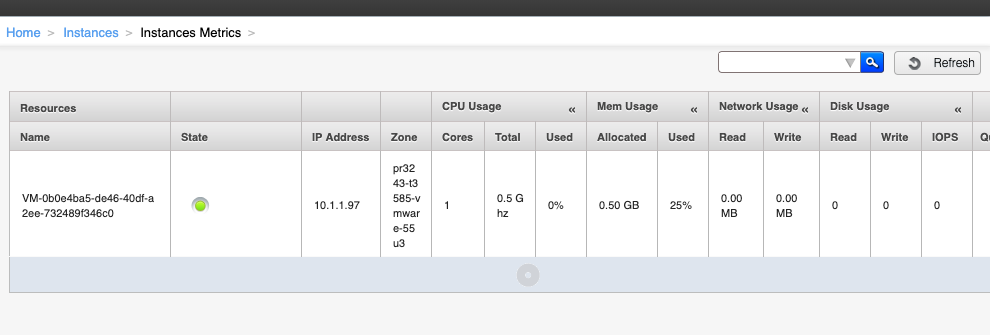

|
LGTM |
|
@rhtyd I think we're OK for merging this |

|
LGTM |
|
Thanks all. |
yadvr
changed the title
5 participants


Problem: The metrics view for instances does not show used memory.
Root Cause: Used memory was not added as a column in the metrics view for instances.
Solution: Metrics view for instances makes ‘listVirtualMachineMetrics’ API call to gather metrics. The response of this API call contains total and free memory with the instance. These have been used to compute used memory as a percentage of total memory and displayed as a new column in UI. Also fixes
a bug for VMware, due to which incorrect memory usage was returned.
Types of changes