DEVDOCS-6658 Various fixes in Stencil docs #1217
There are no files selected for viewing
| Original file line number | Diff line number | Diff line change |
|---|---|---|
|
|
@@ -29,7 +29,7 @@ stencil scss-autofix --dry | |
| 3. To commit the changes and revalidate, run the following commands: | ||
|
|
||
| ```shell showLineNumbers copy | ||
| stencil scss-autofix | ||
| stencil bundle | ||
| ``` | ||
|
|
||
|
|
@@ -58,7 +58,7 @@ Debug: internal, implementation, error | |
| (/usr/local/lib/node_modules/stencil-cli/server/plugins/CssCompiler/index.js:32:26) | ||
| ``` | ||
|
|
||
| On macOS, we have tested Stencil CLI most robustly on Node.js version 4.4.0. On Linux, we have tested most robustly on version 4.1.2. On Windows, we have tested most robustly on version 4.6.1. You’ll find detailed steps (for each operating system) in these instructions' Installing Stencil Prerequisites by OS section. | ||
|
|
||
| ## npm install errors | ||
|
|
||
|
|
@@ -126,7 +126,7 @@ This error typically occurs when your `package.json` file includes an outdated v | |
|
|
||
| ### Running stencil bundle errors | ||
|
|
||
| Nowadays, `stencil bundle` runs several validation checks on a theme before it can be bundled and pushed to the store. | ||
|
|
||
| You may see those errors because your theme has some missing properties in its translations files or frontmatter that have recently become required. | ||
|
|
||
|
|
@@ -155,7 +155,7 @@ The following error indicates that there is a trailing comma in the frontmatter | |
| Error: Found unallowed trailing symbol in: "4,", while parsing frontmatter at ".....templates/pages/home.html". | ||
| ``` | ||
|
|
||
| ### Node support | ||
|
|
||
| When you update the Node.js version, you can check to see whether you can update other theme packages, such as webpack, for updated feature support. | ||
|
|
||
|
|
@@ -197,7 +197,7 @@ If you receive the same error again after running `npm install`, you should comp | |
|
|
||
| ## MacOS: Xcode/iOS license... errors | ||
|
|
||
| On macOS, if you have recently installed a new version of Xcode, the command line will display the following error when you next try to use or reinstall Stencil: | ||
|
There was a problem hiding this comment.
There was a problem hiding this comment.
|
||
|
|
||
| ```text | ||
| error: Agreeing to the Xcode/iOS license requires admin privileges, please re-run as root via sudo. | ||
|
|
@@ -249,7 +249,7 @@ If executing the `stencil start` command generates an `Unauthorized, please use | |
|
|
||
| ### 403 errors | ||
|
|
||
| If the Stencil server responds with a `403` error, and you are using a proxy-based domain service like Cloudflare or Amazon CloudFront, modify your hosts file to map the localhost to your BigCommerce store IP address. | ||
|
|
||
| ## 500 errors | ||
|
|
||
|
|
||

| Original file line number | Diff line number | Diff line change |
|---|---|---|
|
|
@@ -27,9 +27,9 @@ When importing images, ensure your images are high quality, the appropriate dime | |
|
|
||
| Injecting JavaScript context variables allow you to access store data through your theme. You can inject JavaScript context variables using the `{{inject}}` Handlebars helper. Be sure to assign a custom variable name to the injected variable. | ||
|
|
||
| You can then use the `{{jsContext}}` Handlebars helper to access a stringified JSON object containing all injected data with your assigned custom variable names as keys in the key-value pairs. For more information, see [injection helpers](/docs/storefront/stencil/themes/context/handlebars-reference#inject). | ||
|
There was a problem hiding this comment.
|
||
|
|
||
| The code example below uses `{{inject}}` and `{{jsContext}}` to log the product name to your browser's console when added to Cornerstone's `product.html` file: | ||
|
|
||
| ```handlebars filename="product.html" showLineNumbers copy | ||
| {{inject "myProductName" product.title}} | ||
|
|
@@ -43,7 +43,7 @@ The code example below uses `{{inject}}` and `{{jsContext}}` to log the product | |
| </script> | ||
| ``` | ||
|
|
||
| We recommend injecting only the variables you need. If you inject all settings, you could accidentally inject PII (Personally-Identifying Information) and cause performance issues with your site. | ||
|
|
||
| ## Using Lighthouse | ||
|
|
||
|
|
@@ -59,7 +59,7 @@ Largest Contentful Paint (LCP) is the metric that reports the time it takes to d | |
|
|
||
| <Callout type="info"> | ||
| #### Good score | ||
| The optimal LCP score is 2.5 seconds or faster. | ||
|
There was a problem hiding this comment.
|
||
| </Callout> | ||
|
|
||
| To improve LCP: | ||
|
|
@@ -93,7 +93,7 @@ Cumulative Layout Shift (CLS) is the metric that measures visual stability. This | |
|
|
||
| <Callout type="info"> | ||
| #### Good score | ||
| The optimal CLS score is 0.1 seconds or less. | ||
|
There was a problem hiding this comment.
|
||
| </Callout> | ||
|
|
||
| To improve CLS: | ||
|
|
@@ -108,7 +108,7 @@ In this example, the performance score is currently 47. The LCP score is 6.2 s, | |
|
|
||
| 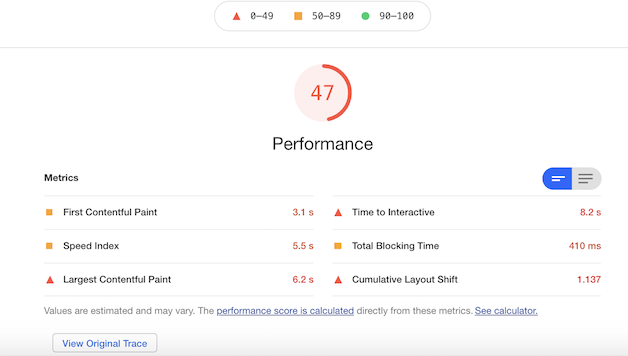 | ||
|
|
||
| To improve performance, let's start by measuring unused JavaScript. In Chrome DevTools, the **Lighthouse** and **Coverage** tabs offer suggestions of unused JavaScript code that you can potentially remove. The red section of the bar represents unused bytes; the green section represents used bytes. It is important to note that unused JavaScript means your page has not used it yet. The JavaScript in red might be connected to event listeners that only fire when a user interacts with your page. | ||
|
|
||
| 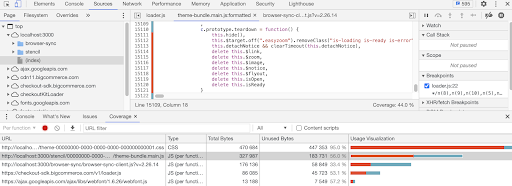 | ||
|
|
||
|
|
@@ -117,7 +117,7 @@ In addition to removing unused code, you can minify, compress, and refactor CSS | |
| ```css filename="Example, Part 1: Not minified" showLineNumbers copy | ||
| .element-class { | ||
| padding: 1px 5px 1px 5px; | ||
| font-family: Consolas, Menlo, Monaco, Lucida Console, Liberation Mono, DejaVu Sans Mono, | ||
| Bitstream Vera Sans Mono, Courier New, monospace, serif; | ||
| background-color: #eeeeee;} | ||
| ``` | ||
|
|
@@ -128,14 +128,14 @@ background-color: #eeeeee;} | |
|
|
||
| Lighthouse displays information relevant to elements contributing to the CLS score. In this example, the banner above the carousel causes a loading issue. Once the image is resized or removed the CLS score improves. | ||
|
|
||
| After removing some unused bytes, minifying JavaScript files, and resizing an image, the performance score is 77. The LCP score is now 4.3 s, the TBT score is 120 ms and the CLS score is 0.001. You can continue to remove additional unused bytes to improve your performance score and metrics. | ||
TomA-R marked this conversation as resolved.
Show resolved
Hide resolved
TomA-R marked this conversation as resolved.
Show resolved
Hide resolved
TomA-R marked this conversation as resolved.
Show resolved
Hide resolved
TomA-R marked this conversation as resolved.
Show resolved
Hide resolved
|
||
|
|
||
| 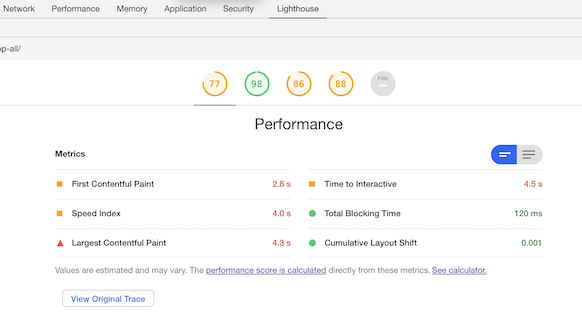 | ||
|
|
||
| Using Lighthouse is an important step in optimizing your site and improving the user experience. It is an easy to use best practice tip that provides powerful insights. | ||
|
|
||
| ## Using error detections and optimization tools | ||
| Tools that automatically record errors and provide session playback and optimization suggestions often benefit from having access to the themes' source maps in production. | ||
| They provide a way to translate between minified code, designed to decrease webpage load times and the source code the developer writes. | ||
|
|
||
| [Stencil CLI](/docs/storefront/stencil/cli/options-and-commands) provides convenient options for bundling the production-ready theme with source maps included. | ||
|
|
||
| Original file line number | Diff line number | Diff line change |
|---|---|---|
| @@ -1,6 +1,6 @@ | ||
| --- | ||
| title: Dynamic Content Rendering on Stencil Storefronts | ||
| keywords: js, javascript, if, | ||
| --- | ||
|
|
||
| # Dynamic Content Rendering on Stencil Storefronts | ||
|
|
@@ -11,7 +11,7 @@ _We're gratefully sharing techniques devised by Ken Utting, Web Developer for Bi | |
|
|
||
| At GORUCK, we've customized our Stencil theme (currently using the [Merchant](https://www.bigcommerce.com/theme/merchant-light/?_ga=2.52710120.1984523106.1539568940-967431010.1523308107) theme) to provide several ways to update our site content without requiring changes to the theme itself. This allows our content folks to make changes to our theme without having to wait on our software developers. | ||
|
|
||
| Also, by pushing content out of the theme, these techniques reduce the differences between our customized theme and the out-of-the-box (base) theme – which makes it easier to integrate ongoing updates into our theme. Finally, these techniques allow us to share identical content across pages without copying and pasting. | ||
|
There was a problem hiding this comment.
|
||
|
|
||
| Three techniques in particular have proven useful to us. We call them Dropzones, Dynamic Tabs, and Snippets. There is nothing particularly special to GORUCK about these techniques, so there is no reason you can't adopt them for your own store/theme. | ||
|
|
||
|
|
@@ -104,8 +104,8 @@ In the example below, we use this technique to place the `RIGHT BY YOU` tab in t | |
| There are two versions of the HTML. The first is designed for a tab you want to drop in using a page's own HTML: | ||
|
|
||
| ```handlebars showLineNumbers copy | ||
| <div class="gr-tab" data-gr-position="POSITION" data-gr-title="TITLE"> | ||
| CONTENT | ||
| </div> | ||
| ``` | ||
|
|
||
|
|
@@ -119,7 +119,7 @@ The second version is designed for a tab that gets its content from an external | |
| In this second case, the HTML in that external file must start with the POSITION and TITLE information: | ||
|
|
||
| ```handlebars showLineNumbers copy | ||
| <input id="gr-tab-data" type="hidden" data-gr-position="POSITION" data-gr-title="TITLE" /> | ||
| CONTENT | ||
| ``` | ||
|
|
||
|
|
@@ -153,37 +153,37 @@ Here are the contents of our `dynamicTab1.html` file: | |
| <div style="display: flex; flex-direction: column"> | ||
| <div style="display: flex"> | ||
| <div> | ||
| <img style="display: block; width: 100px; max-width: 100px; margin-right: 24px" | ||
| src="https://content.goruck.com/2017site/products/free-returns-icon.png" height="auto"/> | ||
| </div> | ||
| <div> | ||
| <h3 style="margin-top: 0">Free & Easy Returns</h3> | ||
| <p>Don't like it? Send it back for free. Returnable in like-new condition within 30 days and | ||
| every order comes with a free return shipping label. Too easy.</p> | ||
| </div> | ||
| </div> | ||
|
|
||
| <div style="display: flex; margin-top: 12px"> | ||
| <div> | ||
| <img style="display: block; width: 100px; max-width: 100px; margin-right: 24px" | ||
| src="https://content.goruck.com/2017site/products/challenge-excellence.png" height="auto"/> | ||
| </div> | ||
|
|
||
| <div> | ||
| <h3 style="margin-top: 0">Challenge Excellence</h3> | ||
| <p>We have two grades, A and F and A- rounds down. Excellence is the standard and please hold us to it, | ||
| we want you to love your gear as much as we do.</p> | ||
| </div> | ||
| </div> | ||
|
|
||
| <div style="display: flex; margin-top: 12px"> | ||
| <div> | ||
| <img style="display: block; width: 100px; max-width: 100px; margin-right: 24px" | ||
| src="https://content.goruck.com/2017site/products/customer-service-icon.png" height="auto"/> | ||
| </div> | ||
| <div> | ||
| <h3 style="margin-top: 0">Do Right By People</h3> | ||
| <p>Our goal is to run a company our grandfathers would be proud of. And the central tenet | ||
| — an oldie but a goodie — is that we do whatever it takes to do right by people. | ||
| Contact us at <a href="https://goruck.zendesk.com/hc/en-us/requests/new" target="_blank"> | ||
| team@goruck.com</a> with any questions and we'll get back to you ASAP.</p> | ||
|
|
@@ -193,7 +193,7 @@ Here are the contents of our `dynamicTab1.html` file: | |
| </div> | ||
| ``` | ||
|
|
||
| ### Dynamic Tabs JavaScript | ||
|
|
||
| Again, the JavaScript code to implement Dynamic Tabs is invoked in the PageManager class' before method. The Dynamic Tabs code is more complex, and it relies on other classes we wrote to get content from the external server and cache it in the browser. | ||
|
|
||
|
|
@@ -225,7 +225,7 @@ The external file can contain any arbitrary HTML and CSS, and the styled HTML is | |
|
|
||
| Like Dropzones and Dynamic Tabs, the Snippets code is invoked in `PageManager`'s `before` method. Snippets adds just another 50 lines of JavaScript code to the theme, also relying on the same code that Dynamic Tabs uses to get the external file and cache it in the browser. | ||
|
|
||
| ## Recap | ||
|
|
||
| At GORUCK, we've developed a number of techniques that allow us to separate our content from our theme. These techniques have proved valuable to us, because they allow us to: | ||
|
|
||
|
|
||
There was a problem hiding this comment.
Choose a reason for hiding this comment
The reason will be displayed to describe this comment to others. Learn more.
macOSis misspelt; did you meanmacES,mac'S,macrOS,macS,tacOS,Macon,Marcos?retext-spellretext-spell