SETC automates vulnerability exploitation in Docker containers, captures network traffic and system telemetry, and converts logs to standard formats (CIM, ECS, OCSF, CEF, UDM). It produces repeatable, on-demand exploit telemetry for security research, tooling development, and dataset generation.
For the full research background, see the arXiv preprint, the published IEEE CARS 2024 paper, and the doctoral dissertation.
# Clone and install
git clone https://github.com/your-org/setc.git
cd setc
pip install -r requirements.txt

# Build required system containers
cd docker_images/tcpdump && docker build -t tcpdump . && cd ../..
cd docker_images/log_format && docker build -t logformat . && cd ../..
docker pull metasploitframework/metasploit-framework:6.2.33

# Run a single-exploit example
python3 setc/setc.py example_configurations/docker_small.json --cleanup_volume --cleanup_networkConfig JSON
|
v
1. Parse config entries (one per CVE / exploit)
|
v
2. Start target container(s) + tcpdump on a private Docker network
|
v
3. Launch Metasploit, run exploit, retry until success
|
v
4. Capture process tables (pre/post exploit)
|
v
5. Zeek parses captured PCAPs into structured logs
|
v
6. Convert logs to CIM, ECS, OCSF, CEF, and UDM formats
|
v
7. Output to Docker volume (and optionally Splunk, PostgreSQL, or ELK)
Each config is a JSON array of exploit entries. SETC supports two target modes:
Single container -- provide a Docker image directly:
[
    {
        "name": "CVE-2018-11776",
        "settings": {
            "description": "Struts2 OGNL injection RCE",
            "target_image": "vulhub/struts2:2.5.25",
            "exploit": "multi/http/struts2_multi_eval_ognl"
        }
    }
]
Docker Compose -- for multi-container targets (uses $VULN_PATH and $SETC_PATH env vars):
[
    {
        "name": "CVE-2014-6271",
        "settings": {
            "description": "Apache CGI shellshock using user agent",
            "yml_file": "$VULN_PATH/bash/CVE-2014-6271/docker-compose.yml",
            "target_name": "setc-web-1",
            "exploit": "multi/http/apache_mod_cgi_bash_env_exec",
            "exploit_options": "set TARGETURI /victim.cgi;"
        }
    }
]| Field | Required | Description |
|---|---|---|
name |
Yes | CVE or exploit identifier |
description |
Yes | Human-readable description |
exploit |
No | Metasploit module path (omit for manual exploit mode) |
target_image |
One of these | Docker image for single-container targets |
yml_file + target_name |
One of these | Docker Compose file + target container name |
exploit_options |
No | Additional MSF console commands (semicolon-separated) |
exploit_mode |
No | "cli" (default) or "rpc" for Metasploit RPC-based exploitation |
exploit_success_pattern |
No | Regex pattern to detect success (default: checks for port 4444) |
target_delay |
No | Seconds to wait after starting the target (default: 0) |
exploit_retries |
No | Retry count before giving up (default: 4) |
exploit_check_delay |
No | Seconds between status checks (default: 3) |
exploit_check_count |
No | Status checks per attempt (default: 7) |
ready_delay |
No | Seconds between readiness checks (default: 5) |
ready_retries |
No | Readiness checks before giving up (default: 5) |
See setc_config_schema.json for the full JSON Schema. Validate configs with:
check-jsonschema --schemafile setc_config_schema.json example_configurations/docker_small.jsonSETC writes all telemetry to a Docker volume (set_logs by default). Logs are converted to five standard formats: Splunk CIM, Elastic Common Schema (ECS), OCSF, ArcSight CEF, and Google Chronicle UDM. Each CVE gets its own directory:
set_logs/
  CVE-2018-11776/
    pcap/                     # Raw packet capture
    zeek/                     # Zeek-parsed logs (conn.log, http.log, ...)
    cim/
      cim_http.log            # Splunk CIM web format
      cim_network.log         # Splunk CIM network format
      cim_process_*.log       # CIM endpoint process logs
    ecs/
      ecs_http.log            # Elastic Common Schema
      ecs_network.log
      ecs_process_*.log
    ocsf/
      ocsf_http.log           # OCSF 1.4.0 HTTP Activity
      ocsf_network.log        # OCSF 1.4.0 Network Activity
      ocsf_process_*.log      # OCSF Process Query
    cef/
      cef_http.log            # ArcSight CEF HTTP events
      cef_network.log         # ArcSight CEF network events
      cef_process_*.log       # CEF process events
    udm/
      udm_http.log            # Google Chronicle UDM HTTP
      udm_network.log         # Google Chronicle UDM network
      udm_process_*.log       # UDM process events
usage: setc [-h] [-v] [-p PASSWORD] [--volume VOLUME] [--network NETWORK]
            [--msf MSF] [--prefix PREFIX] [--splunk] [--postgres] [--elk]
            [--no-zeek] [--cleanup_network] [--cleanup_volume]
            [--cleanup_splunk] [--cleanup_postgres] [--cleanup_elk]
            config
| Flag | Description |
|---|---|
config |
Path to a SETC configuration JSON file |
-v, --verbose |
Enable debug logging |
-p, --password |
SIEM password (default: password1234) |
--volume |
Docker volume name (default: set_logs) |
--network |
Docker network name (default: set_framework_net) |
--msf |
Override the Metasploit Docker image |
--prefix |
Session prefix for container names (auto-generated if omitted) |
--splunk |
Launch a Splunk instance and ingest logs |
--postgres |
Launch a PostgreSQL instance and ingest logs |
--elk |
Launch Elasticsearch + Kibana and ingest logs (Kibana UI at http://localhost:5601) |
--no-zeek |
Disable Zeek PCAP parsing |
--cleanup_network |
Delete the Docker network before running |
--cleanup_volume |
Delete the log volume before running |
--cleanup_splunk |
Remove Splunk container after completion |
--cleanup_postgres |
Remove PostgreSQL container after completion |
--cleanup_elk |
Remove Elasticsearch and Kibana containers after completion |
By default SETC drives Metasploit via msfconsole -x (CLI mode). Setting "exploit_mode": "rpc" in a config entry switches to the MSGRPC API via pymetasploit3, which provides:
- Structured exploit execution —
module.execute()returns a job ID - Reliable success detection — checks
client.sessions.listfor actual Meterpreter/shell sessions instead of greppingnetstat - Job tracking — active jobs are visible via
client.jobs.list
[
    {
        "name": "CVE-2018-11776",
        "settings": {
            "description": "Struts2 OGNL injection RCE",
            "target_image": "vulhub/struts2:2.5.25",
            "exploit": "multi/http/struts2_multi_eval_ognl",
            "exploit_mode": "rpc"
        }
    }
]
RPC mode uses the same Metasploit Docker image — it starts msfrpcd instead of msfconsole. The pymetasploit3 dependency is installed via pip install -r requirements.txt.
When exploit is omitted (or set to ""), SETC starts the target and tcpdump capture, then pauses and waits for you to manually exploit the target from a separate terminal. Press Enter when done and SETC proceeds with cleanup, PCAP parsing, and log conversion as usual.
This is useful for exploits not in Metasploit, custom attack chains, or interactive research.
[
    {
        "name": "CVE-2024-XXXXX",
        "settings": {
            "description": "Manual exploitation of custom vuln",
            "target_image": "vuln-app:latest"
        }
    }
]
# SETC will start the target, then prompt you:
# "Press Enter when finished exploiting to continue..."
python3 setc/setc.py manual_config.json --cleanup_volume --cleanup_network# Single-container config
python3 setc/setc.py example_configurations/docker_small.json --cleanup_volume
# Docker Compose targets (set env vars first)
export VULN_PATH=/path/to/vulhub
export SETC_PATH=/path/to/setc
python3 setc/setc.py example_configurations/compose_small.json --cleanup_volume --cleanup_network
# With Splunk integration
python3 setc/setc.py example_configurations/docker_large.json --splunk --cleanup_volume
# With PostgreSQL backend
python3 setc/setc.py example_configurations/docker_small.json --postgres --cleanup_volume --cleanup_postgres
# With ELK stack (Elasticsearch + Kibana)
python3 setc/setc.py example_configurations/docker_small.json --elk --cleanup_volume --cleanup_elkSETC can optionally ingest logs into a SIEM for querying and visualization. All backends are launched as Docker containers alongside the exploit pipeline and share the same --password flag (default: password1234).
| Backend | Flag | Access | Cleanup |
|---|---|---|---|
| Splunk | --splunk |
http://localhost:8000 (user: admin) |
--cleanup_splunk |
| PostgreSQL | --postgres |
localhost:5432 (user: setc, db: setc) |
--cleanup_postgres |
| ELK | --elk |
Kibana: http://localhost:5601, ES: http://localhost:9200 (user: elastic) |
--cleanup_elk |
Backends are left running after SETC completes by default so you can query the data. Use the corresponding --cleanup_* flag to tear them down automatically.
- Python 3.10+
- Docker (native or Docker Desktop)
These three containers are required for SETC to run:
# Network monitoring (tcpdump sidecar)
cd docker_images/tcpdump && docker build -t tcpdump .

# Log format conversion
cd docker_images/log_format && docker build -t logformat .

# Metasploit (pinned for Docker hostname resolution compatibility)
docker pull metasploitframework/metasploit-framework:6.2.33The example configs reference these vulnerable images. Build or pull whichever you need:
# Metasploitable2 (used by docker_large.json)
cd docker_images/metasploitable2 && docker build -t metasploitable2 .

# Apache HTTPD CVEs (used by docker_large.json)
cd docker_images/httpd/CVE-2021-41773 && docker build -t cve-2021-41773 .
cd docker_images/httpd/CVE-2021-42013 && docker build -t cve-2021-42013 .

# Vulhub images are pulled automatically by Docker
For Docker Compose configs, clone vulhub and set VULN_PATH to point to it.
pip install -r requirements-dev.txt

# Run unit tests (no Docker required)
python -m pytest tests/test_unit.py -v

# Run e2e tests (requires Docker and built images)
python -m pytest tests/test_e2e.py -v
Unit tests run automatically via GitHub Actions on pushes to main/dev and on pull requests.
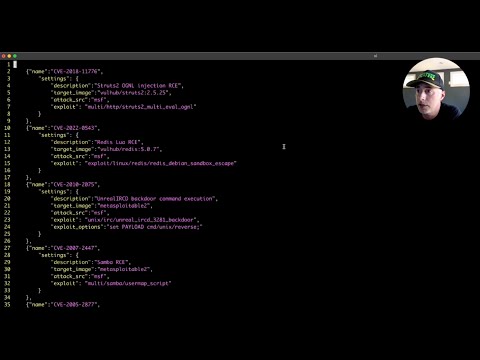
Note: This video shows an earlier version of SETC. The core workflow is the same but the CLI options have changed.
If you use SETC in your research, please cite:
IEEE CARS 2024 paper:
@INPROCEEDINGS{10778761,
  author={Holeman, Ryan and Hastings, John D. and Mathew Vaidyan, Varghese},
  booktitle={2024 Cyber Awareness and Research Symposium (CARS)},
  title={SETC: A Vulnerability Telemetry Collection Framework},
  year={2024},
  pages={1-7},
  doi={10.1109/CARS61786.2024.10778761}
}
Dissertation:
@phdthesis{holeman2024setc,
  author={Holeman, Ryan},
  title={SETC: A Vulnerability Telemetry Collection Framework},
  school={Dakota State University},
  year={2024},
  url={https://scholar.dsu.edu/theses/501/}
}