Simple plugin for translating wordpress posts, pages and woocommerce products using Google Cloud Translate API. The plugin integrates into Polylang plugin, ensuring proper linking of different language versions of posts, pages and products.
Short documentation (full docs in the making):
-
Install and configure Polylang, set up your languages, etc.
-
Please check how to get Google API key here: https://translatepress.com/docs/automatic-translation/generate-google-api-key/
-
Enable Polylang Google API Translate plugin
-
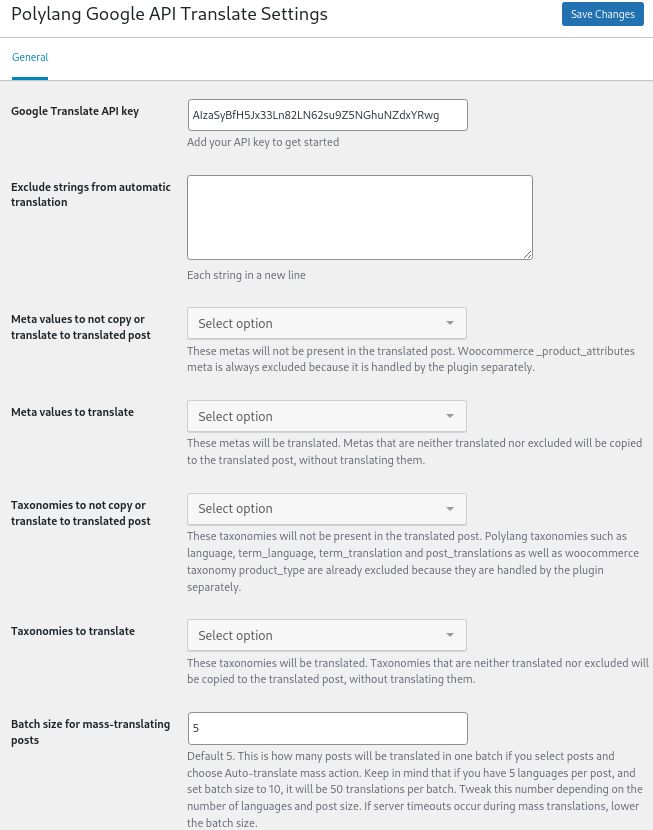
Please enter your API key in Wordpress -> Settings -> Polylang Auto Translate.
Settings page should be quite clear.
Please note: polylang works in such a way, that when a post in another language is created, all the content is duplicated and the two posts (say in English and in French) are linked by Polylang. It does not matter what the contents of the posts are - Polylang considers them to be different language versions of the same post. You may have a "Happy birthday" post in the English verion of the post and an "Obituary" in the French version. The user would see on the front-end a "Happy birthday" post, but then if he switches to French language, he would see an "Obituary" post. It is all up to content creators to ensure that the content on the page is meaningfull.
Polylang Google API Translate plugin takes the content of the post and the language code that is assigned to this post, and tries to translate it using Goolge Translate API to the target language. If the content is garbage and / or it is in a different language than the language code assigned, then the results of the translation will be poor.
Same as post contens, also all taxonomies and metas are duplicated by polylang and assigned a lanugage code and linked together in a "same content different language" relationship.
Depending on your content, some taxonomies and metas should be translated (e.g. the category and tag name), some will be required to be only copied (duplicated, but not translated. e.g. if you have a likes counter - there is no sense in translating a number, but you may want this number to be displayed in the translated version nontheless), and some should stay only in the original post, because they should be different for each language version of the post (e.b. a comment counter - the English version of the post might have 100 comments, but the French version only 5).
You should select which metas and taxonomies you would like to leave out, and which you would like to translate. All the other metas and terms will be duplicated to the translated language and their values will be copied.
The last setting is batch size for batch translation. It is recommende to be between 5 and 10.
- Translating posts, pages, products, etc
Go to Wordpress -> Posts.
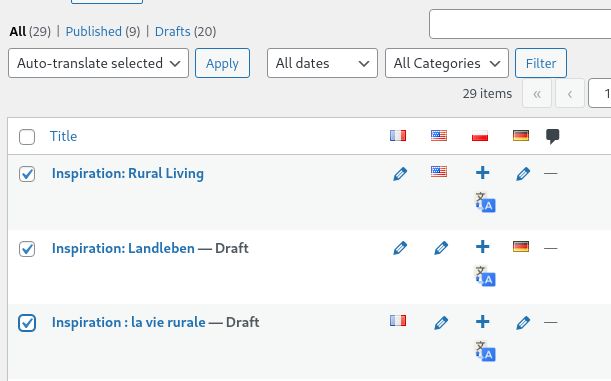
In the languages columns you will see something like below image. If you don't see the languages column, please click on "Screen Options" in the top-right corner and select each of the language that you want to see.
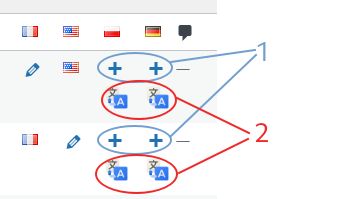
For each post you will see the standard Polylang translation options (i.e. a plus sign - add a new post of a given language, a pen - edit the linked language version of the post, a flag - edit current post). This is marked in blue ovals with a number "1" in the image above.
Below, only for posts that do not have a linked post in another language, you will see an auto translate icon (row marked in red ovals and with number 2 in the image above).
When you click on the auto-translate icon, a translation status window will pop up and inform you about the progress of translation. Any errors will also be displayed here:
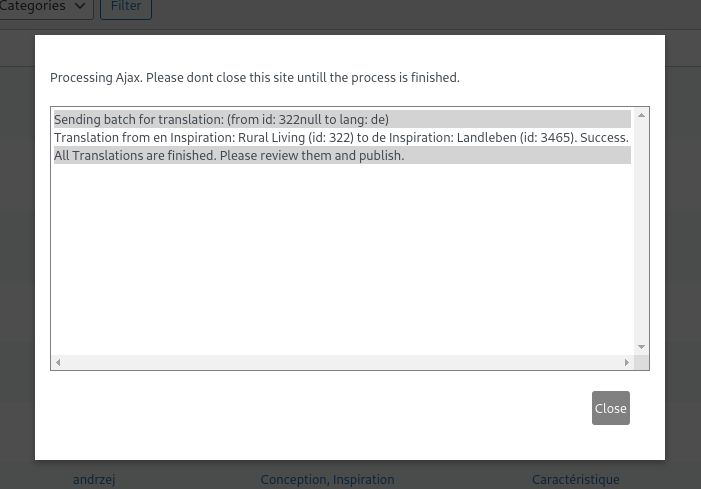
The plugin translates the post content and all the meta and taxonomies, according to selection in the plugin options. The translated post is available as a draft for inspection and publishing.
- Batch translation
You can select more than one post for translation using checkboxes in the left-most column of the posts table. Then click on the drop-down window bulk actions and select "Auto-translate selected". Click "Apply" button to the right of the dropdown and the translation status window will appear informing you about what is being done.
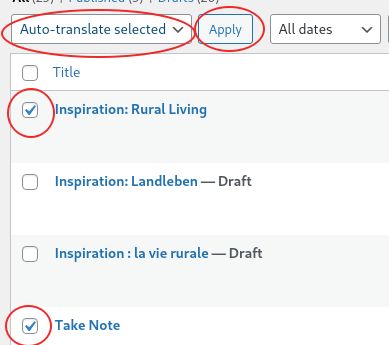
The bulk translation works in such a way that for each selected post the plugin tries to create missing translations (i.e. those that have the auto-translation icon displayed).
!IMPORTANT
Please be very carefull which posts you select. In the example below the plugin will translate the same "logical" post from english to polish, from french to polish and from german to polish. The result will be 3 polish versions of the same post and a mess in how the posts are linked (most probably two polish translations will be orphaned and only the last one would be linked to the other languages).
BTW: you can quickly fix translation links using the function described in section 9 below.
- If you are in a single post edit screen, you can also auto-translate it in a similar way as in the post table screen. If you are in the gutenberg block-edit screen, please click on the polylang icon in the top-right corner. Otherwise look for the polylang metabox in the right side of the screen. You should be able to see something like this:
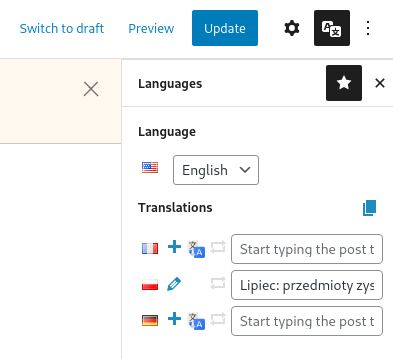
Here the process is the same as in the case of post table translation. The difference is that you will be redirected to the newly creadted translarted post, where you can check the changes and publish it.
- Translation of tags, categories, attributes, etc. (taxonomies and meta)
If the post has tags, categories, etc, they will be translated automatically and linked together, unless they are selected in the settings to be left out in the settings panel.
You can also translate tags and categories directly in the tags and categories pages.
The plugin works like this:
- if a post is being translated, for each tag and category that is not left out in the settings, check if it has a linked translation
- if it does, simply link this translation
- if not - create a new translation and either translate the original, or duplicate the content
- Linking translations
There is an option in the bulk-edit dropdown called "Re-link tranlsations". It works both for posts and tags, categories, etc. This option is to quickly re-link translations if the links are broken. This option does not do any automatic translation, etc. Please select a few posts or tags, categories, etc, each of a different language and use this option. The plugin will clear all the language relations of the selected items and then link them together as different language versions of the same content.
- Translating pages
Translation of pages works the same as for posts.
- Woocomemrce products
Woocommerce products are translated in the same way as posts. The internal functions of the plugin are diffrent, because products are more complex.
Translating product variations should work, but has not been tested. Your contribution is welcome.
- Other post types
If you would like to translate other post types, please use Polylang filter pll_get_post_types to include your post type in the translatable post type, like so:
    add_filter( 'pll_get_post_types', 'translate_custom_post_type', 10 );
    function translate_custom_post_type( $post_types ) {
        $post_types['custom_post_type'] = 'custom_post_type';
        return $post_types;
    }
If your post has specific fileds, or structure, the automatic translation might not work as expected.
Polylang reference can be found here: https://polylang.wordpress.com/documentation/documentation-for-developers/
- Updating translated content
If you have posts that are different language versions and linked together, and you edit the content of one of the posts, then you have to manually update the remaining posts.
- Translating strings
If you go to Languages -> String translations you will see that there is an auto-translate icon to the right of each text field. Upon clicking it, the plugin will take the main string (the value in the left-most "String" column), and try to translate it to the language that is assigned to the given text field. The plugin does not send any original language code to Google Translate, so Google Translate will try to determine the language of the original.