Prototype web aplication for cost evaluation and provisioning with Libcloud on Amazon Web Services
api-01: Ensure the vars are correly put on the validation-schema.ts and docker-compose.yml
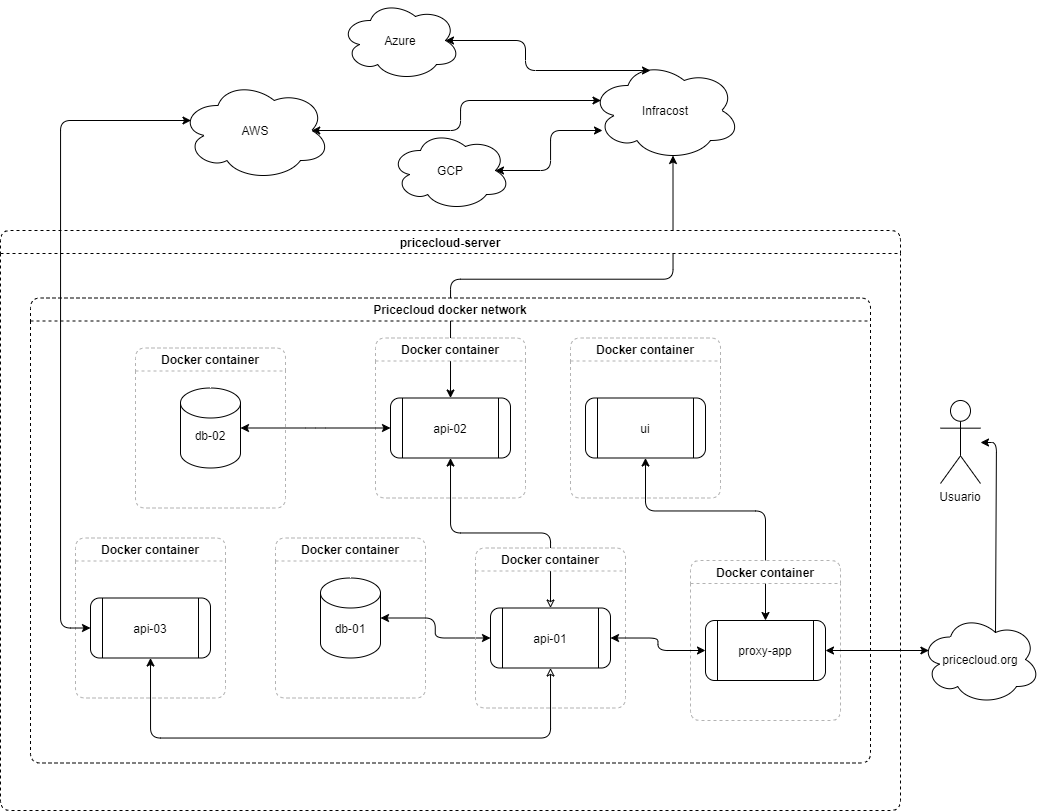
This code was built using NodeJS, ExpressJS, React and other packages (please see the package.json files for more info).
To run this project make sure to install Docker.
Now let's follow the next steps.
First thing is to clone the whole proyect.
git clone https://github.com/sebastianaf/pricecloud
cd pricecloudCreate a .env from .env.example file into the folders completing all environment variables, these will be used by the containers created by docker-compose.yml and the development services.
Inside ui make sure to create .env.production for production. (Based on create-react-app)
The docker-compose.yml file will deploy a extra service named uv-pricecloud-duckdns, it is a DDNS container named DuckDNS which is very usefull if you don`t have a static public IP. We highly recommend to use a reverse proxy like nginx-proxy-manager and to configure your port forwarding ISP modem, do not forget try to configure a firewall, (e.g. OPNSense).
Make sure to include the reverse proxy container into the project network using the following setup in the reverse proxy docker-compose.yml file to reach the pricecloud's containers.
version: "3.8"
    services:
        proxy-container
                .
                .
                .

            networks:
                - uv-pricecloud
        .
        .
        .

networks:
  proxy-container-network:
    name: proxy-container-network
  uv-pricecloud:
external: trueNow is time to wake up the services and access it thought the uv-pricecloud docker network.
If you need to access it locally uncomment the local service's ports deleting the # charapter from the docker-compose.yml file and then run the app with:
vagrant up
docker compose -p uv-pricecloud -up -d --build
This commands will wake up the services access it thought port specified as follow.
Server ports:
<API_PORT>: api-01
9010: api-02
<API03_PORT>: api-03
5432: db-01
5432: db-02
<UI_PORT>: ui
After initialization please type:
cd api-01Create database schema
npm run migrations:runRun seeding data
npm run seedIf you need environment to development please use vagrant up to create a dev box, dbs hostnames are org-postgresql-db-01 and org-postgresql-db-02