Generate Git commit messages from staged changes in VS Code using your local AI CLI.
Local Commit AI CLI includes presets for Codex CLI and Claude Code CLI, plus a custom provider for any command-line tool that can generate text. The extension runs the selected command on your machine, sends it the staged Git diff, and writes the generated message back to the Source Control commit input.
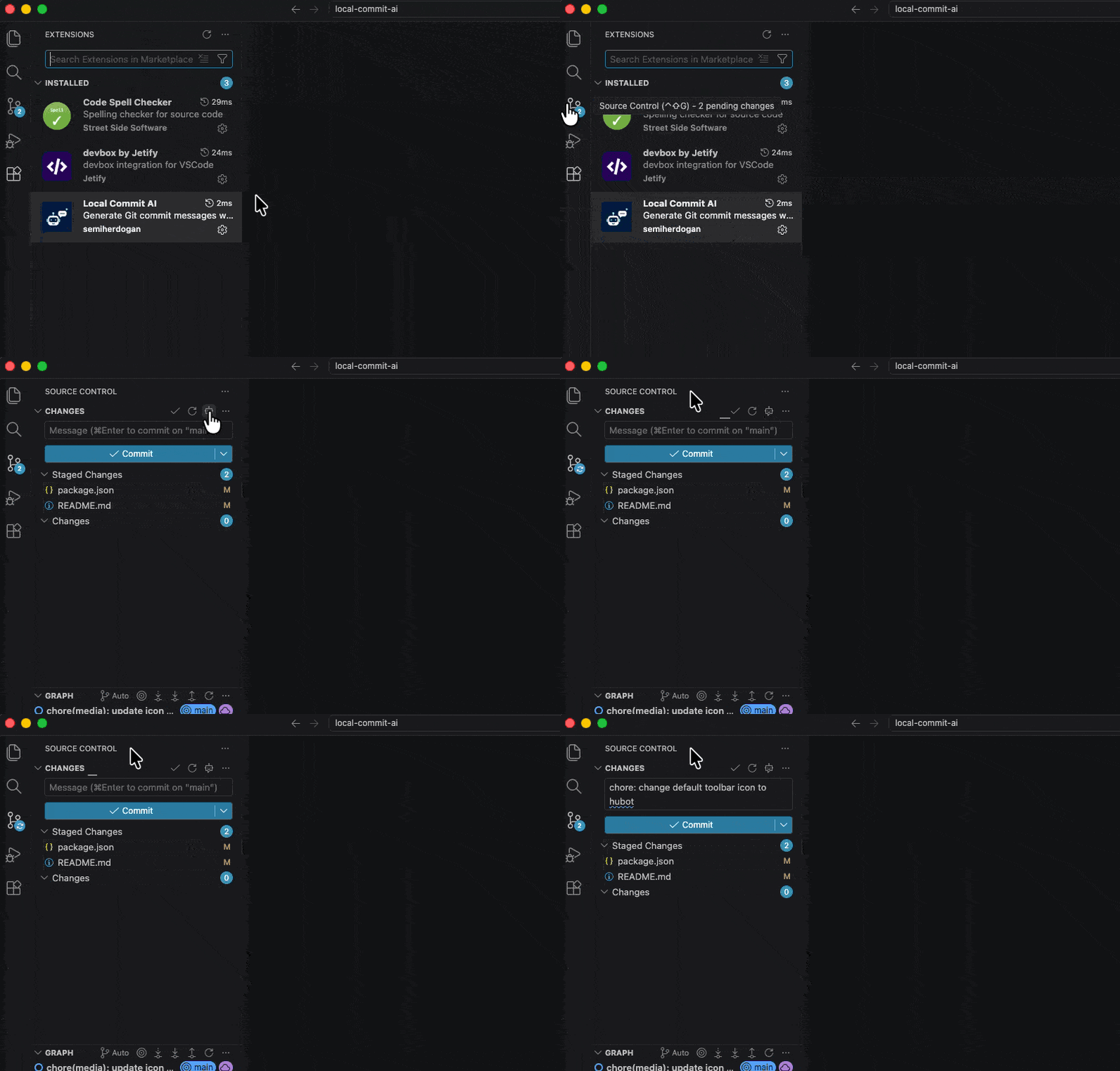
- Adds a Generate Commit Message action to the Source Control toolbar.
- Reads staged changes with
git diff --cached. - Sends the diff to
codex exec,claude --print, or your custom command. - Writes the generated message back to the Git commit input.
- Supports a customizable prompt template with
{diff}replacement. - Supports optional model names for built-in providers.
- Limits the number of diff lines sent to the CLI to keep generation fast and predictable.
- Lets you choose the toolbar icon from a small set of built-in VS Code icons.
Install from the extension registry:
For manual installation, download the latest VSIX file from GitHub Releases.
Then install it in VS Code:
- Open the Extensions view.
- Open the
...menu in the top-right corner. - Select Install from VSIX....
- Choose the downloaded
local-commit-ai-cli-*.vsixfile.
You can also install it from the command line:
code --install-extension local-commit-ai-cli-*.vsixInstall at least one supported CLI:
- Codex CLI
- Claude Code CLI
- Any custom CLI that accepts a prompt through stdin or command arguments
The CLI must be available on the PATH seen by VS Code.
- Open a Git repository in VS Code.
- Stage the changes you want to commit.
- Open the Source Control view.
- Click Generate Commit Message in the Source Control toolbar.
- Review the generated message before committing.
Only staged changes are used to generate the commit message.
| Setting | Default | Description |
|---|---|---|
localCommitAi.provider |
codex |
CLI provider. Supported values: codex, claude, custom. |
localCommitAi.model |
"" |
Optional model name passed to the selected CLI. |
localCommitAi.buttonIcon |
hubot |
Toolbar icon. Supported values: sparkle, hubot, gitCommit, commentAdd. |
localCommitAi.customCommand |
"" |
Command used when provider is custom. |
localCommitAi.customArgs |
[] |
Arguments used when provider is custom. Use {prompt} to insert the generated prompt into an argument. |
localCommitAi.customPromptStdin |
true |
Send the generated prompt to stdin when customArgs does not include {prompt}. |
localCommitAi.prompt |
Conventional commit prompt | Prompt template. Use {diff} where the staged diff should be inserted. |
localCommitAi.maxDiffLines |
100 |
Maximum staged diff lines sent to the CLI. Use 0 to disable truncation. |
localCommitAi.debug |
false |
Write generation diagnostics to the Local Commit AI CLI output channel. |
Example settings:
{
  "localCommitAi.provider": "codex",
  "localCommitAi.buttonIcon": "hubot",
  "localCommitAi.maxDiffLines": 100
}
Start without setting localCommitAi.model. When it is empty, the extension lets the selected CLI use its own default model.
Minimal provider settings:
| Provider | Setting |
|---|---|
| Codex CLI | "localCommitAi.provider": "codex" |
| Claude Code CLI | "localCommitAi.provider": "claude" |
| Custom CLI | "localCommitAi.provider": "custom" |
Only set localCommitAi.model if you want to override the CLI default. For Claude Code, aliases such as sonnet and haiku are supported by the CLI. For Codex CLI, use a model name supported by your Codex CLI version and account.
Prompt customization example:
{
  "localCommitAi.prompt": "Write one conventional commit message for this staged diff:\n\n{diff}"
}
Custom provider example with opencode:
{
  "localCommitAi.provider": "custom",
  "localCommitAi.customCommand": "opencode",
  "localCommitAi.customArgs": ["run", "{prompt}"],
  "localCommitAi.customPromptStdin": false
}
If your CLI reads from stdin, omit {prompt} from customArgs and leave customPromptStdin enabled:
{
  "localCommitAi.provider": "custom",
  "localCommitAi.customCommand": "your-cli",
  "localCommitAi.customArgs": ["generate-commit-message"],
  "localCommitAi.customPromptStdin": true
}Enable localCommitAi.debug to inspect generation diagnostics in the Local Commit AI CLI output channel.
The debug log includes provider, command, argument template, prompt source, diff line counts, duration, exit code, stderr preview, and the generated message. It does not log the full prompt or diff content.
For packaging and release steps, see CONTRIBUTING.md.
MIT