
Open-source drag-and-drop email editor for modern apps




Playground · Documentation · Website · Discussions
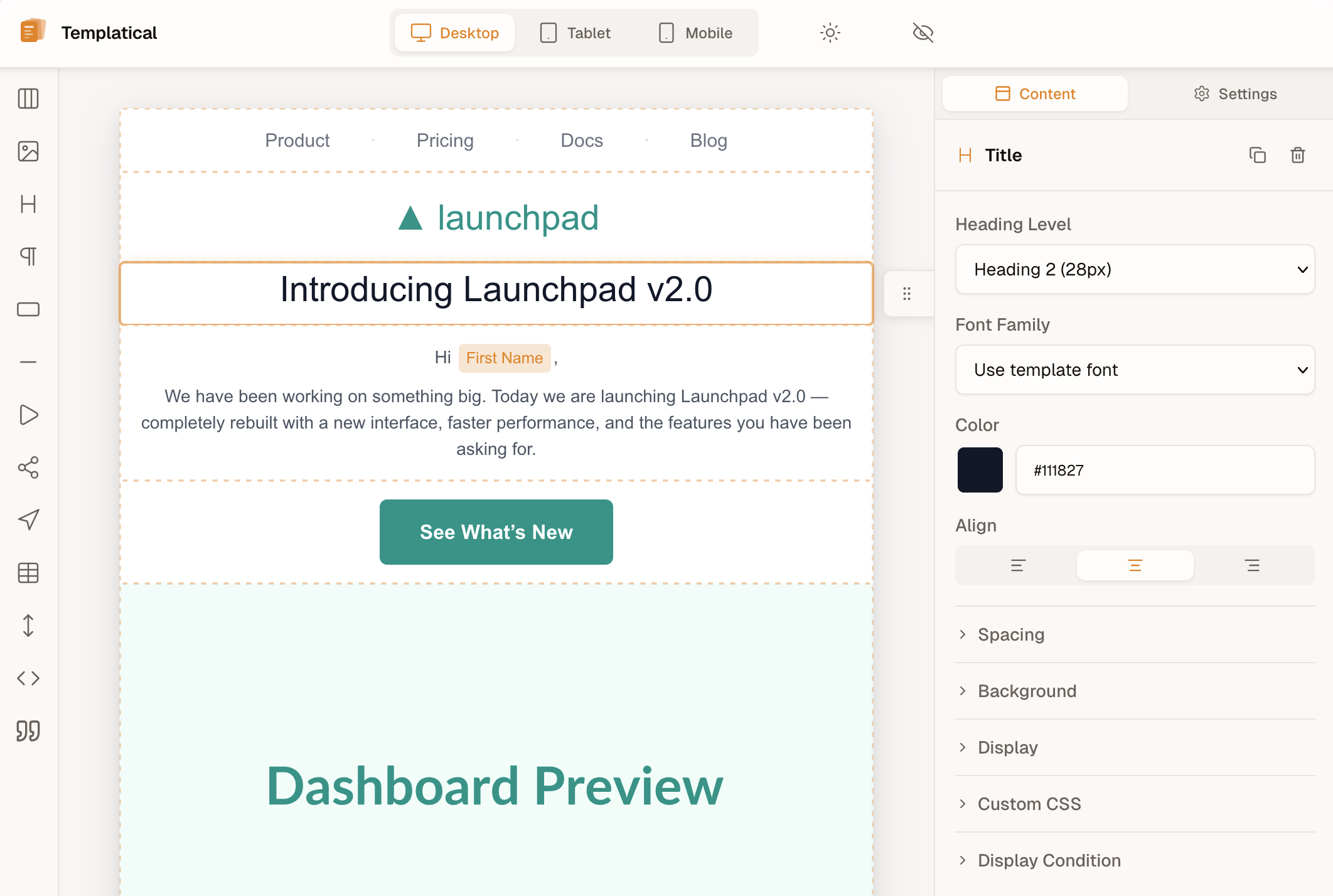
▶ Try it live in the playground
Templatical is a production-ready drag-and-drop email editor you can drop into any web app with a single function call. Templates are portable JSON, output is MJML (so they render correctly in every email client), and the editor itself is framework-agnostic — Vue under the hood, but you embed it in React, Svelte, Angular, or vanilla JS the same way. An optional Cloud tier is in development for AI rewrites, real-time collaboration, comments, snapshots, saved modules, multi-tenancy, test email sending, MCP support, and more.
Things that are usually paid features in commercial editors — open-source in Templatical:
- Custom blocks with API-backed data sources — register your own block types whose content is rendered from a static template or fetched live from your API at preview time. Typically a paid-tier feature in commercial editors.
- Merge tags with pluggable syntax —
{{handlebars}},{liquid},${js}, or your own — with automatic human-readable label replacement directly in the editor canvas. Build your CRM-aware tag picker in minutes. - Display conditions — show/hide blocks based on recipient attributes, with live preview in the editor.
- Full theming via design tokens — 27 OKLch tokens, custom fonts, dark mode, complete theme overrides. No CSS hacking, no paid tier.
- Template & block defaults — define your brand once. New templates and new blocks pick up your brand automatically.
Cloud features — AI rewrite, AI chat, real-time collaboration with block locking, comments, snapshots and version history, saved modules, hosted media library, template scoring, test email sending, MCP integration, multi-tenancy, headless API, and more — are part of the Templatical Cloud tier currently in development. The Cloud implementation is also open code in
@templatical/core/cloud. Learn more about Cloud →
- Drop-in mount — one
init()call, oneunmount(). No framework lock-in. - Style-isolated, both directions — Shadow DOM by default keeps host CSS out of the editor;
tpl:Tailwind prefix and no preflight reset keep editor styles out of your app. Drops into any page, any framework, any CMS — no resets, no conflicts. Learn more → - 14 block types — Title, Paragraph, Image, Button, Section, Divider, Spacer, Social Icons, Menu, Table, HTML, Video, Countdown, Custom.
- JSON templates — portable, versionable, store anywhere, render anywhere.
- MJML output — works with any email provider (Postmark, Resend, SES, Mailgun, anything).
- Framework-agnostic — first-class examples for React, Vue, Svelte, Angular, vanilla.
- Bilingual — en/de built in, easy to add more locales.
- TypeScript strict — full types for blocks, config, and callbacks.
- Battle-tested — ~1,400 unit tests + Playwright E2E coverage.
npm install @templatical/editor @templatical/rendererimport { init } from '@templatical/editor';
import '@templatical/editor/style.css';
const editor = await init({
container: '#editor',
onChange(content) {
// content is JSON — store it, version it, send it anywhere
console.log('Template updated:', content);
},
});
// Render to MJML when you're ready to send
const mjml = await editor.toMjml();<div id="editor" style="height: 100vh"></div>Read the full guide → · React, Svelte, Angular examples →
| Package | Description | License |
|---|---|---|
@templatical/editor |
Vue 3 visual drag-and-drop editor | FSL-1.1-MIT |
@templatical/core |
Framework-agnostic editor logic, state, history | FSL-1.1-MIT |
@templatical/media-library |
Media library — composable, components, standalone SDK | FSL-1.1-MIT |
@templatical/types |
Shared TypeScript types and block factories | MIT |
@templatical/renderer |
JSON → MJML → HTML renderer (browser + Node) | MIT |
@templatical/quality |
Accessibility linter for templates (browser + Node) | MIT |
@templatical/import-beefree |
Convert BeeFree templates to Templatical format | MIT |
@templatical/import-unlayer |
Convert Unlayer templates to Templatical format | MIT |
@templatical/import-html |
Convert HTML email templates (table-based) to Templatical format | MIT |
Editor packages (@templatical/editor, @templatical/core, @templatical/media-library) are licensed under Functional Source License 1.1, which automatically converts to MIT after 2 years per release. You can:
- ✅ Embed it in your SaaS, CRM, marketing tool, or transactional product
- ✅ Self-host, modify, fork for internal use
- ✅ Use it commercially without paying anything
The only restriction: don't repackage Templatical itself as a directly competing email-editor product. Renderers, types, and importers are pure MIT.
- Getting Started — install, mount, render
- Block Reference — all 14 block types
- Theming — design tokens, dark mode, custom fonts
- Custom Blocks — extend with your own
- Cloud (AI, Collab, Comments) — optional managed tier
- Migrating from BeeFree
- Migrating from Unlayer
- Migrating from HTML
Full docs: docs.templatical.com (English + Deutsch).
- More built-in block types (accordion, code, AMP-for-email)
- Plain-text email auto-generation
- More locales (community contributions welcome)
Track progress on GitHub Issues or open a Discussion to propose something.
Contributions, bug reports, and feature requests are welcome.
git clone https://github.com/templatical/sdk.git
cd sdk
pnpm install
pnpm run build
pnpm run test
See CONTRIBUTING.md for the full guide and CLAUDE.md for architecture details.
Templatical is built and maintained by a solo developer. If your company uses it in production, consider sponsoring on GitHub — it directly funds new features, faster releases, and continued open development.
- Editor packages (
@templatical/editor,@templatical/core,@templatical/media-library) — FSL-1.1-MIT - Types, renderer, importers — MIT