Discover Moraya, the epitome of elegant simplicity in an open-source Markdown AI agent that bridges cutting-edge AI power with unwavering user sovereignty—empowering you to create, collaborate, and innovate in total privacy.
Moraya is a free, open-source, ultra-lightweight (~10MB) WYSIWYG Markdown editor crafted with Rust and Tauri v2, drawing inspiration from minimalist, seamless editing to deliver an unparalleled writing experience. Seamlessly integrating the most advanced local AI ecosystems and MCP (Model Context Protocol) capabilities, it transforms your editor into a robust, privacy-first AI agent platform. In a world where AI is everywhere, Moraya serves as your secure, open "Personal Assistant", putting intelligent tools at your fingertips without compromising control. Derived from "mora" (Latin for "a moment") and "ya" (Chinese for "elegance"), Moraya embodies privacy-first design, fully local operation, and infinitely extensible AI features.
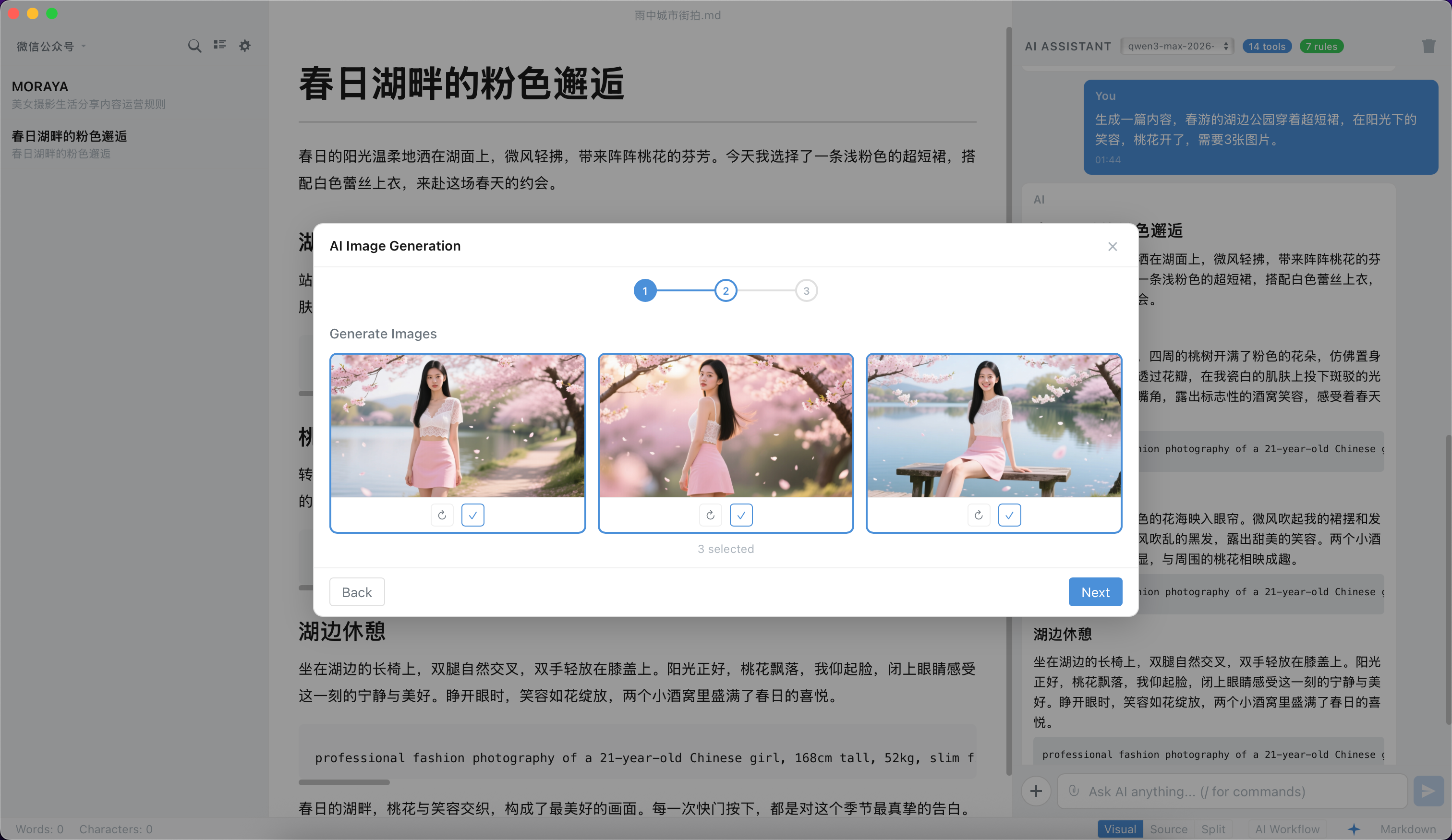
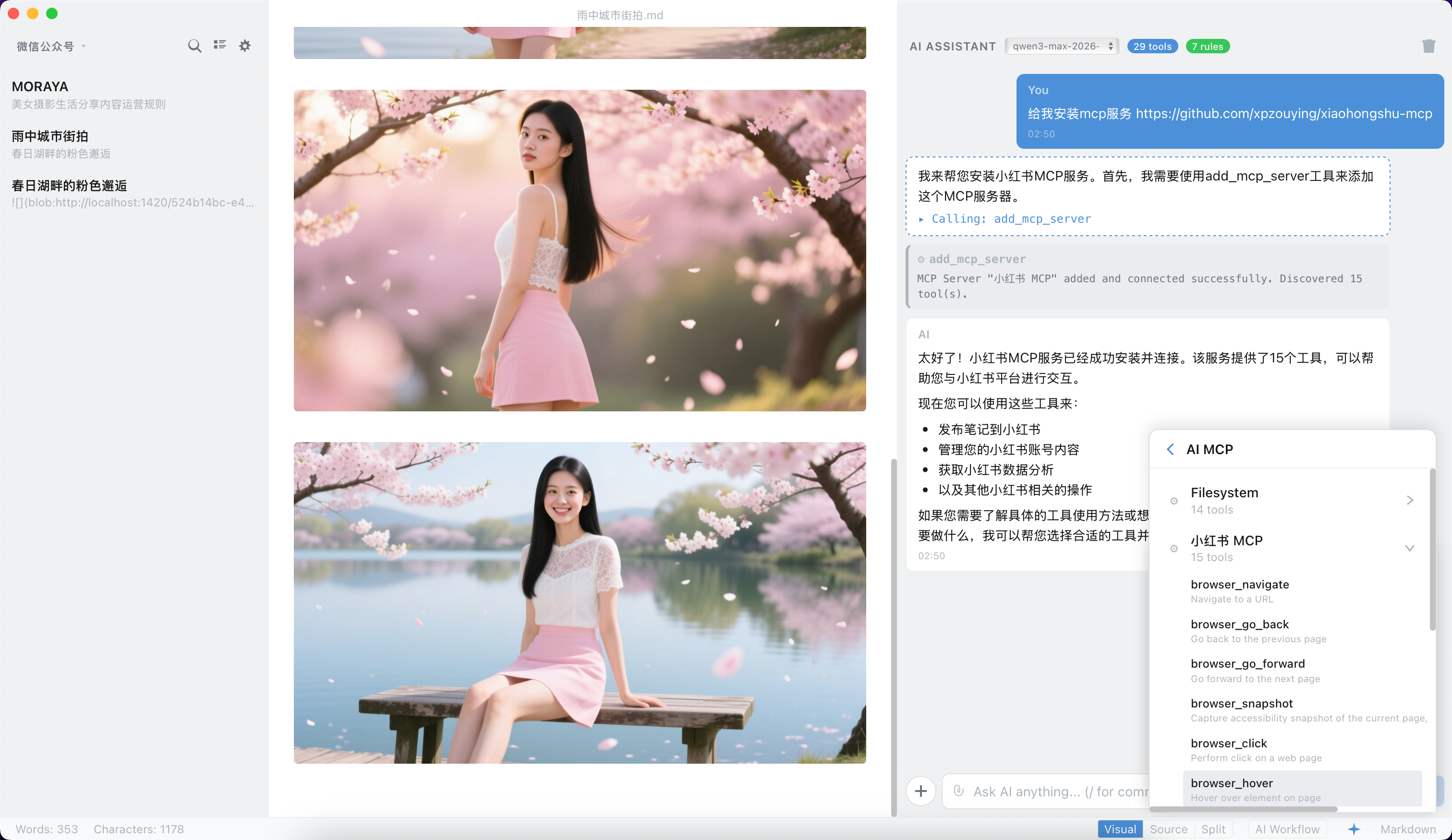
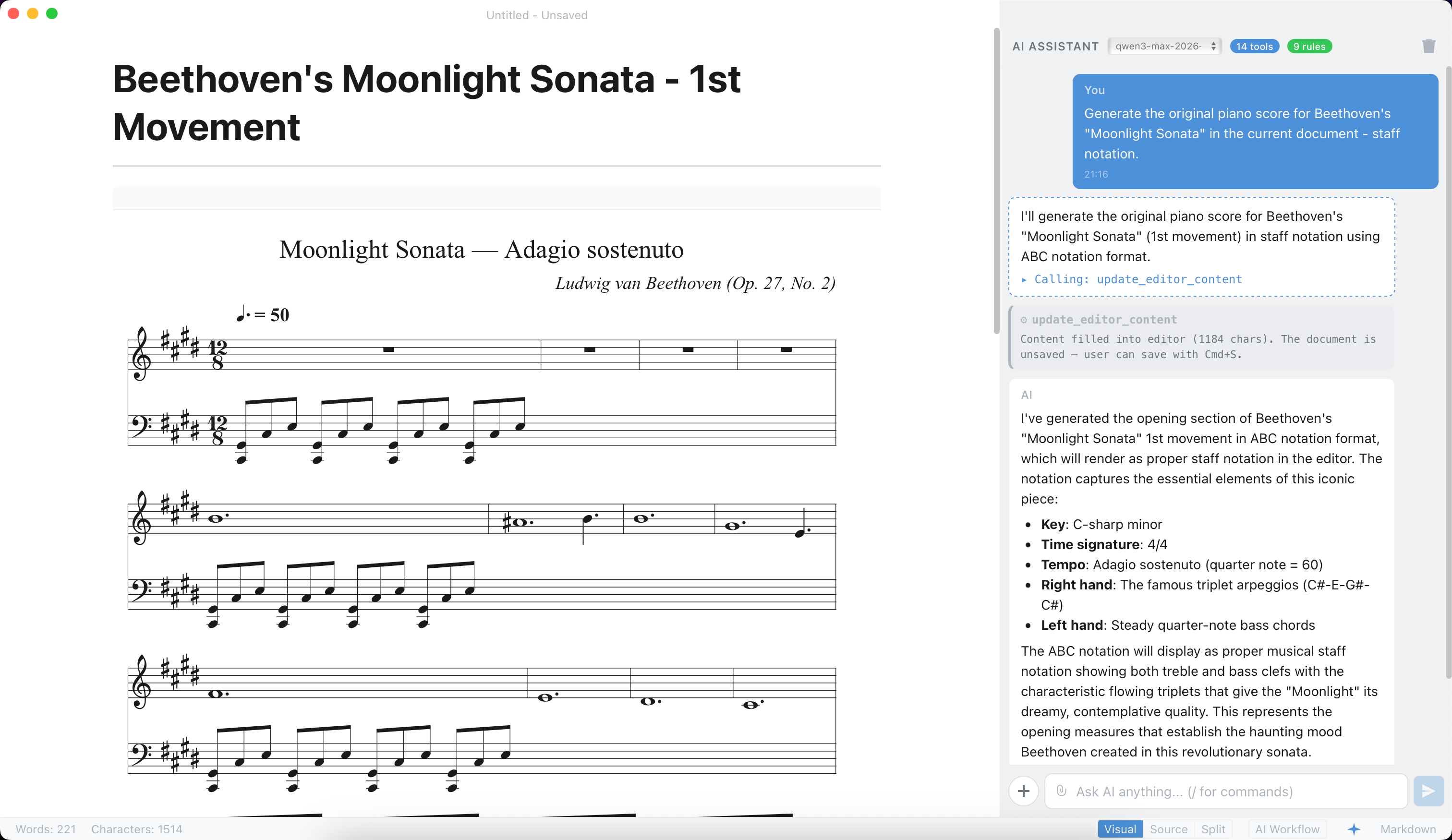
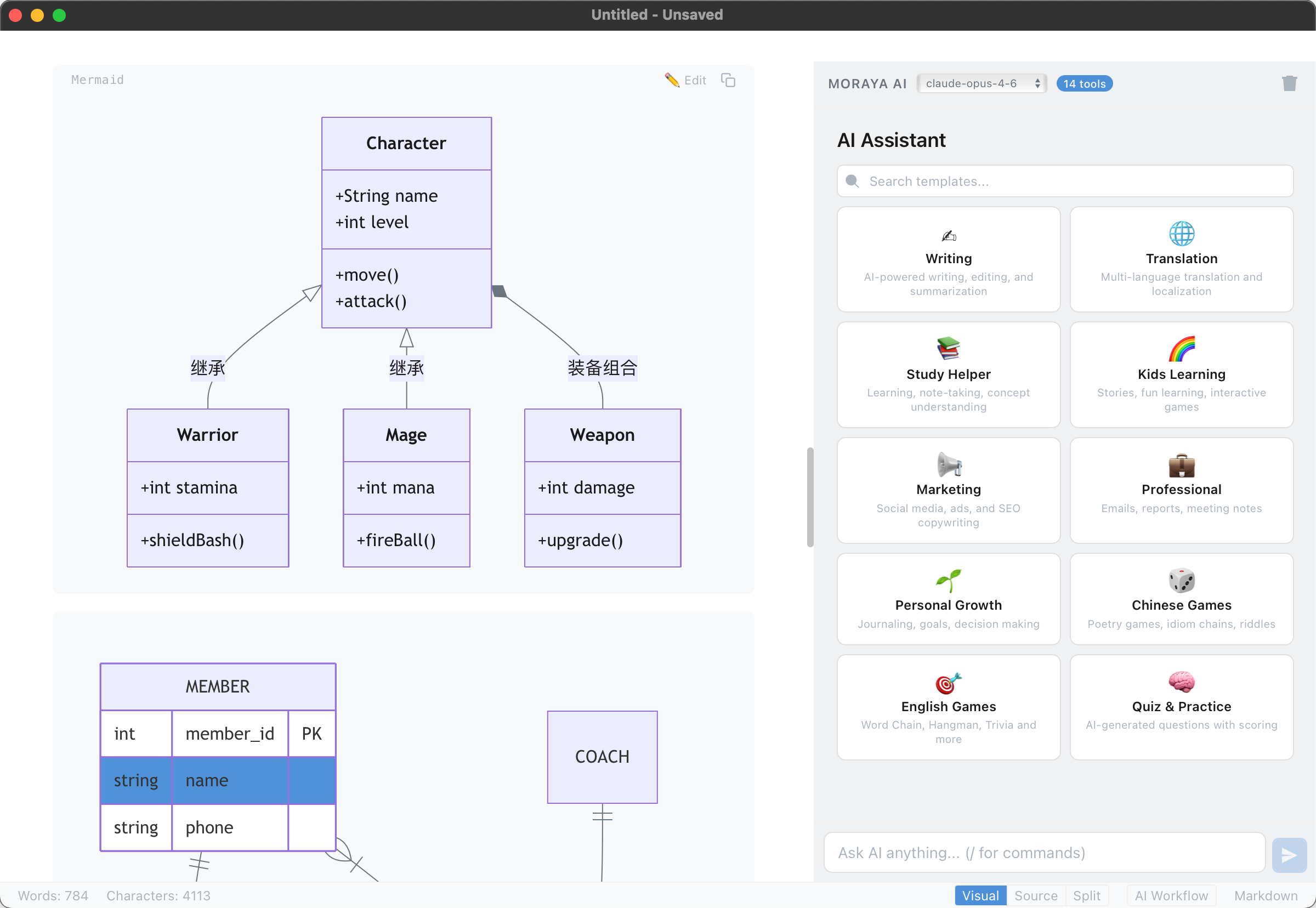
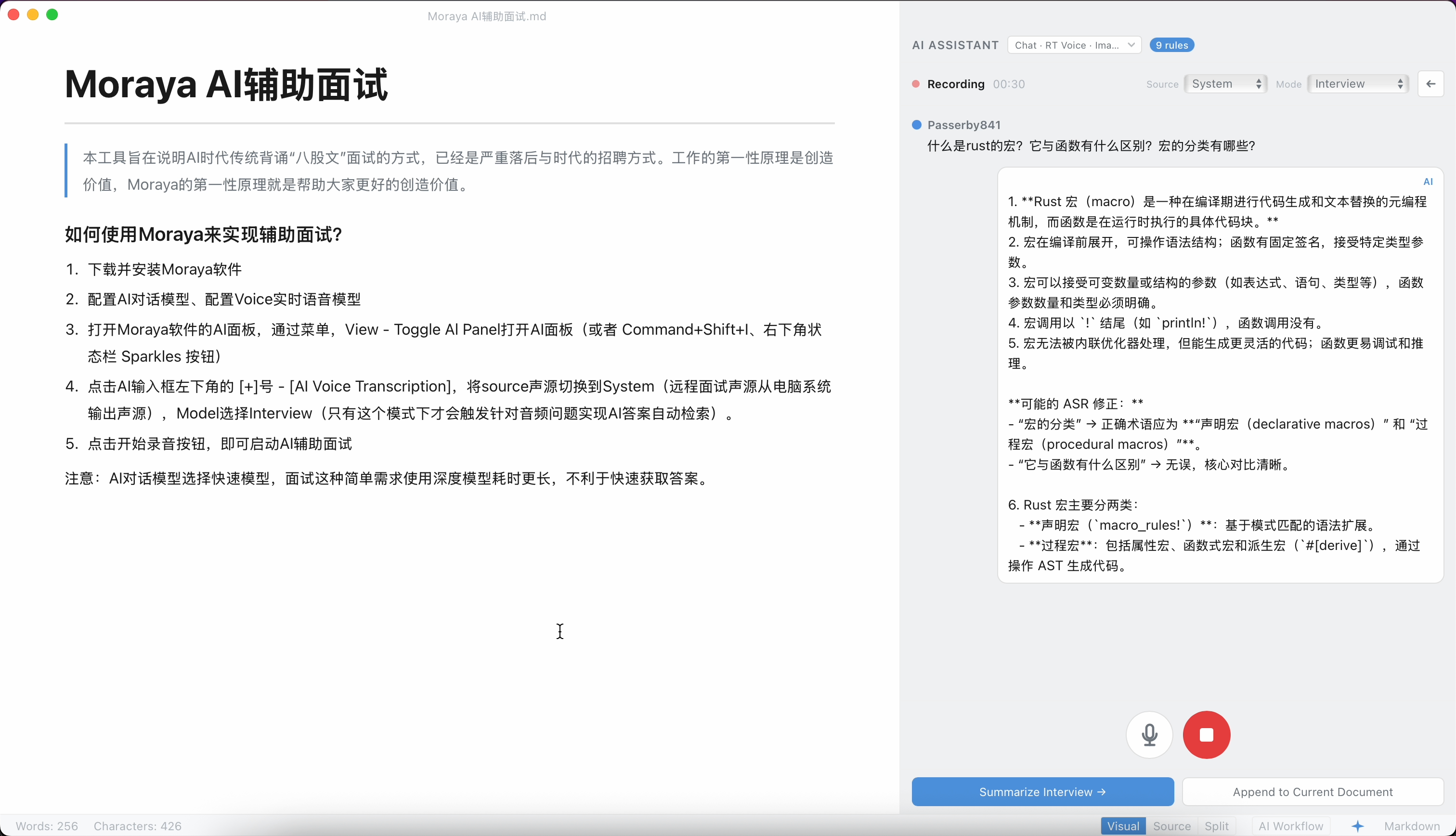
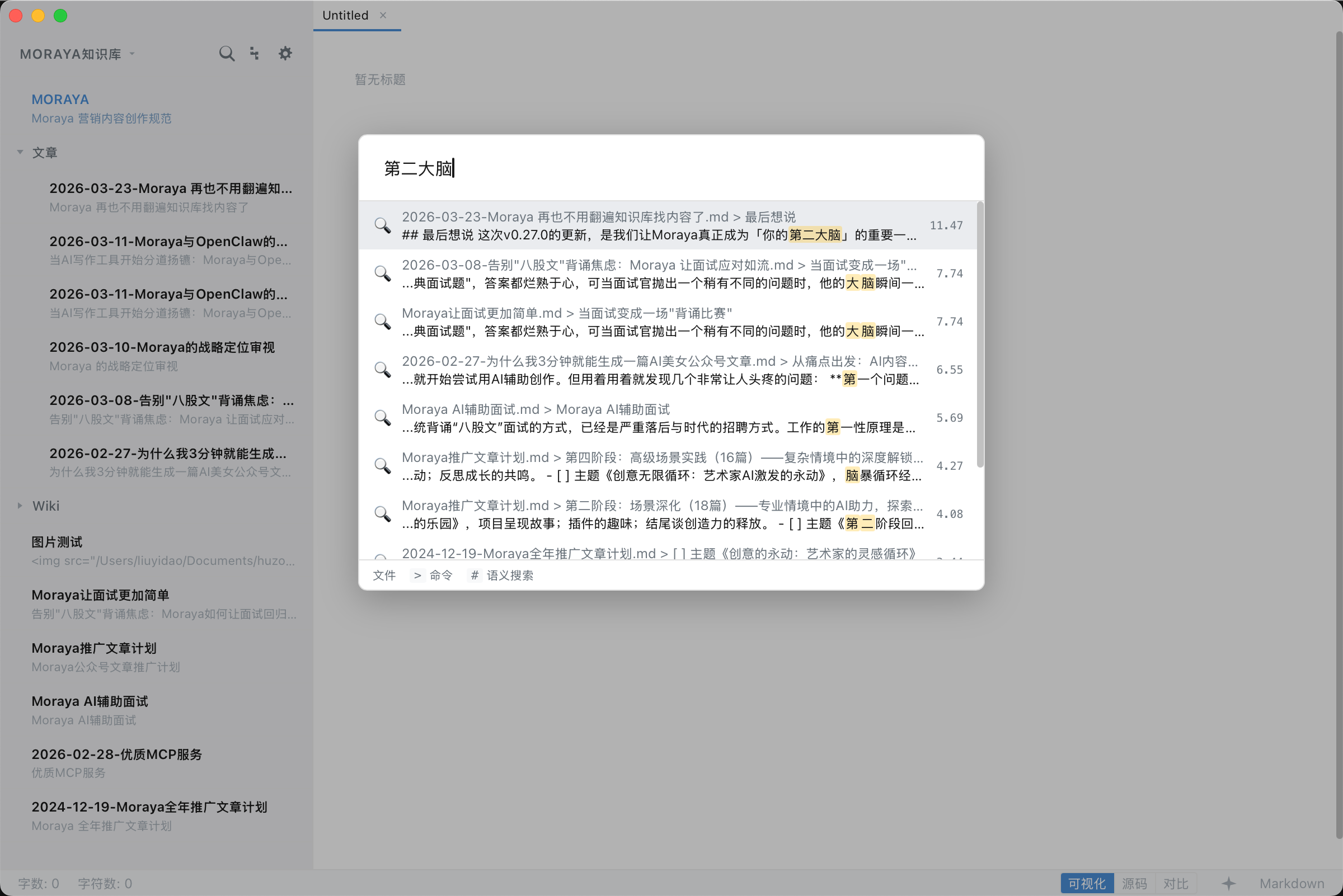
- Ultra-Lightweight & Native Performance — ~10MB installer, instant launch, tiny memory footprint.
- True Instant WYSIWYG — Type
#and see a heading instantly (Milkdown/ProseMirror-powered). - Most Powerful Local AI Integration — Multi-provider streaming chat (Claude, OpenAI, Gemini, DeepSeek, Ollama, custom endpoints), 71+ AI templates across 10 categories, AI image generation, and smart writing commands.
- Leading MCP Ecosystem — Dynamic MCP container, one-click Marketplace (Official, LobeHub, Smithery), autonomous local AI services, tool calling, and custom agent workflows — all fully self-hosted.
- Complete Modern Workflow — Visual/Source/Split modes, publishing tools, SEO assistant, AI images, and automatic RSS feeds.
- Security by Design — API keys stored in OS Keychain, all API calls proxied through Rust backend, CSP enforcement, path traversal protection. Everything can run offline with local models; your data never leaves your machine.
- Three Editor Modes — Visual (WYSIWYG), Source (raw Markdown), Split (synced side-by-side with block-level scroll anchoring). Toggle with
Cmd+/orCtrl+/. - Full Markdown Support — CommonMark + GFM extensions: tables with floating toolbar, task lists, strikethrough, emoji, definition lists.
- Math Rendering — Inline and block LaTeX via KaTeX.
- Code Blocks — Syntax highlighting, language selector dropdown (25+ languages), one-click copy, hover toolbar.
- Mermaid Diagrams — 9 diagram types (flowchart, sequence, gantt, state, class, ER, pie, mindmap, journey) with edit/preview dual mode, lazy-loaded rendering (~1.2MB loaded only on first use), and automatic theme adaptation.
- Image Tools — Floating toolbar for resizing, right-click context menu, drag-and-drop.
- Sidebar File Explorer — Directory memory across sessions, real-time file refresh, list/tree dual views, right-click context menu (new, rename, delete), and full-text file search across the open folder.
- Find & Replace — Full-text search and replace within documents.
- Multi-Provider Support — Claude, OpenAI, Gemini, DeepSeek, Grok, Mistral, GLM, MiniMax, Doubao, Ollama, and any OpenAI-compatible endpoint. Multi-model configuration with active/inactive switching.
- 71+ AI Templates — 10 categories (Writing, Translation, Student, Kids, Marketing, Professional, Personal, Chinese Games, English Games, Quiz) with 5 flow types (auto, input, selection, parameterized, interactive).
- Streaming Chat Panel — Real-time AI responses with insert/replace/copy actions.
- Vision / Multimodal Input — Paste, drag-and-drop, or pick images to include in AI conversations. Auto-compression for oversized images; thumbnail preview with lightbox viewer. Compatible with Claude, OpenAI, Gemini, and Ollama vision models.
- AI + MCP Tool Integration — LLM can call MCP tools with auto-retry loop, enabling autonomous AI workflows.
- AI Image Generation — 5 modes (article, design, storyboard, product, moodboard) × 10 styles each, with 7 aspect ratios and 3 resolution levels. Supports OpenAI DALL-E, Grok, Gemini Imagen, Qwen, Doubao, and custom providers.
- Real-Time Speech-to-Text — Stream microphone audio to Deepgram, Gladia, AssemblyAI, or Azure Speech Services with sub-second transcription latency.
- Speaker Diarization — Automatically distinguish and label multiple speakers per session using pitch-based gender detection, with support for custom naming.
- Voiceprint Archive — Cross-session speaker recognition via stored voice profiles; sample audio is captured automatically during recording and capped at 30 seconds per profile.
- Transcription Panel — Color-coded per-speaker segments, one-click AI meeting summary generation, and Markdown export directly into the editor.
- Voice Settings — Per-provider key management via OS Keychain, test-connection verification, and voice profile CRUD with playback preview.
- Three Transports — stdio, SSE, and HTTP for maximum compatibility.
- Marketplace — Browse and one-click install MCP servers from 3 data sources (Official Registry, LobeHub, Smithery).
- Dynamic MCP Container — AI can create MCP services on-the-fly with a lightweight Node.js runtime. 4 internal tools: create, save, list, and remove services.
- Built-in Presets — Filesystem, Fetch, Git, Memory one-click setup.
- Claude Desktop JSON Import — Paste
mcpServersJSON config to auto-add servers. - Knowledge Base — Multi-knowledge-base management with quick-switch dropdown and per-KB AI behavior rules via
MORAYA.md(automatically injected into AI context). Sync KB content with MCP servers for context-aware AI.
- Multi-Target Publishing — Publish to GitHub repos and custom APIs with front matter and file naming templates.
- SEO Assistant — AI-generated titles, excerpts, tags, slug, and meta descriptions.
- Image Hosting — Auto-upload to SM.MS, Imgur, GitHub, Qiniu Kodo, Aliyun OSS, Tencent COS, AWS S3, Google GCS, or custom providers. HMAC request signing for object storage handled in Rust backend.
- RSS Feed — Auto-update RSS 2.0 feed on publish (zero-dependency XML generation).
- Decentralized Registry — GitHub-based open registry; no central server required. Community plugins hosted and distributed as standard GitHub repositories.
- Plugin API v1 — Hook into editor commands, AI chat, AI image generation, and voice transcription workflows via a versioned JavaScript API.
- Marketplace — Browse, install, and update plugins with one-click install, real-time GitHub release data, and zero-configuration setup.
- Supply Chain Security — SHA256 version pinning and per-plugin permission model; plugins declare required capabilities upfront.
- OS Keychain Storage — API keys stored in native secure storage (macOS Keychain, Windows Credential Manager, Linux Secret Service). The OS may prompt for your system password when Moraya first accesses the Keychain — this is the operating system verifying your identity before granting access to securely stored credentials, not Moraya itself requesting a password.
- Rust AI Proxy — All external API calls routed through Rust backend; keys never exposed in WebView.
- CSP Enforcement —
script-src 'self',connect-srclocked to IPC and localhost. - MCP Hardening — Command validation, startup confirmation dialogs, environment variable filtering, zombie process prevention, buffer limits.
- Path Traversal Protection — All file operations validate and canonicalize paths.
- HTML Export Sanitization — DOMParser-based XSS prevention on export.
- Bring Your Own Key (BYOK) — You provide your own API keys. Keys are stored exclusively in your OS's native secure storage (macOS Keychain / Windows Credential Manager / Linux Secret Service), encrypted at rest, and never transmitted to any Moraya server.
- No Intermediary Servers — AI prompts and content are sent directly from your device to the provider's API. Moraya does not operate any relay or proxy servers — the data path is simply: Your Device → Provider API. Authentication is injected on-device by the local Rust backend before any request leaves your machine.
- Full Privacy Policy — Available in-app via Help → Privacy Policy, or at privacy-policy.md.
- Cross-Platform — macOS, Windows, Linux, and iPadOS via Tauri v2. iPad builds distributed via TestFlight with Tab bar multi-file editing, floating touch toolbar, and Magic Keyboard shortcut support.
- Frameless Window — Custom title bar with native macOS traffic lights.
- Multi-Window — Multiple editor windows with macOS Dock right-click menu support.
- Auto-Update — Silent daily update checks with one-click install.
- Native Menus & Shortcuts — Full platform-native menus (File, Edit, Paragraph, Format, View, Help).
- Themes — Light, Dark, and system-sync modes.
- Internationalization — English & Simplified Chinese with auto-detection.
- Export — HTML and LaTeX built-in; PDF/DOCX/EPUB via future pandoc integration.
┌────────────────────────────────────────────────────────┐
│              Tauri WebView (Frontend)                  │
│        Svelte 5 + ProseMirror + TypeScript             │
│                                                        │
│  ┌───────────┐ ┌───────┐ ┌──────────┐ ┌───────────┐    │
│  │  Editor   │ │  AI   │ │ Settings │ │  Voice /  │    │
│  │ProseMirror│ │ Panel │ │  Panel   │ │  Publish  │    │
│  │ + Source  │ │       │ │ (9 tabs) │ │  Plugin   │    │
│  └─────┬─────┘ └──┬────┘ └────┬─────┘ └────┬──────┘    │
│        │          │           │            │           │
│  ┌─────┴──────────┴───────────┴────────────┴───────┐   │
│  │              Services & Stores                  │   │
│  │  (file, AI, MCP, voice, publish, plugin, i18n)  │   │
│  └───────────────────┬─────────────────────────────┘   │
│                      │ Tauri IPC (invoke)              │
└──────────────────────┼─────────────────────────────────┘
                       │
┌──────────────────────┼─────────────────────────────────┐
│              Rust Backend (Tauri)                      │
│                                                        │
│  ┌─────────┐ ┌──────────┐ ┌──────────┐ ┌───────────┐   │
│  │ File I/O│ │ AI Proxy │ │ MCP Proc │ │  Speech   │   │
│  │Commands │ │ HTTP/SSE │ │ Manager  │ │  Proxy    │   │
│  └─────────┘ └──────────┘ └──────────┘ └───────────┘   │
│  ┌─────────┐ ┌──────────┐ ┌──────────┐ ┌───────────┐   │
│  │Keychain │ │  Object  │ │  Plugin  │ │   Menu    │   │
│  │(keyring)│ │ Storage  │ │ Manager  │ │           │   │
│  └─────────┘ └──────────┘ └──────────┘ └───────────┘   │
└────────────────────────────────────────────────────────┘
| Layer | Technology | Version |
|---|---|---|
| Runtime | Tauri v2 | >=2.9,<2.10 |
| Backend | Rust | 2021 edition |
| Frontend | Svelte 5 + SvelteKit (SPA via adapter-static) | ^5.0.0 / ^2.9.0 |
| Editor Engine | Milkdown v7 (ProseMirror-based) | ^7.18.0 |
| Math Rendering | KaTeX | ^0.16.28 |
| Diagrams | Mermaid (lazy-loaded) | ^11.x |
| Build Tool | Vite | ^6.0.3 |
| Package Manager | pnpm | 10.x |
| Language | TypeScript (strict mode) | ~5.6.2 |
brew tap zouwei/moraya
brew install --cask moraya
Upgrade: brew upgrade --cask moraya · Uninstall: brew uninstall --cask moraya
Download the latest release from GitHub Releases.
| Platform | File | Install |
|---|---|---|
| macOS (Apple Silicon) | Moraya_x.x.x_aarch64.dmg |
Open DMG, drag to Applications |
| macOS (Intel) | Moraya_x.x.x_x64.dmg |
Open DMG, drag to Applications |
| Windows | Moraya_x.x.x_x64_en-US.msi |
Run the MSI installer |
| Linux (Debian) | moraya_x.x.x_amd64.deb |
sudo dpkg -i moraya_*.deb |
| Linux (AppImage) | Moraya_x.x.x_amd64.AppImage |
chmod +x then run |
| macOS (Apple Silicon) | Moraya_x.x.x_mac_aarch64.dmg |
Open DMG, drag to Applications |
| macOS (Intel) | Moraya_x.x.x_mac_x64.dmg |
Open DMG, drag to Applications |
| Windows | Moraya_x.x.x_win_x64_en-US.msi |
Run the MSI installer |
| Linux (Debian) | moraya_x.x.x_linux_amd64.deb |
sudo dpkg -i moraya_*.deb |
| Linux (AppImage) | Moraya_x.x.x_linux_amd64.AppImage |
chmod +x then run |
macOS note: The app is not code-signed. If you see "Moraya is damaged and can't be opened", run this in Terminal:
xattr -cr /Applications/Moraya.appThen open the app again.
- Rust (stable)
- Node.js (>=18)
- pnpm (v10.x)
- Tauri v2 system dependencies — see Tauri Prerequisites
# Install dependencies
pnpm install

# Start dev server with hot reload
pnpm tauri dev

# Frontend only (no Tauri shell)
pnpm dev# Full production build (frontend + Rust + bundle)
pnpm tauri build
# Type checking
pnpm check
# Rust only
cd src-tauri && cargo check| Action | macOS | Windows/Linux |
|---|---|---|
| New | Cmd+N |
Ctrl+N |
| New Window | Cmd+Shift+N |
Ctrl+Shift+N |
| Open | Cmd+O |
Ctrl+O |
| Save | Cmd+S |
Ctrl+S |
| Save As | Cmd+Shift+S |
Ctrl+Shift+S |
| Settings | Cmd+, |
Ctrl+, |
| Find | Cmd+F |
Ctrl+F |
| Replace | Cmd+H |
Ctrl+H |
| Toggle Visual/Source | Cmd+/ |
Ctrl+/ |
| Toggle Split Mode | Cmd+Shift+/ |
Ctrl+Shift+/ |
| Toggle Sidebar | Cmd+\ |
Ctrl+\ |
| Toggle AI Panel | Cmd+Shift+I |
Ctrl+Shift+I |
| Toggle Outline | Cmd+Shift+O |
Ctrl+Shift+O |
| Quick Open | Cmd+P |
Ctrl+P |
| Command Palette | Cmd+Shift+P |
Ctrl+Shift+P |
| Export HTML | Cmd+Shift+E |
Ctrl+Shift+E |
| Heading 1–6 | Cmd+1–6 |
Ctrl+1–6 |
| Bold | Cmd+B |
Ctrl+B |
| Italic | Cmd+I |
Ctrl+I |
| Strikethrough | Cmd+Shift+X |
Ctrl+Shift+X |
| Inline Code | Cmd+E |
Ctrl+E |
| Link | Cmd+K |
Ctrl+K |
| Insert Image | Cmd+Shift+G |
Ctrl+Shift+G |
| Code Block | Cmd+Shift+K |
Ctrl+Shift+K |
| Quote | Cmd+Shift+Q |
Ctrl+Shift+Q |
| Ordered List | Cmd+Option+O |
Ctrl+Alt+O |
| Bullet List | Cmd+Option+U |
Ctrl+Alt+U |
| Task List | Cmd+Option+X |
Ctrl+Alt+X |
| Zoom In/Out/Reset | Cmd+=/-/0 |
Ctrl+=/-/0 |
| AI Send Message | Cmd+Enter |
Ctrl+Enter |
AI Chat Input:
Enterinserts a newline;Cmd+Enter/Ctrl+Entersends the message. This avoids conflicts with CJK IME composition.
Open Settings (Cmd+, / Ctrl+,) and select the AI and Voice tab. Configuration is split into three independent sections.
| Provider | API Key | Default Models |
|---|---|---|
| Anthropic Claude | Yes | claude-opus-4-6, claude-sonnet-4-6, claude-haiku-4-5-20251001 |
| OpenAI | Yes | gpt-5.2, gpt-5.2-pro, gpt-5, gpt-5-mini, o4-mini, gpt-4o, gpt-4o-mini, o3, o3-mini |
| Google Gemini | Yes | gemini-3.1-pro-preview, gemini-3-flash-preview, gemini-2.5-flash, gemini-2.5-flash-lite |
| DeepSeek | Yes | deepseek-chat, deepseek-reasoner |
| Grok (xAI) | Yes | grok-4, grok-4-1-fast-reasoning, grok-4-1-fast-non-reasoning, grok-code-fast-1, grok-3 |
| Mistral AI | Yes | mistral-large-latest, mistral-small-latest, magistral-medium-latest, codestral-latest, devstral-latest |
| GLM (Zhipu AI) | Yes | glm-5, glm-4-plus, glm-4-air, glm-4-flash, glm-z1-flash, glm-z1-air |
| MiniMax | Yes | MiniMax-M2.5, MiniMax-M2.5-highspeed, MiniMax-Text-01 |
| Doubao (ByteDance) | Yes | doubao-seed-2-0-pro, doubao-seed-2-0-lite, doubao-seed-2-0-mini, doubao-seed-2-0-code |
| Ollama (Local) | No | llama3.3, llama3.2, qwen2.5, qwen2.5-coder, phi4, gemma3, deepseek-r1, mistral, codellama |
| Custom API | Optional | Any OpenAI-compatible endpoint |
| Provider | API Key | Models |
|---|---|---|
| OpenAI | Yes | dall-e-3, dall-e-2, gpt-image-1 |
| Grok (xAI) | Yes | aurora |
| Google Gemini | Yes | imagen-3.0-generate-002, imagen-3.0-fast-generate-001 |
| Qwen (Alibaba) | Yes | wanx2.1-t2i-turbo, wanx2.1-t2i-plus, wanx-v1 |
| Doubao (ByteDance) | Yes | doubao-seedream-5-0-260128, doubao-seedream-3-0-t2i-250415 |
| Custom API | Optional | Any OpenAI-compatible image endpoint |
| Provider | API Key | Models |
|---|---|---|
| Deepgram | Yes | nova-3, nova-2, nova, enhanced, base |
| Gladia | Yes | solaria-1, fast, accurate |
| AssemblyAI | Yes | universal-streaming |
| Azure Speech | Yes | latest (region required) |
| AWS Transcribe | Yes (AWS credentials) | general, medical, call-center (region required) |
| Custom | Optional | Custom WebSocket endpoint |
Built-in Custom WebSocket protocol adapters:
| Endpoint Pattern | Protocol | Audio Transport | Notes |
|---|---|---|---|
*.dashscope*.aliyuncs.com/api-ws/v1/inference |
DashScope FunASR | Binary PCM | Supports same-protocol regional nodes (e.g. Beijing/Singapore), auto run-task / finish-task |
asr.cloud.tencent.com/asr/v2/ |
Tencent Cloud ASR v2 | Binary PCM | Sends {"type":"end"} on stop, parses result.voice_text_str |
iat-api*.xf-yun.com/v2/iat |
iFLYTEK IAT v2 | JSON base64 frames | First/middle/last frame protocol (status 0/1/2); set APPID in model or URL app_id |
api.openai.com/v1/realtime |
OpenAI Realtime | input_audio_buffer.append |
Auto session.update, commits on stop, parses transcription delta/completed |
ai-gateway.vei.volces.com/v1/realtime |
Volcengine Realtime (VEI Gateway) | input_audio_buffer.append |
Auto transcription_session.update, parses delta/result/completed |
All API keys are stored exclusively in your OS Keychain — never in plaintext. Click Test Connection in each section to verify before use.
| Version | Feature | Status |
|---|---|---|
| v0.1.0-v0.3.0 | Core Editor, AI Integration, MCP Ecosystem | ✅ |
| v0.4.0 | MCP Container & Dynamic Services | ✅ |
| v0.5.0 | Publish Workflow (SEO, AIGC, GitHub/RSS) | ✅ |
| v0.6.0 | Security Hardening (Keychain, CSP, Path validation) | ✅ |
| v0.7.0-v0.8.0 | Image Scaling, Image Hosting (5 providers) | ✅ |
| v0.9.0-v0.10.0 | AI Prompt Templates, Editor UX Enhancement | ✅ |
| v0.11.0 | Multi-Tab Editing | ✅ |
| v0.12.0 | Plugin System | ✅ |
| v0.13.0 | Mermaid Diagram Support | ✅ |
| v0.14.0 | AI Model & Image Hosting Enhancement | ✅ |
| v0.15.0 | AI Voice Transcription | ✅ |
| v0.16.0-v0.17.0 | Search & Replace, ProseMirror Performance | ✅ |
| v0.18.0 | Document Outline, Table Keys, Freeze Fix | ✅ |
| v0.19.0 | Rendering Pipeline v2 (Doc Cache, hljs Cache, Async Parse) | ✅ |
| v0.20.0 | Multi-Language Support (12 locales, RTL) | ✅ |
| v0.21.0 | AI-powered rule file automatic splitting engine | ✅ |
| v0.22.0 | Built-in plugins, 10 new mainstream plugins added | ✅ |
| v0.23.0 | AI input interaction and real-time voice dialogue upgrade | ✅ |
| v0.24.0 | Fix KB subdirs, AI image storage; add drag-drop, MCP rules, MORAYA.md highlight | ✅ |
| v0.25.0 | Regex Search & Replace & Base64 Image Support | ✅ |
| v0.26.0 | Prompt Template management, 6 new MCP, Workflow adjustments, full-tree + image preview Tab | ✅ |
| v0.27.0 | Knowledge Base Vector Search + Command Palette + Offline Models | ✅ |
| v0.28.0 | Image Upload Auto-Naming & Storage | ✅ |
| v0.29.0 | Anti-Clone Protection (Internal) | ✅ |
| v0.30.0 | Git Sync Foundation — bind KB to GitHub repo, auto-commit, sync status | ✅ |
| v0.31.0 | Team Review System — sidecar reviews, anchor matching, soft locking | 🚧 |
| v0.32.0 | AI Review + Audit — AI reviewer, history timeline, blame, diff | 📋 |
| v0.33.0 | Picora Image Host — recommended image host with one-click deep-link import | 📋 |