An open-source, AI-native SSH client built with Rust.
Your next computer isn't a computer. It's your own Jarvis in the cloud.
Termex turns remote servers into your private AI workspace — code, deploy,
and automate with AI that runs in the cloud, free from local hardware.
SSH is just the wire. What flows through it is your entire workflow.
Connect from any device. Punch through any network.
AI keeps working while you're offline. Reconnect, and pick up right where it left off.
Devices are temporary. Your workspace is permanent.
Installation • Features • Shortcuts • Development • Roadmap
| Termius | Tabby | WindTerm | Termex | |
|---|---|---|---|---|
| Beautiful UI | Yes | Yes | No | Yes |
| Native Performance | Yes | No (Electron) | Yes | Yes (Tauri/Rust) |
| AI Integrated | No | No | No | Yes |
| Free & Open Source | No | Yes | Yes | Yes (MIT) |
| Encrypted Config | No | Partial | Partial | Yes (OS Keychain + AES-256-GCM) |
Download the latest release for your platform from GitHub Releases:
| Platform | Architecture | Format |
|---|---|---|
| macOS | Apple Silicon (M1/M2/M3) | .dmg |
| macOS | Intel | .dmg |
| Windows | x64 | .msi / .exe |
| Linux | x86_64 | .deb / .rpm / .AppImage |
| Linux | aarch64 | .deb / .rpm |
If you see an error like "Termex is damaged and cannot be opened" on macOS, run this command in Terminal:
xattr -cr /Applications/Termex.appThis removes the quarantine attribute that macOS adds to unsigned apps. After running this command, you can open Termex normally.
Note: A
fix-macos-gatekeeper.commandscript is included in each release for convenience. You can download and run it instead of typing the command manually.
git clone https://github.com/user/termex.git
cd termex
pnpm install
pnpm tauri build- SSH Terminal -- WebGL-accelerated xterm.js, multi-tab, 60fps, password & key auth
- Server Management -- Tree view with groups, search, drag & drop, encrypted credential storage
- SFTP File Browser -- Dual-pane with context menu, drag & drop, copy/cut/paste, chmod, file info
- SSH Tunnel -- ProxyJump / bastion host support (multi-level), port forwarding (local/remote/dynamic)
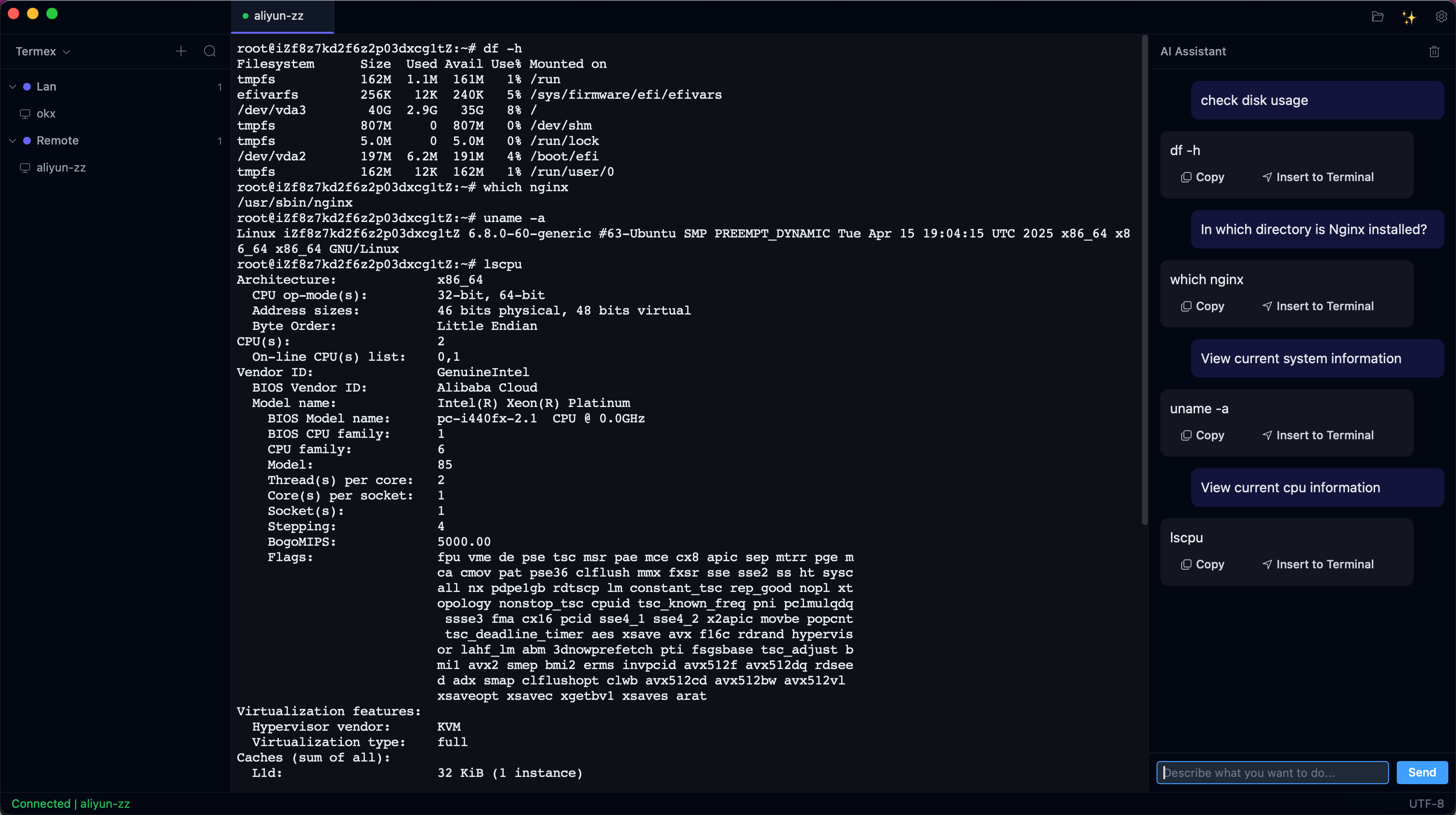
- AI Assistant -- Dangerous command detection, command explanation, natural language to shell
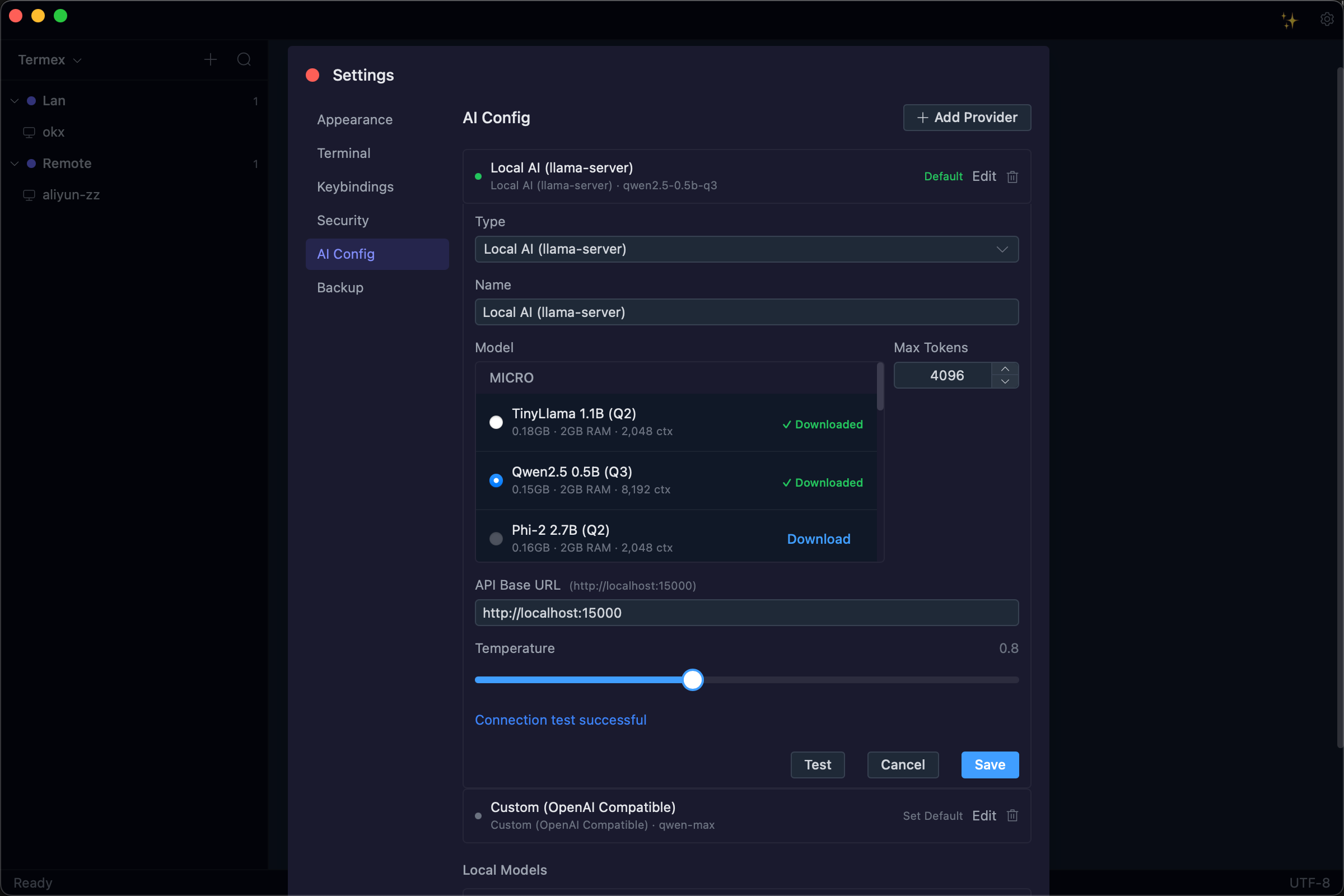
- Local AI -- Built-in llama-server with 12 GGUF models, fully offline, no API key required
- Terminal Search -- In-terminal search (
Cmd+F), keyword highlighting, cross-tab search (Cmd+Shift+F) - Customization -- Dark/Light themes, 6 built-in fonts + custom upload, customizable keybindings
- Security -- OS Keychain (macOS/Windows/Linux), AES-256-GCM fallback, SQLCipher encrypted database
- Config Backup -- Encrypted export/import (
.termexformat), cross-device migration - i18n -- English and Chinese out of the box
Tauri v2 + Rust          Backend, SSH, encryption, storage
Vue 3 + TypeScript       Frontend framework
Element Plus             UI components
Tailwind CSS             Styling
xterm.js (WebGL)         Terminal rendering
SQLCipher                Encrypted local database
russh                    Pure-Rust SSH2 protocol
ring + Argon2id          AES-256-GCM encryption & key derivation
All shortcuts are fully customizable via Settings → Keybindings. Click any shortcut label to enter recording mode and press your desired key combination.
| Action | macOS | Windows / Linux |
|---|---|---|
| New Connection | Cmd+N |
Ctrl+N |
| Open Settings | Cmd+, |
Ctrl+, |
| Toggle Sidebar | Cmd+\ |
Ctrl+\ |
| Toggle AI Panel | Cmd+Shift+I |
Ctrl+Shift+I |
| Action | macOS | Windows / Linux |
|---|---|---|
| Close Current Tab | Cmd+W |
Ctrl+W |
| Next Tab | Cmd+Tab |
Ctrl+Tab |
| Previous Tab | Cmd+Shift+Tab |
Ctrl+Shift+Tab |
| Go to Tab 1–9 | Cmd+1 ~ Cmd+9 |
Ctrl+1 ~ Ctrl+9 |
| Action | macOS | Windows / Linux |
|---|---|---|
| Search in Terminal | Cmd+F |
Ctrl+F |
| Search All Tabs | Cmd+Shift+F |
Ctrl+Shift+F |
Termex uses the operating system's native credential manager to protect all sensitive data:
| Platform | Backend | Protection |
|---|---|---|
| macOS | Keychain Services | Hardware-level (Secure Enclave + Touch ID) |
| Windows | Credential Manager (DPAPI) | User login password |
| Linux | Secret Service (GNOME Keyring / KDE Wallet) | User login password |
How it works:
- SSH passwords, private key passphrases, and AI API keys are stored in the OS keychain -- never in
termex.db termex.dbonly stores a keychain reference ID (e.g.,termex:ssh:password:{uuid})- Even if
termex.dbis stolen, no credentials are exposed - No master password required -- the OS login session provides the security boundary
- Fallback: If the OS keychain is unavailable (headless Linux), Termex falls back to AES-256-GCM encryption with a user-provided master password
- Credential fields encrypted with AES-256-GCM (ring crate) in fallback mode
- Fallback master password derived via Argon2id (m=64MB, t=3, p=4)
- Database encrypted with SQLCipher
- AI requests never include passwords, keys, or tokens
- No telemetry, no analytics, no phone-home
termex/
├── .github/workflows/         # CI + cross-platform release
├── docs/                      # Requirements, design, prototype
│   └── iterations/            #   Version iteration plans (v0.1.0 ~ v0.9.0)
├── scripts/                   # Version bump utilities
├── src-tauri/src/             # Rust backend
│   ├── commands/              #   Tauri IPC handlers (58 commands)
│   ├── ssh/                   #   SSH session, auth, port forwarding
│   ├── sftp/                  #   SFTP file operations
│   ├── crypto/                #   AES-256-GCM, Argon2id KDF
│   ├── storage/               #   SQLCipher database, migrations, models
│   ├── ai/                    #   AI provider abstraction, danger detection
│   ├── recording/             #   Session recording (asciicast v2)
│   ├── plugin/                #   Plugin manifest & registry
│   └── state.rs               #   Global AppState
└── src/                       # Vue 3 frontend
    ├── components/            #   sidebar/, terminal/, settings/, sftp/, ai/
    ├── composables/           #   useTerminal, useShortcuts
    ├── stores/                #   server, session, settings, sftp, ai, portForward
    ├── i18n/                  #   zh-CN, en-US
    ├── types/                 #   TypeScript definitions
    └── utils/                 #   Tauri IPC wrappers
- Rust (stable)
- Node.js (22+)
- pnpm (10+)
- Platform-specific Tauri v2 dependencies
git clone https://github.com/user/termex.git
cd termex
pnpm install
pnpm tauri dev| Command | Description |
|---|---|
pnpm tauri dev |
Start dev server with hot reload |
pnpm tauri build |
Build production app |
pnpm dev |
Start frontend dev server only (Vite) |
pnpm run build |
Type-check + build frontend |
cd src-tauri && cargo test |
Run Rust tests (45 tests) |
cd src-tauri && cargo clippy |
Lint Rust code |
pnpm version:bump patch |
Bump version (patch/minor/major/x.y.z) |
# Full-stack development (frontend + Rust backend with hot reload)
pnpm tauri dev

# Frontend only (no Rust backend, useful for UI work)
pnpm dev

# Run Rust backend tests
cd src-tauri && cargo test

# Run with verbose Rust logging
RUST_LOG=debug pnpm tauri dev

# Build production binary
pnpm tauri build

# Build in debug mode (faster compile, larger binary)
pnpm tauri build --debug# Semantic version bump (syncs package.json, Cargo.toml, tauri.conf.json)
pnpm version:bump patch # 0.1.0 → 0.1.1
pnpm version:bump minor # 0.1.0 → 0.2.0
pnpm version:bump major # 0.1.0 → 1.0.0
pnpm version:bump 0.2.0 # explicit version
# Commit and tag
git add -A && git commit -m "chore: release v0.2.0"
git tag v0.2.0
git push origin main --tags # triggers GitHub Actions build- Product requirements & UI prototype
- Detailed technical design
- v0.1.0 -- MVP (SSH + Terminal + Server Management)
- v0.2.0 -- SFTP File Browser
- v0.3.0 -- Port Forwarding + Config Export/Import
- v0.4.0 -- Theme System + Settings Persistence + UX Polish
- v0.5.0 -- AI Core: Danger Detection + Command Explanation
- v0.6.0 -- AI Advanced: NL2Cmd + Smart Autocomplete
- v0.7.0 -- Session Recording + Server Monitoring
- v0.8.0 -- Plugin System + Extensibility
- v0.9.0 -- Stable Release
- v0.10.0 -- OS Keychain Security (credential protection)
- v0.11.0 -- Local AI Models (llama-server integration, 12 models, offline-first)
- v0.12.0 -- SSH ProxyJump & Bastion (multi-level jump servers, connection pooling, SSH Agent)
- v0.13.0 -- SFTP Enhancement (context menu, clipboard ops, chmod, file info)
- v0.14.0 -- Font Management (6 built-in fonts, custom upload, live terminal updates)
- v0.15.0 -- Terminal Search System (in-terminal search, keyword highlighting, cross-tab search)
- v0.16.0 -- Custom Keybindings (user-defined shortcuts, record mode, live apply)
- v0.17.0 -- Server-to-Server SFTP (direct file transfer between remote servers)
- v0.18.0 -- Network Proxy (SOCKS5/SOCKS4/HTTP CONNECT, HTTPS with mTLS, proxy + bastion chain)
- v0.19.0 -- SFTP Per-Tab (per-tab SFTP instances, drag-based layout switching, CWD sync)
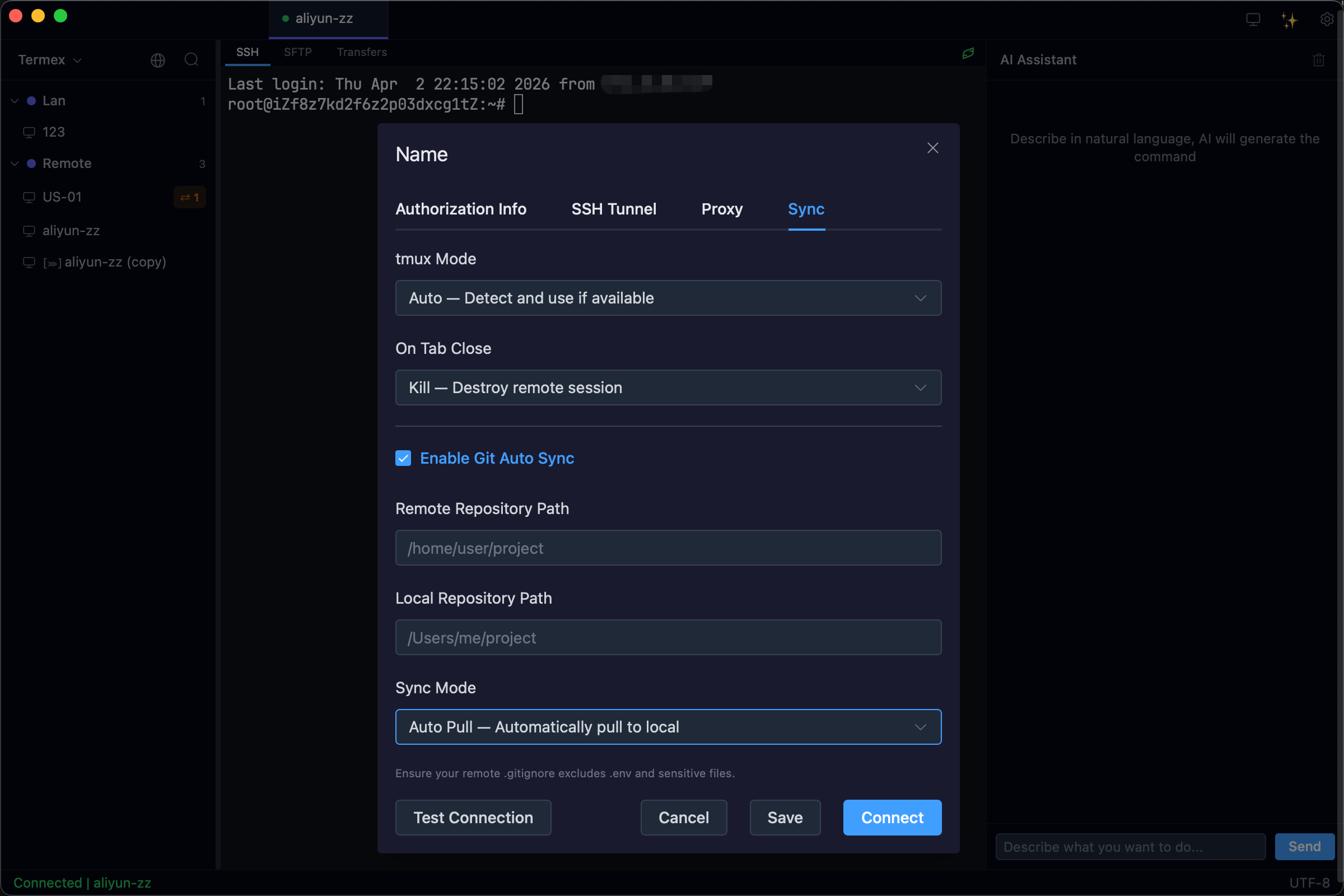
- v0.20.0 -- Tor Proxy + tmux Persistent Sessions + Git Auto Sync (digital nomad remote dev workflow)
- v0.21.0 -- SSH Dynamic Port Forwarding (SOCKS5 proxy,
ssh -Dequivalent)
Contributions are welcome! Please open an issue before submitting large PRs.